QuestionnairePro | Respond to Security Questionnaires in Hours, Not Weeks
Desktop application for security questionnaire response, assessment, and analysis. 474 pre-written answers, 22 assessment templates, Trust Center builder, and AI-powered response generation. $299/yr. Data stays local.
The same 80% of questions come up every time. Stop answering them from scratch.
Your prospects send security questionnaires. Your team scrambles to answer them — rewriting the same responses about encryption, access control, and incident response that you answered last month for someone else. Deals stall. Deadlines slip.
QuestionnairePro gives you 474 pre-written, practitioner-quality answers across 19 security domains — plus the tools to assess vendors, measure your own gaps, and present your security posture through a professional Trust Center. Desktop application. Your data stays on your machine.
What’s inside
Respond to questionnaires
Import, match, generate, and return completed questionnaires.
Response Library
474 pre-written answers across 19 security categories, each with 3 maturity tiers (Mature, Developing, Early-stage). Search, filter, copy, and refine with AI.
The 80% that repeats — already answeredImport Questionnaire
Upload any XLSX/CSV questionnaire. Automatic column detection, fuzzy matching with synonym expansion, AI generation for unmatched questions. Export preserves original format.
Days to hours per questionnaireCreate Questionnaire
Build branded questionnaire documents from your library. Select questions, configure branding, export as professional XLSX or DOCX. Use your own template or the Ridgeline format.
Send questionnaires with your brandingAssess and measure
Evaluate vendors, measure your own readiness, and track compliance.
Assessment Templates
22 assessment templates covering vendor security, internal controls, cloud readiness, AI governance, and more. Score responses (1–3), add notes, export results as XLSX.
Structured, repeatable assessmentsGap Assessment
Standard (40 questions) or Comprehensive (80 questions) self-assessment. Yes/Partial/No scoring with category breakdown and remediation priorities.
Know where you stand before someone else tells youAnalyse Vendor Response
Upload a completed vendor questionnaire. Keyword scoring engine identifies weak responses, red flags, and risk ratings. AI deep analysis for critical findings.
Surface what matters in 200 responsesCompliance Profiles
Framework-specific views showing your control coverage, implementation status, and evidence mapping across 22 frameworks.
Answer "which framework do you follow?" with specificsPresent and configure
Show your security posture and set up the application.
Trust Center Builder
6-step wizard: select frameworks (22), security domains (20), policies (21), common questions (30), configure branding, export standalone HTML. No external dependencies.
Prospects self-serve before they send a questionnaireAI Integration
10 AI providers supported (OpenAI, Anthropic, Google, Azure, Mistral, Groq, Perplexity, DeepSeek, Ollama, Custom). BYOK — your key, stored in your OS keychain, calls go direct.
AI answers using your company contextCompany Profile
Company identity, compliance certifications, security contacts, and technology stack. Feeds into questionnaire responses, Trust Center, and all exports automatically.
Enter once, use everywhereSee it in action
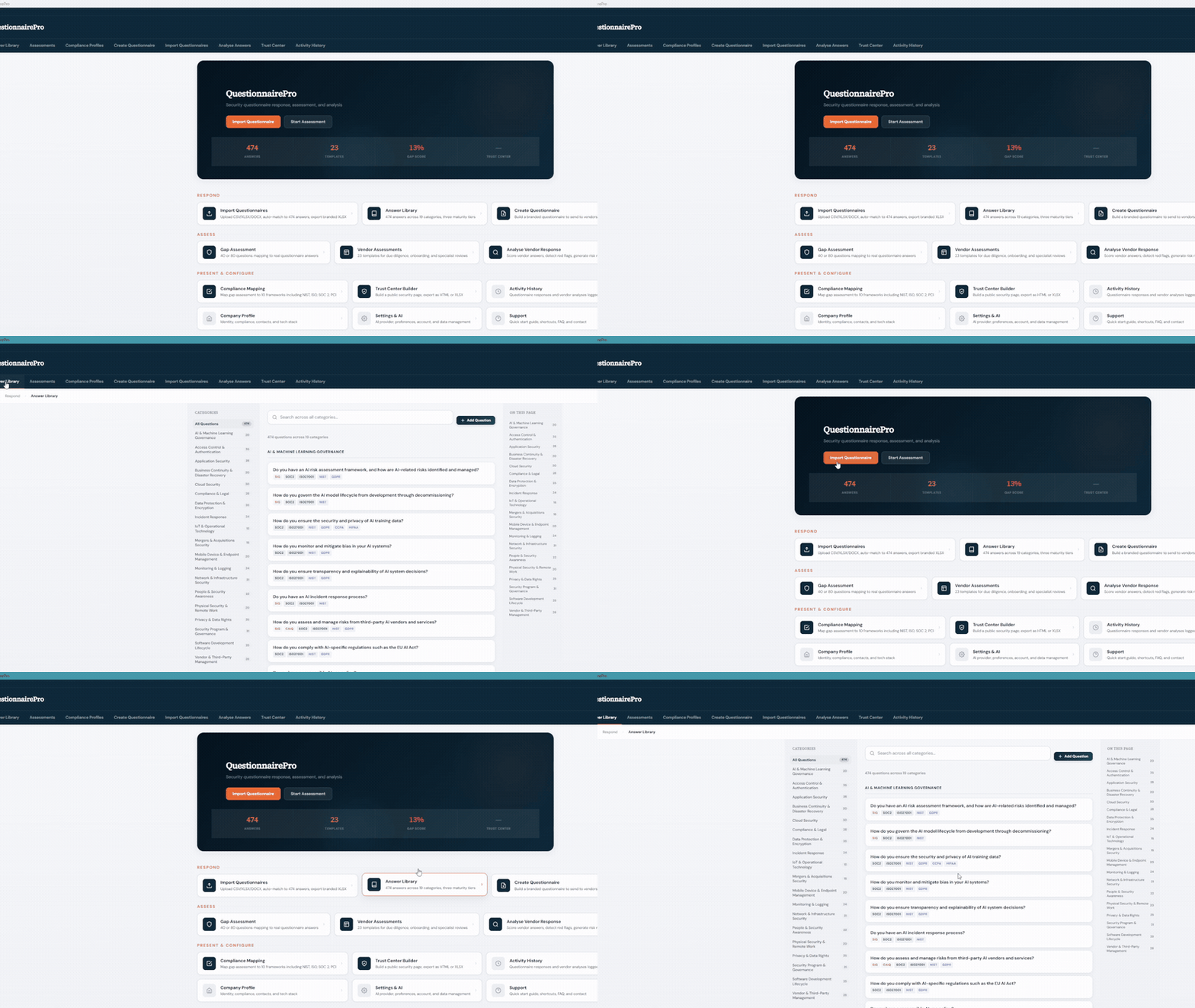
Built like a security product should be
This application stores your company’s security posture — questionnaire responses, gap analysis results, vendor assessments, API keys. That data gets the same protection you’d expect from any security tool.
Authentication: Argon2id password hashing, multi-user with admin/viewer roles, Active Directory and Entra ID domain authentication, session timeout, brute-force lockout.
Encryption: AES-256-GCM encrypted SQLite database, key-wrapped encryption, API keys stored in your OS keychain.
Licensing: Offline Ed25519 signature validation. No phone-home. No telemetry. No cloud dependency.
Audit: Activity history with per-user logging. Know who changed what and when.
474 answers · 19 categories · 22 templates · 22 frameworks
Everything a 20–200 person company needs to handle security questionnaires — without a $30,000/year SaaS platform.
19 security categories
Every answer is written by a security practitioner. Three maturity tiers per question let you match the response to where your program actually is — not where you wish it was.
When someone asks, here’s what happens
A prospect sends a 200-question security questionnaire
Import it. The matching engine auto-fills 60–80% from your Response Library. AI handles the gaps. Export in the original format. Send it back the same week instead of next month.
Your board wants evidence that you have a security program
Build a Trust Center in 30 minutes. Select your frameworks, domains, and policies. Export a branded HTML page. Host it at trust.yourcompany.com. Done.
You need to assess a vendor before signing a contract
Send them a questionnaire built from your templates. When they return it, upload their responses. The scoring engine flags weak answers and red flags. AI provides deep analysis on critical findings.
You're preparing for SOC 2 or ISO 27001 and need to know where you stand
Run the Comprehensive Gap Assessment — 80 questions across 11 categories. Get a category-by-category breakdown of your readiness with specific remediation priorities.
The cost comparison
Two editions
Community
Free
Full Response Library (view and search), basic questionnaire import with matching, standard gap assessment (40 questions), company profile, JSON backup.
Download CommunityProfessional
$299/year
Everything in Community plus: AI integration, fuzzy matching, all 22 templates, comprehensive gap assessment, vendor analysis, Trust Center builder, branded exports, multi-user, AD/Entra auth, audit logging.
Buy ProfessionalWho this is for
✓ Right fit
20–200 person companies that receive security questionnaires from customers and prospects. Companies that need to demonstrate security posture without a full GRC platform. Teams that want their security data to stay on their machine, not in someone else's cloud.
✗ Not the right fit
Large enterprises with dedicated compliance teams and existing GRC platforms. Companies that need real-time collaboration across distributed security teams. Anyone who needs automated evidence collection from cloud infrastructure — that's what Drata and Vanta do.
Common questions
Where is my data stored?
On your machine. QuestionnairePro is a desktop application with an AES-256-GCM encrypted local database. Nothing is sent to Ridgeline or any external service. If you configure AI integration, API calls go directly from your machine to your chosen provider — Ridgeline is never in the middle.
What operating systems are supported?
Windows 10/11 and macOS. Linux support is planned. The installer is under 25MB.
Can multiple people use it?
Yes. Professional tier supports multiple user accounts with admin and viewer roles. Active Directory and Microsoft Entra ID authentication are supported for organisations that use them.
How does the AI integration work?
Bring Your Own Key. You provide an API key from any of 10 supported providers. Your key is stored in your OS keychain. AI calls go directly from your machine to the provider. AI is optional — every feature works without it.
What questionnaire formats can I import?
XLSX and CSV. The import engine automatically detects column headers and maps them. It handles most questionnaire formats including SIG, CAIQ, HECVAT, and custom spreadsheets. The export preserves the original file format and structure.
What's the difference between Community and Professional?
Community gives you read access to the full Response Library and basic import matching. Professional unlocks AI integration, branded exports, vendor analysis, Trust Center builder, all assessment templates, multi-user access, and the comprehensive gap assessment. Community is a fully functional tool — Professional makes you faster.
I already bought Ridgeline documentation toolkits. Do I need this too?
Different tools for different problems. Ridgeline toolkits give you the security documents themselves — policies, procedures, plans. QuestionnairePro helps you respond to questionnaires about those documents and present your posture. They work well together — your toolkit documents become the evidence behind your questionnaire answers.
Is AI used in creating the response content?
Ridgeline uses AI tools in the research and drafting process. All 474 answers are written, reviewed, and validated by a security practitioner. The AI integration in the app is a separate feature that helps you generate and refine responses using your own company context and your own API key.