
Prove your security program in 30 days
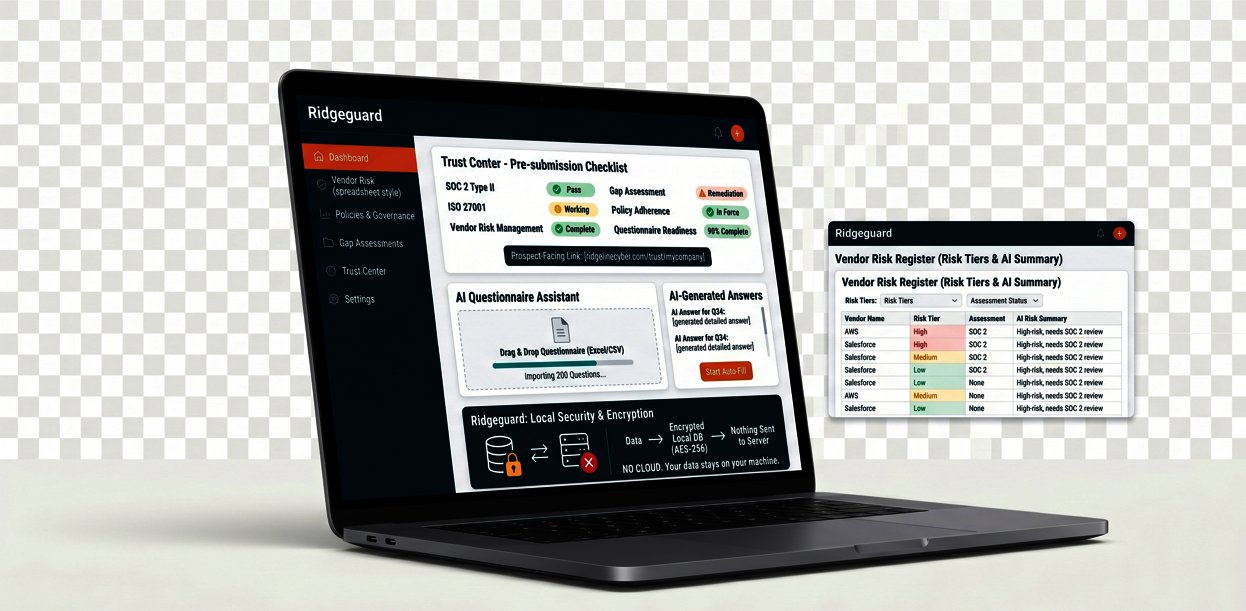
Download Ridgeguard and import your first questionnaire today. By the end of the month: questionnaires answered, vendors assessed, policies governed, gaps measured, Trust Center published. Full Professional features. No credit card. No Ridgeline account.
Windows 10/11 · ~7 MB · 30-day Professional trial · Data stays on your machine
Download
Free Trial
Ridgeguard
Version 2.0.0 · Windows 10/11
30-day Professional trial
MSI Installer (~7 MB) + Quick Start Guide
Professional
$299/year
Unlimited vendors & policies
AI · Trust Center · XLSX export
License key emailed instantly
Your first 30 days
1Day 1, Install and set up
Double-click the MSI installer. Create your local admin account (12-character password, this encrypts your database). Windows SmartScreen may warn you, click "More info" then "Run anyway" (code signing is pending). Fill in your Company Profile, name, industry, framework, cloud providers. This feeds into every AI-generated answer, so do it first.
2Week 1, Answer your first questionnaire
Import that spreadsheet that's been sitting in your inbox. The matching engine fills 60–80% automatically. AI generates the rest using your company profile. Review, adjust, export. Send it back. That questionnaire that would have taken two weeks just took a day.
3Week 2, Know where you stand
Run the Comprehensive Gap Assessment, 80 questions, 11 categories. AI generates a prioritized remediation plan. You now have a color-coded breakdown of your security posture and a list of what to fix first. When the board asks, you answer with data.
4Week 3, Get your vendors in order
Add your vendors to the register. Assign risk tiers. Send assessments from the 22 built-in templates. When responses come back, score them and generate AI risk summaries. You now have a vendor risk register an auditor takes seriously.
5Week 4, Prove your posture
Set up your policies in the Policy Register with the 15 built-in templates. Build a Trust Center in 30 minutes, pick an industry preset, select your frameworks and policies, export standalone HTML. Publish it. The next prospect who asks about your security posture gets a link, not a two-week wait.
After the trial, your data is never deleted or locked.
Core features continue free: Response Library browsing, basic import matching, standard gap assessment, 5 vendors, 5 policies, CSV export. Activate a Professional license key any time to keep AI, Trust Center, unlimited vendors, XLSX export, and multi-user. All your data carries over.
See the full feature comparison, Trial vs Professional
| Feature | After trial (free) | Professional ($299/yr) |
|---|---|---|
| Response Library, 790 answers, 25 categories | View & search | View, search, copy, export, AI refine |
| Import Questionnaire | Basic column matching | Fuzzy matching, synonym expansion, AI generate |
| Gap Assessment | Standard (40 questions) | Comprehensive (80 questions) + AI remediation |
| Company Profile | ✓ | ✓ |
| Vendor Register | 5 vendors | Unlimited |
| Policy Register | 5 policies | Unlimited + 15 templates |
| Assessment Templates (22) | ✗ | ✓ |
| Create Questionnaire | ✗ | ✓ |
| Trust Center Builder | ✗ | ✓ |
| Compliance Profiles (12 frameworks) | ✗ | ✓ |
| AI integration (10 providers) | ✗ | ✓ |
| Branded XLSX exports | CSV only | ✓ |
| Multi-user (admin/viewer) | ✗ | ✓ |
| AD/Entra authentication | ✗ | ✓ |
| Evidence linking | ✗ | ✓ |
| Activity History & audit logging | ✗ | ✓ |
Common questions
What happens when the 30-day trial ends?
The app keeps working. You keep full access to the Response Library (view and search), basic questionnaire import, standard gap assessment, 5 vendors, 5 policies, and CSV export. Professional features (AI, Trust Center, unlimited vendors/policies, XLSX export, multi-user) require a license key. Your data is never deleted or locked.
Do I need to create an account?
No Ridgeline account. On first launch, you create a local admin account (username and password) stored on your machine. Not connected to any cloud service.
How do I activate Professional?
Purchase a license key from this page or the product page. Open Settings → License tab. Enter the key. Professional features activate immediately. All existing data carries over.
What are the system requirements?
Windows 10 (version 1803+) or Windows 11, 64-bit. 150 MB disk space. 4 GB RAM minimum, 8 GB recommended. No network required for core features, AI integration needs internet access to your chosen provider.
Windows SmartScreen shows a warning, is it safe?
Yes. This is expected for applications that are not yet code-signed with a commercial certificate. Click "More info" then "Run anyway". Code signing is pending business registration.
What if I forget my password?
There is no password reset, by design. Your password is the key to decrypting the database. If another admin account exists, that admin can reset your password. If you are the only user and forget the password, the data cannot be recovered. Keep your password in a password manager.