Wide uses the full column for everything, text, diagrams, code, and exercises. Narrow keeps the standard reading width.
Text size
Scales the body text. Headings and code blocks keep their size.
In this section
▾
KQL for Detection and Threat Hunting: Course Orientation
Module 0
KQL FOR DETECTION AND THREAT HUNTING · MODULE 00
Stop waiting for someone else's query. Write your own.
KQL is the language under every detection, every hunt, and every investigation in the Microsoft security stack. When you can write it, no question about your data is off limits. This course takes you from your first where to time-series anomaly detection and production detection rules, against real attack data. This module shows you what you'll be able to query, where you'll run it, and how the course gets you there.
14 modules
across 4 phases
68 exercises
hands-on, against real data
3 surfaces
Sentinel, Defender XDR, Log Analytics
No prerequisites
starts at your first query
Why this course exists
A SOC running on pre-built queries can only answer the questions someone already thought to ask. The moment an investigation needs something the vendor content does not cover, has this service account ever signed in from this country, which hosts talked to this IP in the hour before the alert, is this volume of failed logons normal for a Monday, the team stalls. The data holds the answer. Nobody can write the query to get it.
KQL is the skill that removes that ceiling. It is the single query language behind Microsoft Sentinel, Defender XDR Advanced Hunting, and Log Analytics, and it is what separates an analyst who consumes detections from one who builds them. This course is not a syntax reference. It builds genuine fluency through 68 hands-on exercises against real attack data, from filtering and aggregation to joins, time-series anomaly detection, and production detection engineering, until writing the query you need is faster than searching for one that almost fits.
What you will be able to do
This course is built around the queries you can write at the end, not the operators you can name. Every module adds techniques you practice immediately against real attack data, so capability compounds query by query.
Filter and shape any table
Cut a flood of records down to the rows that matter with where, project, and extend, the operators in every query you will ever write.
Turn events into intelligence
Aggregate with summarize, bin, and dcount to surface patterns, baselines, and outliers that raw events hide.
Correlate across data sources
Use join and union to trace an attack across identity, endpoint, email, and cloud in a single query.
Detect behavioral anomalies
Build time-series with make-series and find deviations with series_decompose_anomalies, catching what static thresholds miss.
Engineer detections and hunts
Turn a query into a scheduled or near-real-time detection rule with entity mapping, and run structured threat hunts for what automation misses.
Write queries that scale
Optimize for performance so your queries return fast over huge data volumes, and present results in workbooks and operational dashboards.
You also leave with something you keep: a reusable KQL query library, built exercise by exercise, that you can carry into every investigation, detection, and hunt you run after the course.
Where you will run it
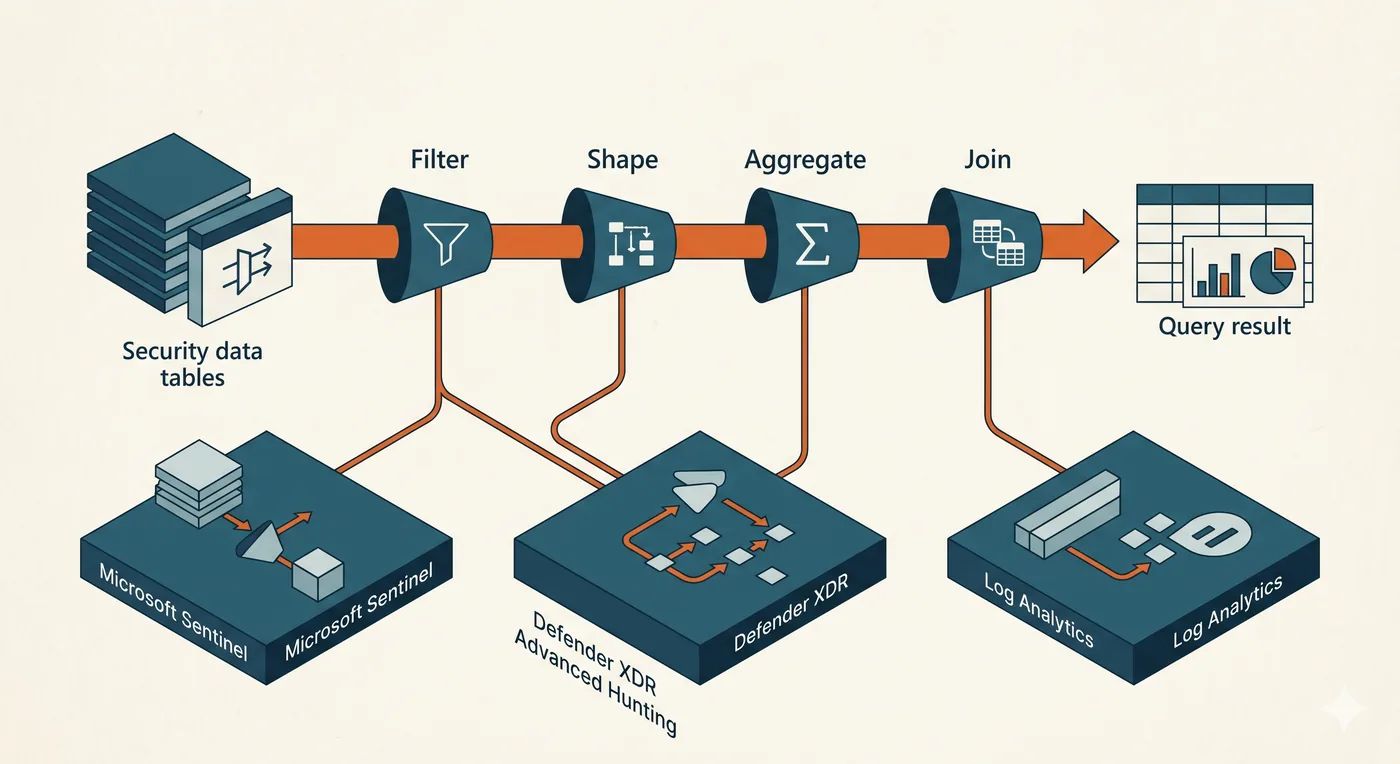
KQL is one language across three surfaces. The same query skills you build in this course run in Microsoft Sentinel for SIEM-scale hunting and detection, in Defender XDR Advanced Hunting across endpoint, identity, email, and cloud telemetry, and in Log Analytics over any data Azure collects. Learn the language once and it works everywhere these surfaces reach.
Underneath every query is the same shape: take a table, pipe it through operators that filter, reshape, aggregate, and join, and arrive at a precise result. You practice on a realistic-volume dataset built for this course, the same Microsoft security tables a working SOC queries, with real attacks buried in legitimate noise, so the queries you write are tested against the data they would face in production. The language also ports: the query thinking you build here, pipe an input through transformations to an answer, is the same discipline behind SPL on Splunk and the query layer of any modern SIEM.
How the course is built
Fourteen modules move through four phases. You learn how KQL processes data and the core operators, layer on intermediate technique, reach advanced analytical patterns, then apply all of it to detection engineering, threat hunting, and a capstone hunt.
What you need and who this is for
There are no prerequisites, and the course starts at your very first query. It is for anyone whose work touches Microsoft security data: SOC analysts who want to investigate beyond the pre-built queries, detection engineers who need the language their rules are written in, threat hunters who think in hypotheses and need to express them, and engineers and admins who want to answer questions about their environment that no dashboard shows.
Transferable query thinking
Piping an input through transformations to an answer is how every modern query language works. The thinking you build in KQL ports to SPL on Splunk and the query layer of any SIEM you meet.
Helpful, not required
A free M365 E5 developer tenant or a Log Analytics workspace lets you run every query live. Without one, the runnable exercises and the prepared dataset let you follow every step on the page.
How to get the most
Write every query yourself before revealing the answer, and predict each result. Save the ones that work; that habit is how your reusable library gets built.
Do I already know this material?
Six quick scenarios across the full range of this course, from how KQL processes data to time-series anomaly detection and query performance at scale. Answer them to find out where you sit, and whether this course fits or it will sharpen knowledge you already have.
A KQL query runs slowly: it projects columns, sorts, and only then filters with a where clause at the very end. What is the single biggest improvement?
Remove the project statement.
Move the where filter to the start of the pipeline so the smallest possible dataset flows through everything after it.
KQL runs left to right, so each operator works on whatever the previous one passed it. Filtering first shrinks the data every later step has to handle, which is the highest-leverage change you can make to a slow query.
Add more columns to the project statement.
Move the sort earlier in the query.
You want successful sign-ins from the last 24 hours, returning only the user and the time. Which is the right shape?
summarize count() by UserPrincipalName
project UserPrincipalName, TimeGenerated, then where ResultType == 0
where TimeGenerated > ago(24h) and ResultType == 0, then project UserPrincipalName, TimeGenerated
Filter first on time and result, then project down to the two columns you need. Projecting before filtering wastes work, and filtering after projecting can fail once the column you filter on has been dropped.
sort by TimeGenerated
You want, per user, the number of distinct source IP addresses and their most recent sign-in time. Which is correct?
summarize count(IPAddress), max(TimeGenerated) by UserPrincipalName
summarize dcount(IPAddress), max(TimeGenerated) by UserPrincipalName
count() returns total rows, which over-counts repeated IPs; dcount() returns distinct values, which is the question. max(TimeGenerated) gives the most recent time, and the by clause produces one row per user.
distinct UserPrincipalName, IPAddress
summarize by UserPrincipalName, IPAddress
You join sign-in logs to a watchlist of risky users, wanting every sign-in plus a flag where the user is on the watchlist, and you must keep all sign-ins. Which join do you use?
join kind=leftouter, which keeps every row from the left sign-in table and adds the watchlist columns only where a match exists.
leftouter preserves all left-hand rows and fills watchlist columns where matched, leaving them empty otherwise, which is exactly all sign-ins with a flag. inner would silently drop sign-ins that are not on the watchlist.
join kind=inner
join kind=rightouter
join kind=anti
You want to flag a host whose outbound connection volume suddenly spikes against its own normal pattern over time. Which KQL approach fits?
summarize count() by Host
sort by the connection count
distinct Host
Build a per-host time series of the connection count with make-series and bin(), then apply a series anomaly function to flag deviations from each host's baseline.
A spike relative to a host's own normal needs a baseline over time, which a flat summarize cannot express. make-series builds the per-host series, and a series decomposition or anomaly function scores each point against that baseline.
A hunting query across 30 days of a high-volume table times out, though the logic is correct. Which change most reliably helps?
Add more summarize statements.
Remove the where clause entirely.
Narrow the time range, filter on high-selectivity columns as early as possible, and reduce columns before expensive operations like join and parse, so far less data reaches them.
Timeouts on big tables are usually about how much data reaches the costly steps. Tightening time, filtering selectively up front, and trimming columns before join or parse cuts the work those operators must do, which is what relieves the timeout.
Schedule the query to run more often.
This course is for you.
You will build KQL from how the language processes data up through joins, parsing, time-series, detection rules, and a full hunting lab, writing every query yourself.
You have the fundamentals. The value here is the harder half.
You can filter and shape data, so the payoff is the back half: correlation, parsing, time-series and anomaly detection, performance at scale, and turning KQL into detections and hunts.
You handled distinct aggregation, join semantics, time-series anomalies, and query performance, the advanced end of the language. Take the course to sharpen what you have, close the gaps you did not expect, and turn fluent KQL into detection and hunting you can run at scale.
You are a student of this course now, so start by deciding what you want from it. Are you here to stop being blocked when a pre-built query runs out, to write the detection rules behind your SOC, or to hunt for what automation never catches? Name that outcome, then turn it into a study plan: which phases matter most to you, how much time you will give it each week, and what you want to be able to query by the time you finish.
The rest of Module 0 sets you up to do exactly that. Work through it to see the questions only KQL can answer, the security data model and the tables you will query every day, and your first real query against live data. Then begin Module 1.
Stuck on this lesson?
Your question goes straight to the team and we'll reply by email. Sign in to ask.