Wide uses the full column for everything, text, diagrams, code, and exercises. Narrow keeps the standard reading width.
Text size
Scales the body text. Headings and code blocks keep their size.
In this section
▾
Microsoft 365 Security Operations: Course Orientation
Module 0
MICROSOFT 365 SECURITY OPERATIONS · MODULE 00
Run the whole Microsoft stack as one security operation.
Most teams own the Microsoft security tools and run them as separate consoles: alerts in one, hunting in another, response somewhere else, and the campaign slips through the gaps between them. This course teaches you to operate the full stack, Defender XDR, Sentinel, Purview, Defender for Cloud, and Security Copilot, as one SOC, running the detect, investigate, respond, and recover lifecycle that turns alerts into outcomes, and finishing on real investigation scenarios. You leave with a security operations playbook and live detections. This module shows you what you'll run, the operation you'll build, and how the course gets you there.
17 modules
across 4 phases
Full stack
XDR, Sentinel, Purview, Copilot
5 investigations
real scenario casework
No prerequisites
every concept built up
Why this course exists
The Microsoft security stack is not the problem; almost everyone has it. The problem is that it usually runs as a row of disconnected consoles. Defender XDR raises an incident, Sentinel holds the logs, Purview governs the data, Copilot answers a question, and each lives in its own tab with its own workflow. An analyst pivots between them by hand, context is lost at every jump, and the attacker who moves across email, identity, endpoint, and cloud moves precisely through the seams the tooling never closes. Owning the products is not the same as running a security operation.
This course teaches you to run one. You configure and operate the full stack as a single SOC, Defender XDR for cross-product correlation, Sentinel for detection and hunting, Purview, Defender for Cloud, and Security Copilot in their place, and you work the lifecycle that actually resolves an incident: detect, investigate, respond, recover. Then you prove it on real investigation scenarios, AiTM phishing, business email compromise, token replay, consent phishing, and insider threat, the cases a Microsoft SOC sees, run end to end. You finish able to operate the whole stack as one team, not toggle between seven of them.
What you will be able to do
This course is built around the operation you can run at the end, not the portals you can open. Every module puts one capability of the stack to work and ends by applying the whole thing to real cases.
Operate Defender XDR as the hub
Run cross-product incident correlation across email, endpoint, identity, and cloud from one unified portal.
Mitigate threats across the stack
Use Defender for Endpoint, Defender for Cloud, Defender for Office, and Purview to contain threats wherever they land.
Build the Sentinel operation
Stand up the workspace, connect the logs, and write KQL to query and correlate telemetry across the estate.
Detect and hunt
Create detections and run investigations in Sentinel, and hunt proactively for what the rules did not catch.
Accelerate with Copilot
Bring Security Copilot into the workflow to speed triage, investigation, and summarization without losing the analyst's judgment.
Run real investigations
Work AiTM phishing, BEC, token replay, consent phishing, and insider threat end to end across the full stack.
You also leave with things you keep: a full Microsoft 365 security operations playbook, live Sentinel and Defender XDR detections built in your own tenant, and five worked investigation scenarios you can run against real cases.
The operation you will run
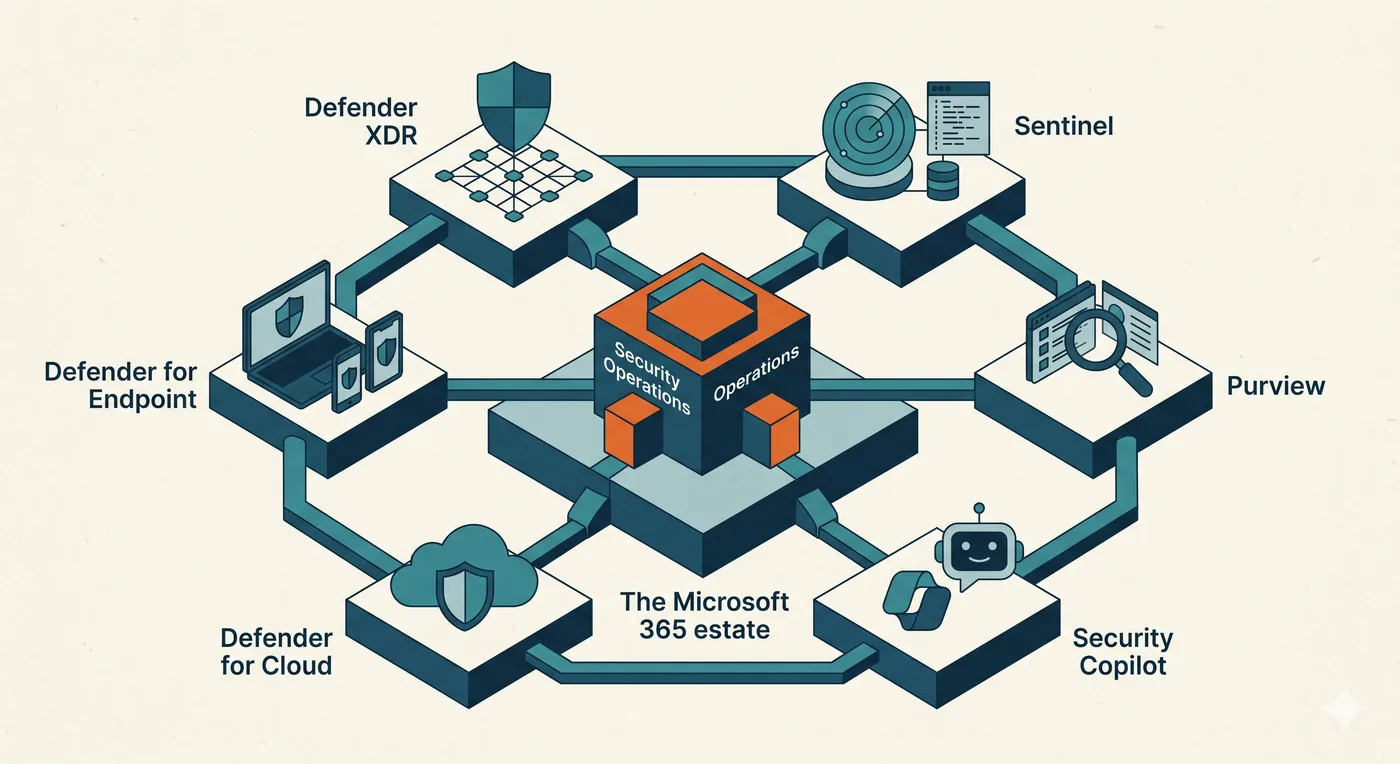
A security operation is the whole Microsoft stack working as one. Defender XDR correlates incidents across email, endpoint, identity, and cloud; Sentinel holds the telemetry and runs detection and hunting; Defender for Endpoint, Defender for Cloud, Purview, and Security Copilot each cover their part of the estate, and all of it feeds a single operation rather than seven separate views. Run that way, an attack that crosses domains is one incident you can follow, not five alerts in five tabs. This course configures and operates every part of it.
You build this against Northgate Engineering's Microsoft 365 estate, and a free M365 E5 developer tenant with Sentinel gives you a live environment to configure the stack, connect the logs, and run every detection and investigation yourself. The discipline is what carries: cross-product correlation, the detect-investigate-respond-recover lifecycle, and scenario-driven investigation are how a SOC operates on any platform, so the operating skill transfers well beyond one vendor. The Microsoft stack is the implementation; running a security operation is the skill, and it aligns to the SC-200 exam objectives along the way.
How the course is built
Seventeen modules move through four phases. You ground the foundations and your lab, learn to operate every product in the Microsoft security stack, build detection and hunting in Sentinel, then run five real investigation scenarios end to end.
What you need and who this is for
There are no prerequisites, and every concept is explained the first time it appears. This course is for anyone who runs, or wants to run, a Microsoft SOC: analysts moving from watching alerts to working incidents, SOC engineers operating the stack, IT and security staff consolidating scattered tools into one operation, and anyone preparing for the SC-200 with hands-on practice rather than memorization.
Transferable operations skill
Cross-product correlation, the detect-investigate-respond-recover lifecycle, and scenario-driven investigation run a SOC on any platform. The Microsoft stack is the implementation; operating it is the skill.
A live tenant to operate
A free M365 E5 developer tenant with Sentinel gives you a real environment to configure the stack and run every detection and investigation yourself.
How to get the most
Operate each product in your own tenant, then run the investigation scenarios as if they were real incidents. The playbook you keep is the one you actually worked.
Do I already know this material?
Six quick scenarios across the full range of this course, from the unified Defender investigation surface to token replay and consent phishing. Answer them to find out where you sit, and whether this course fits or it will sharpen knowledge you already have.
You are investigating an incident that spans an email, an endpoint, and an identity signal. Where do you start to see them connected?
Open three separate consoles and correlate them by hand.
The unified Defender XDR incident view, which already correlates the email, endpoint, and identity alerts into one incident with a shared timeline.
The whole point of the unified incident is that the correlation is done for you: related alerts across workloads are stitched into one incident and timeline, so you reason about the attack, not about reconciling three consoles.
Only the endpoint console.
Wait for the SIEM to email a report.
Defender for Endpoint raises an alert for a suspicious process. Before escalating, what is the most useful built-in context to review first?
The process tree and device timeline, showing the parent process, the command line, and what the process actually did.
Triage of an endpoint alert lives in the process tree and timeline: the parent that spawned it, the command line, and the actions taken tell you in seconds whether this is benign or malicious, which no amount of surrounding metadata does.
The device's hardware warranty status.
The user's mailbox rules.
The Azure cost report.
You built a Sentinel analytics rule, but it never triggers, and querying its table returns nothing. What is the most likely cause?
The KQL syntax is wrong.
Sentinel is down.
The data connector for that source is not configured, so the table is not being populated in the workspace.
A rule over an empty table is silent no matter how good the logic. When the table itself returns nothing, the cause is upstream: the connector is not sending that data into the workspace. Confirm ingestion before touching the rule.
The rule needs a higher severity.
A Sentinel incident groups several alerts. To understand the attack quickly, what is the most efficient first step?
Close the lowest-severity alerts to reduce clutter.
Use the incident's entity and investigation graph to see how the accounts, hosts, and addresses across the alerts relate, and build the attack timeline.
The investigation graph turns a pile of alerts into a connected picture: which account touched which host, reached which address, in what order. That relationship view is the fastest path to the story the incident is telling.
Re-run each alert query individually.
Export everything to a spreadsheet.
A user passes MFA, yet minutes later you see activity from a new device and location with no second MFA prompt. What does this most likely indicate?
The user simply travelled quickly.
MFA is broken.
A false positive; MFA prevents this entirely.
Token or session replay: the attacker is reusing a stolen session token, riding the already-authenticated session, so MFA is never prompted again.
MFA protects the moment of authentication, not the session that follows. If an attacker steals the issued token, they inherit an authenticated session and act without re-prompting. New device and location with no fresh MFA is the signature of replay.
Investigation shows a user granted consent to an unfamiliar third-party OAuth application that now has mailbox read access. The user's password is fine. What is the priority response?
Reset the user's password.
Block the user's account.
Revoke the application's consent grant and review what it accessed; the app's access is independent of the password, so revoking the grant is what actually removes it.
Consent phishing trades on a granted app, not a stolen password, so a reset changes nothing. The access lives in the consent grant and its tokens; you revoke the grant, then assess what the app reached while it had access.
Ignore it, since the user consented.
This course is for you.
You will build security operations across the Microsoft stack from the ground up: Defender XDR, endpoint, Purview and cloud, KQL and Sentinel, and full investigations of real attack patterns.
You have the fundamentals. The value here is the harder half.
You can navigate the stack, so the payoff is the back half: KQL and Sentinel detections, hunting, and the investigation playbooks for AiTM phishing, business email compromise, token replay, consent phishing, and insider threats.
You handled unified investigation, the data dependency behind a silent rule, token replay, and consent phishing, the advanced end of the stack. Take the course to sharpen what you have, close the gaps you did not expect, and turn strong instincts into investigations you can run end to end.
You are a student of this course now, so start by deciding what you want from it. Are you here to turn a pile of Microsoft security tools into one working operation, to build the detection and investigation skill a SOC runs on, or to prepare for the SC-200 with real hands-on practice? Name that outcome, then turn it into a study plan: which parts of the stack you most need to operate, how much time you will give it each week, and what you want to be running by the time you finish.
The rest of Module 0 sets you up to do exactly that. Work through it to see what Microsoft 365 security operations is, how the course maps to the SC-200, how to learn it, and the lab setup, your M365 tenant, your Sentinel workspace, and the sample data, that every later module runs on. Then begin Module 1.
Stuck on this lesson?
Your question goes straight to the team and we'll reply by email. Sign in to ask.