
In this section
M365 Shared Responsibility Model for Incident Response
What the shared responsibility model means for incident response
When an organization moves to Microsoft 365, it delegates infrastructure security to Microsoft. Microsoft secures the physical data centers, the network fabric, the hypervisors, the storage layer, and the application code that runs Exchange Online, SharePoint, OneDrive, Teams, and Entra ID. Microsoft patches the platform. Microsoft monitors for infrastructure-level attacks. Microsoft provides the uptime SLA. This delegation is real. The infrastructure your organization would have secured on-premises is now Microsoft's problem.
What Microsoft does not take responsibility for is what happens inside your tenant. The users you create, the permissions you assign, the Conditional Access policies you configure (or don't configure), the audit logs you retain (or let expire), the incidents you detect (or miss), and the evidence you preserve (or lose) are yours. Microsoft provides the audit logging capability. You decide whether to retain those logs beyond 30 days. Microsoft provides Conditional Access as a control framework. You decide whether to enforce MFA, block legacy authentication, and require compliant devices. Microsoft provides the tools to revoke sessions and reset credentials. You decide when and whether to use them.
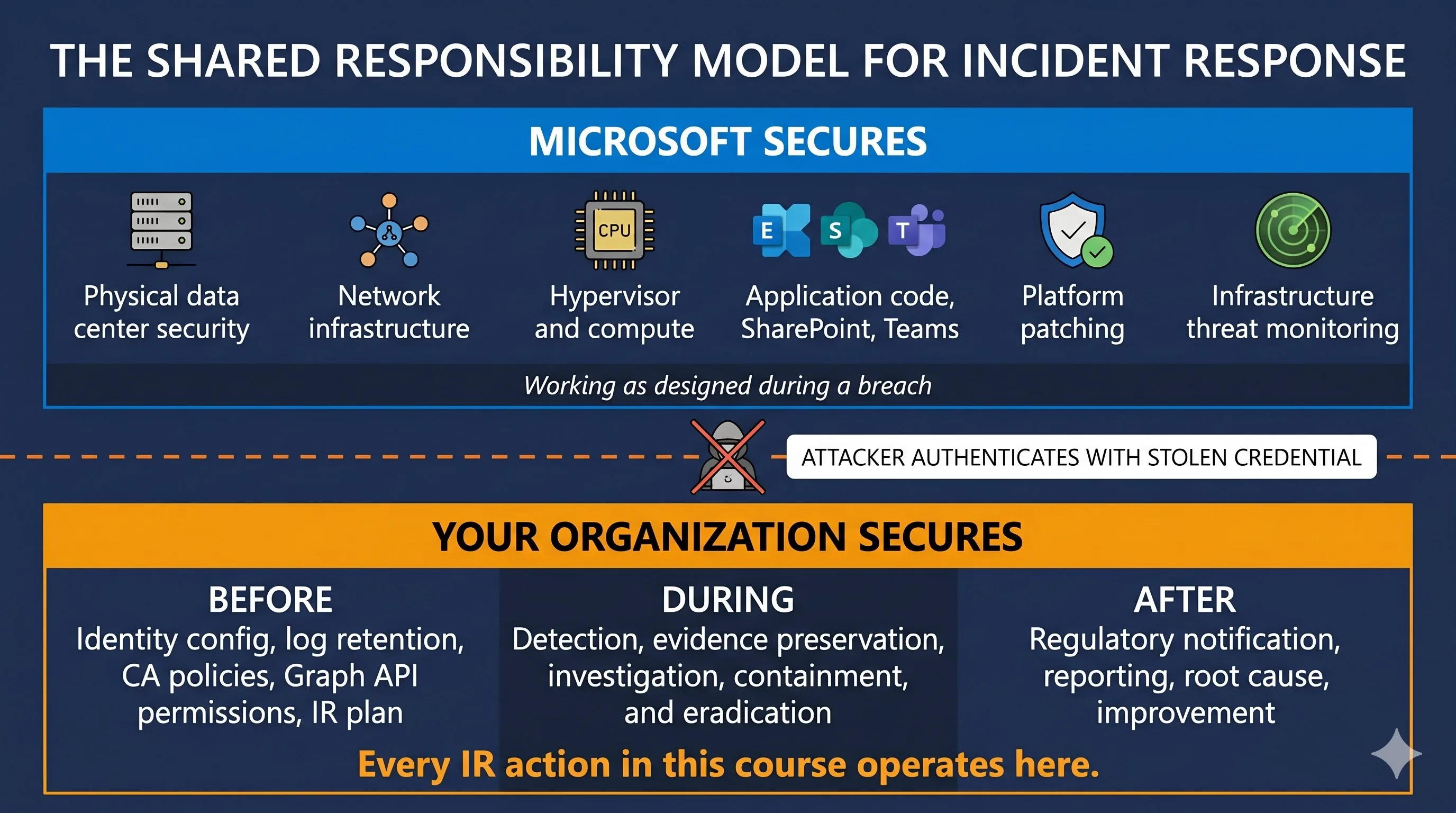
This split has direct consequences for incident response. When an attacker compromises an identity in your tenant, Microsoft's infrastructure security is working exactly as designed. The physical data center is secure. The platform code is patched. The network is protected. None of that matters because the attacker authenticated legitimately with a stolen credential. The breach is inside the boundary that Microsoft secures. Everything from this point forward, detection, investigation, containment, evidence preservation, regulatory notification, is the customer's responsibility.
The shared responsibility model is typically discussed in terms of data protection and backup. For incident response, the implications are more specific and more urgent.
Evidence retention is a customer decision. Entra ID sign-in logs are retained for 30 days natively. The Unified Audit Log is retained for 180 days (all tiers since October 2023), with E5 tenants getting one year for key workloads. MailItemsAccessed, the evidence that proves which emails the attacker read, requires E5 or the Audit Premium add-on. If your organization runs E3, that evidence source does not exist for your tenant. Microsoft provides the logging. You decide how long to keep it and whether to pay for the advanced sources. These are decisions made months or years before an incident, and they determine what evidence is available during the investigation.
Containment tooling exists but must be prepared. Microsoft provides the APIs to revoke sessions, deploy emergency Conditional Access policies, remove OAuth consent grants, and reset credentials at scale. But these actions require pre-configured permissions (Graph API scopes, Exchange Online admin roles), pre-built scripts or playbooks, and pre-tested procedures. An organization that hasn't configured Graph API permissions before the incident cannot start configuring them during the incident. The containment capability exists in the platform. Making it operational is the customer's responsibility.
Detection is entirely the customer's responsibility. Microsoft provides Defender XDR with built-in detections, Identity Protection with risk scoring, and Sentinel with analytics rules. But enabling, tuning, and monitoring these detections is the customer's job. An organization that has Defender XDR licensed but hasn't configured alert policies, hasn't tuned risk detections, and doesn't have a SOC monitoring the alert queue has detection tooling and no detection capability. The 2026 Microsoft Secure Access report found that 97% of organizations experienced an identity or network access incident in the past year. The tools exist. Whether they're operational depends on the customer.
Identity as the attack surface
Traditional incident response developed around the network perimeter. An attacker needed to get through the firewall, find a vulnerable host, exploit it, and establish a foothold. The evidence of that intrusion lived on the compromised system: a binary on disk, a process in memory, a registry key, a scheduled task. The investigation started with the compromised endpoint and worked outward.
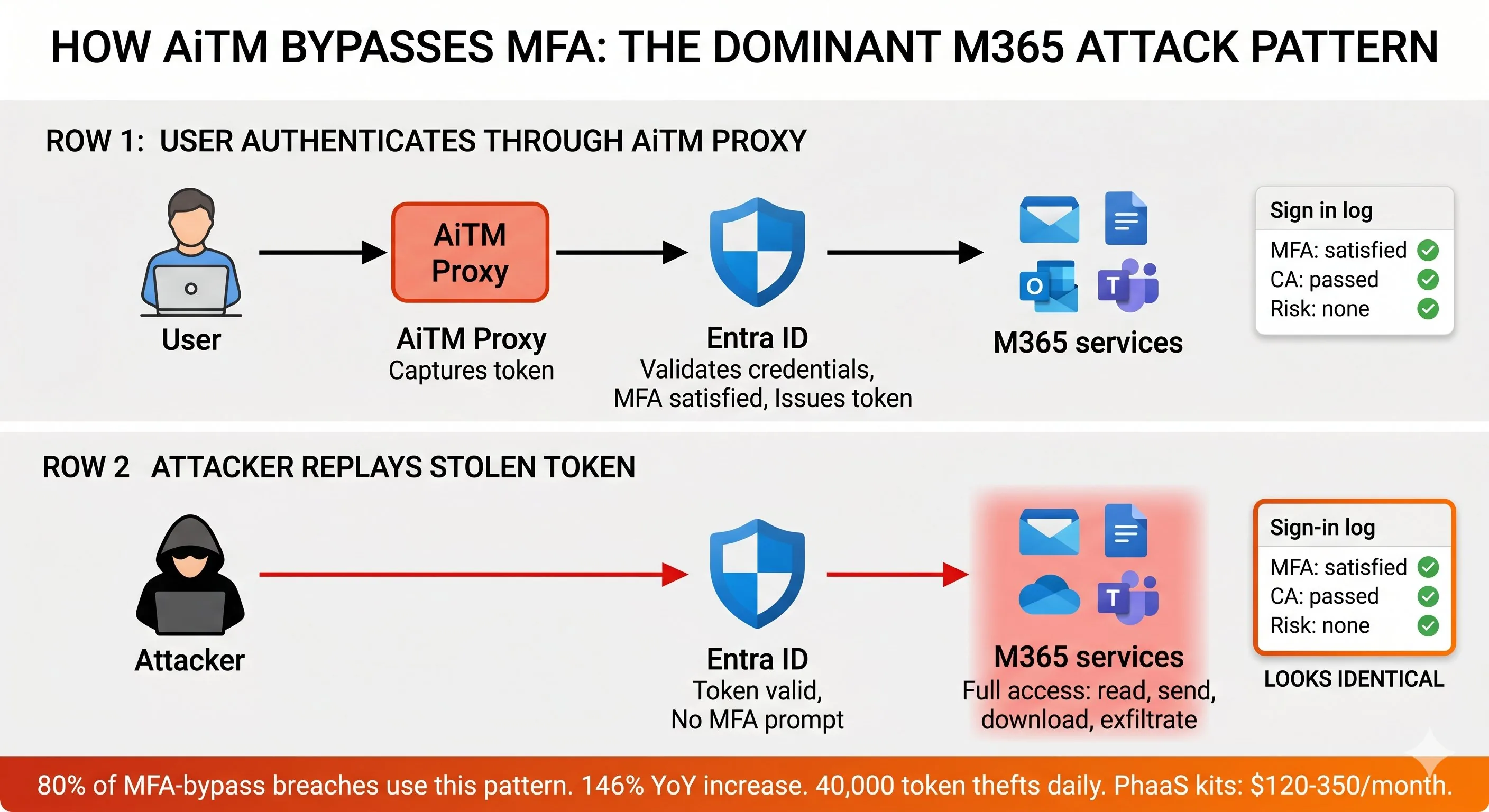
In M365, the attack surface is the identity provider. The attacker doesn't need to breach a firewall or exploit a vulnerability on a server. They need a valid credential or a valid session token. Once they have it, they authenticate through the same front door your users use. Entra ID evaluates the authentication request, checks the Conditional Access policies, evaluates the MFA status, and, if everything passes, issues an access token. From Entra ID's perspective, the sign-in is legitimate. The real user (or their stolen credential) provided the correct authentication factors.
The numbers quantify the scale. Microsoft's 2025 Digital Defense Report recorded over 600 million identity attacks against M365 environments daily, with a 32% surge in the first half of 2025. Of those attacks, 97% were password-based: credential stuffing, password spraying, and brute force. Password-based attacks reach over 4,000 per second. These are the blunt-force attacks. Most fail. MFA blocks over 99% of identity-based attacks when properly configured.
The attacks that succeed despite MFA are the ones this course focuses on. AiTM phishing attacks increased 146% year-over-year, with nearly 40,000 token theft incidents detected daily across Microsoft environments. Microsoft's 2025 Digital Defense Report attributed 80% of MFA-bypass breaches to AiTM proxy techniques. Token theft accounted for 31% of M365 breaches in 2025. Commodified phishing-as-a-service kits (Tycoon 2FA, Mamba 2FA, Evilginx, Sneaky 2FA) make AiTM accessible to any operator willing to spend $120 to $350 per month.
The IBM X-Force 2025 Threat Intelligence Index found that abusing valid accounts remained the preferred entry point for cybercriminals, representing 30% of all incidents X-Force responded to. The Verizon 2025 DBIR identified stolen credentials as the primary initial access vector in 22% of breaches. These are not M365-specific statistics, but they reflect the same shift: attackers don't break in, they log in.
Beyond human identity, non-human identities expand the attack surface further. The 2025 CoreView State of M365 Security report found that more than half of enterprises have over 250 Entra ID applications with high-risk read-write permissions. Each of those applications is a service principal with permissions that may be as broad as a Global Administrator. Attackers who compromise a user identity and consent to a malicious OAuth application create a non-human identity that authenticates without MFA, without Conditional Access evaluation, and without triggering the user-focused detections that most organizations rely on. In June 2025, a flaw in Entra ID (dubbed n0Auth) was found that allowed attackers to pivot from compromised SaaS applications into core M365 resources by manipulating a single mail attribute. The flaw, originally flagged in 2023, was still believed to impact tens of thousands of SaaS applications as of 2025.
What identity-centric IR means in practice
When identity is the attack surface, the investigation methodology changes in three ways.
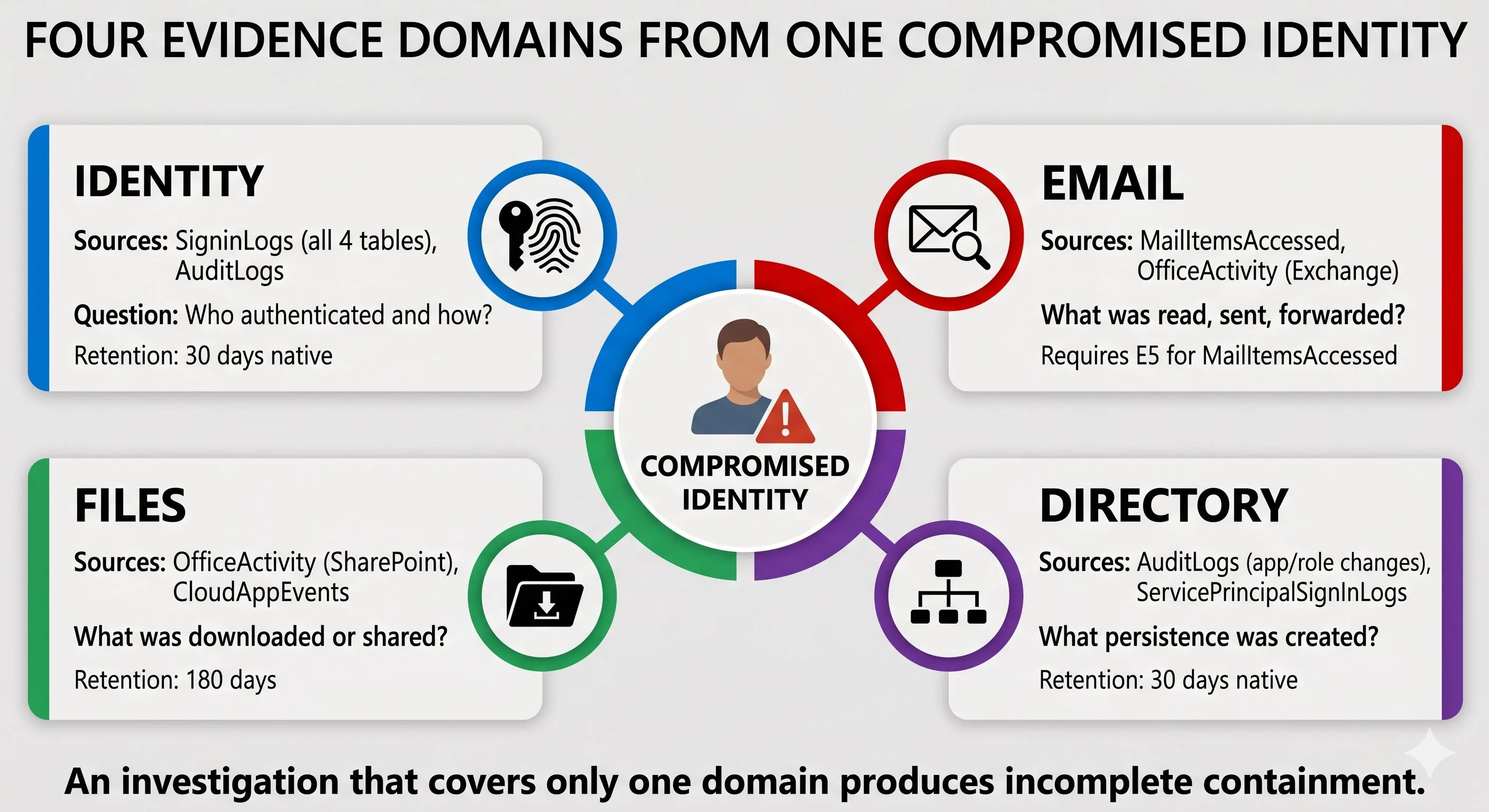
Evidence is in sign-in logs and audit trails, not on disk. The first evidence you examine in an M365 incident is the Entra ID sign-in log. Not a disk image. Not a memory capture. Not a Prefetch file. The sign-in log tells you which identity authenticated, from which IP, with which device, whether MFA was satisfied, what Conditional Access policies evaluated, and what risk level Identity Protection assigned. The audit log tells you what that identity did: which roles were assigned, which apps were registered, which credentials were added to service principals. The email audit tells you what was read, what rules were created, what was sent. The file audit tells you what was downloaded and shared. Four evidence domains, all queryable through APIs, all subject to retention limits.
EVIDENCE SOURCE              WHAT IT PROVES                                           FIRST QUERY
SigninLogs                   Who authenticated, from where, with what device           Was this sign-in legitimate?
AuditLogs                    What directory changes were made                          Did the attacker create persistence?
MailItemsAccessed            Which emails were read                                   What data was exposed via email?
OfficeActivity (SharePoint)  Which files were accessed or downloaded                  What data was exfiltrated?
OfficeActivity (Exchange)    Which inbox rules, forwarding, delegate access created   How is the attacker maintaining email access?
Containment targets the identity, not the device. On-premises, you isolate the compromised endpoint from the network. In M365, you revoke the identity's sessions, deploy a Conditional Access policy that blocks authentication except from the IR team's IP, reset the password with correct sequencing (service accounts and privileged accounts before standard users), remove OAuth consent grants the attacker created, delete inbox rules and forwarding the attacker configured, and rotate service principal credentials. Each of these is an independent containment action. Missing one leaves a channel open. The attacker who had their sessions revoked but whose OAuth application was not removed continues accessing email and files through the application's service principal. Module 6 teaches the full containment methodology.
Scoping follows the identity chain, not the network path. On-premises, you scope an incident by tracing network connections and lateral movement paths between hosts. In M365, you scope by following the identity. Which accounts were compromised? What did each account access? Which service principals were created from those accounts? Which OAuth permissions were consented? Which other users received phishing emails from the compromised accounts? The scope expands through identity relationships, not network adjacency. A single compromised account in finance may have sent phishing emails to 200 internal users, three of whom clicked and had their tokens stolen. The scope just expanded from one identity to four, across three departments, touching email, SharePoint, and the Entra ID directory.
The investigation methodology for identity-centric IR is what the rest of this course teaches. Module 4 covers detection and scoping. Module 5 covers forensic evidence collection across all four evidence domains. Module 6 covers containment. Module 7 provides threat-specific playbooks. Every module builds on the foundation this section establishes: the shared responsibility model defines what evidence you have and what tools you can use, and identity as the attack surface defines where you look and how you trace the attacker's activity.
Section 1.2 covers the current M365 threat landscape: the specific attack types, their prevalence, and the threat data that shapes what this course teaches you to respond to.