
In this section
M365 IR Playbook: Phishing, AiTM Proxy, Password Spray, Device Code Phishing, and Teams Phishing Investigation
The MFA prompt that didn't protect anyone
The organization enforced MFA on every account. When the phishing campaign hit, the security team was confident: even if users entered their passwords on the credential harvest page, MFA would stop the attacker from using those credentials. Except the attacker wasn't running a credential harvest. The phishing link pointed to an AiTM proxy (Evilginx) that sat between the user and the real Microsoft login page. The user authenticated normally — entered the password, approved the MFA prompt — and the proxy captured the session cookie. The attacker used that cookie to access the tenant without ever needing the password or MFA again. By the time the SOC investigated the phishing alert, the attacker had already authenticated successfully from a VPS in a different country using the stolen session cookie.
MFA stops credential replay. It doesn't stop session token theft. The distinction between these attack types determines whether your containment is effective or irrelevant.
Credential harvest and password attacks
Credential harvest phishing sends the user to a page that looks like the Microsoft login portal but captures the username and password without proxying the actual authentication. The attacker collects credentials and replays them later. If MFA is enforced, credential harvest alone is insufficient — the attacker needs to handle the MFA challenge separately (social engineering the user to approve a push notification, SIM swapping for SMS codes, or using stolen session tokens from a separate attack).
Password spray operates differently. Instead of phishing individual users, the attacker tries a small number of common passwords against many accounts. The password spray stays below lockout thresholds by testing one or two passwords per account per attempt, then cycling to the next account. Against organizations without MFA on every account, password spray finds accounts with weak passwords. Against organizations with MFA gaps (service accounts, legacy protocols, break-glass accounts excluded from CA policies), spray finds the accounts that MFA doesn't protect.
The evidence pattern is distinctive: multiple failed sign-ins from the same IP address, targeting different accounts, within seconds of each other. ResultType 50126 (invalid password) across many accounts from a single IP is the signature. The attacker rotates usernames rapidly while keeping the password constant. Some sprays distribute across multiple IP addresses to evade per-IP detection, but the timing pattern (sequential attempts against many accounts within a tight window) remains consistent.
// Detect password spray: many accounts, few passwords, same IP
SigninLogs
| where TimeGenerated > ago(24h)
| where ResultType == "50126"
| summarize
    TargetedAccounts = dcount(UserPrincipalName),
    AttemptCount = count(),
    Accounts = make_set(UserPrincipalName, 10),
    FirstAttempt = min(TimeGenerated),
    LastAttempt = max(TimeGenerated)
    by IPAddress
| where TargetedAccounts > 10
| extend SprayDuration = LastAttempt - FirstAttempt
| sort by TargetedAccounts desc
After identifying the spray, the investigation pivots to success. Did any of the targeted accounts return ResultType 0 (success) from the spray IP? If so, those accounts had weak passwords or weren't protected by MFA. The scope of the incident depends entirely on whether the spray succeeded and what happened after the successful authentication.
Containment for credential harvest and spray: Password reset for all accounts where the attacker obtained credentials (confirmed by successful sign-in from attacker IP). MFA re-registration if the attacker may have registered their own MFA method during the session. Session revocation per IR6.2. For password spray specifically: force password change for all accounts that were targeted (not just those that succeeded), because the attacker now knows which accounts have which passwords even if MFA blocked the authentication. Those passwords are compromised and will be retried when a CA gap appears.
AiTM proxy attacks
AiTM (Adversary-in-the-Middle) is the initial access vector that most consistently defeats MFA. The attacker deploys a reverse proxy — Evilginx is the most common framework, but NakedPages, Modlishka, and custom implementations exist — between the user and the real Microsoft login page. The user interacts with the proxy as if it were Microsoft. The proxy forwards every request to Microsoft and captures the responses, including the session cookie that Microsoft issues after the user completes MFA.
The user sees the real Microsoft login page (rendered through the proxy), enters the real password, approves the real MFA prompt, and receives the real session. The proxy captures the session cookie and replays it from the attacker's infrastructure. The attacker never needs the password or MFA again — they have a session token that's already authenticated.
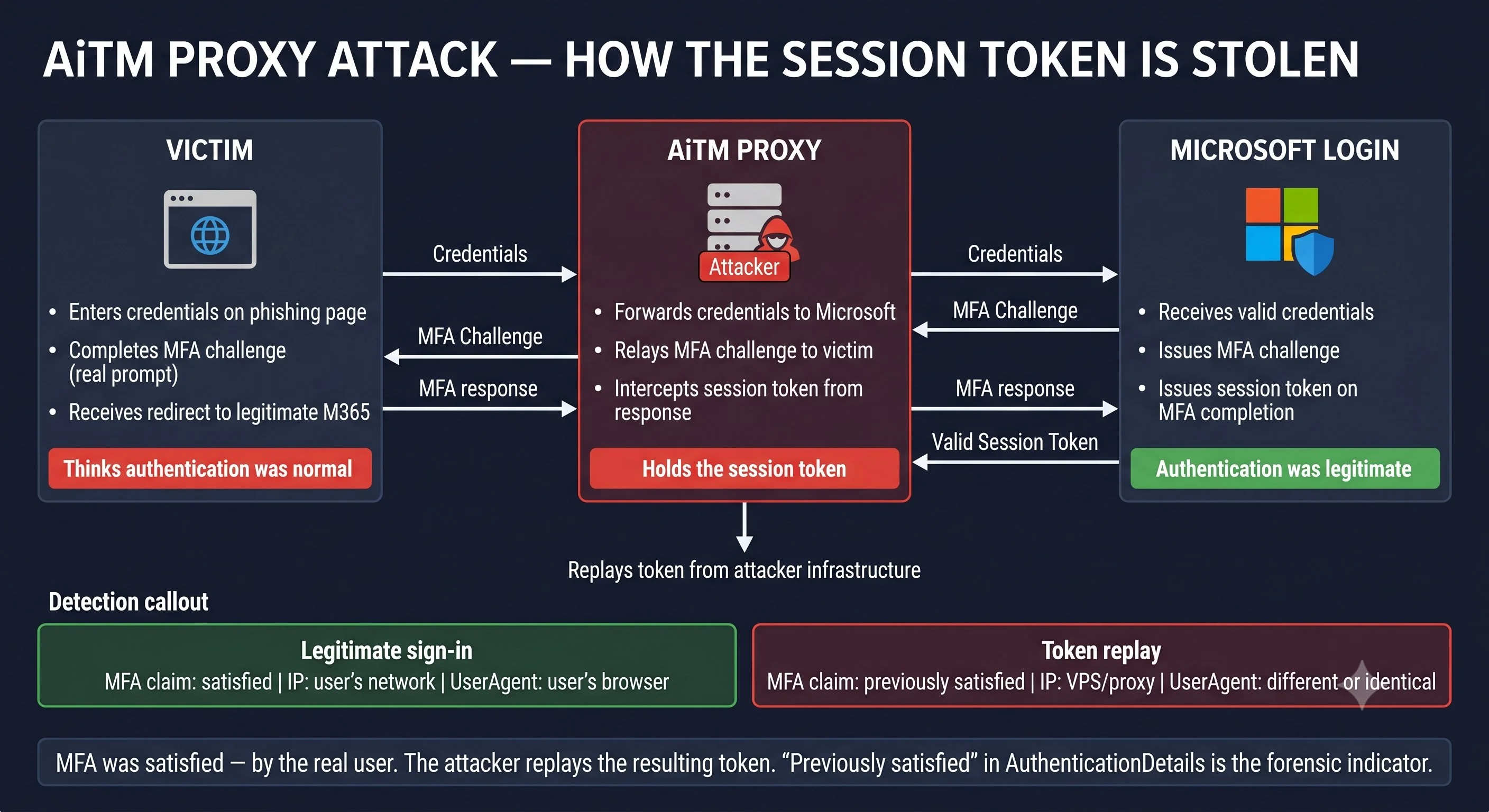
The critical indicator is "Previously satisfied" in the authentication details combined with a sign-in from an unfamiliar location. The attacker authenticated using a session cookie that was already MFA-authenticated by the legitimate user. Microsoft didn't prompt for MFA because the cookie already carried the MFA claim. The sign-in appears legitimate except for the IP address and location mismatch.
Entra ID Identity Protection detects some AiTM attacks through anomalous token detection (the token is used from a different IP than the one where the user authenticated). This produces a RiskState: atRisk with RiskDetail indicating unfamiliar features. But this detection fires after the attacker has already authenticated and started operating. The detection is useful for scoping, not for prevention.
// Find AiTM indicators: session token replay from different IP
SigninLogs
| where TimeGenerated > ago(7d)
| where ResultType == "0"
| where RiskLevelDuringSignIn in~ ("high", "medium")
| where AuthenticationDetails has "Previously satisfied"
| project
    TimeGenerated,
    UserPrincipalName,
    IPAddress,
    Location,
    AppDisplayName,
    RiskDetail,
    SessionId
| sort by TimeGenerated asc
Containment for AiTM: Standard password reset is necessary but insufficient. The attacker holds a session cookie, not a password. Session revocation (Revoke-MgUserSignInSession) invalidates the cookie. Emergency CA policy (IR6.2) prevents re-authentication. But AiTM attackers anticipate session revocation: many register a new MFA method and create OAuth app consents within minutes of landing. Check AuditLogs for MFA method registration and consent grants from the attacker's session immediately after the AiTM sign-in. If the attacker registered a new MFA method, remove it. If they consented to an OAuth app, revoke the consent per IR6.4.
Device code phishing
Device code phishing exploits the OAuth device authorization flow, a legitimate authentication mechanism designed for devices that can't render a browser (IoT devices, smart TVs, CLI tools). The flow works like this: the device requests a code from Microsoft, displays it to the user, and tells the user to visit https://microsoft.com/devicelogin and enter the code. The user authenticates on their own browser, and the device receives tokens.
The attacker generates a device code and sends it to the victim via email, Teams, or social engineering. The message says something like: "Enter this code to access the shared document." The user visits the legitimate Microsoft device login page, enters the code, and authenticates normally — including MFA. The authentication is entirely legitimate from Microsoft's perspective. But the tokens are delivered to the attacker's device, not to any device the user controls.
The signature is AuthenticationProtocol: deviceCode with empty device details. The user authenticated from their browser (which is logged separately), but the token was issued to the attacker's device, which has no OS or browser information because it's a headless script polling the token endpoint. The IP address is the attacker's infrastructure, not the user's device.
// Find device code authentication — rare in most tenants
SigninLogs
| where TimeGenerated > ago(30d)
| where AuthenticationProtocol =~ "deviceCode"
| project
    TimeGenerated,
    UserPrincipalName,
    IPAddress,
    Location,
    AppDisplayName,
    ResultType,
    DeviceDetail
| sort by TimeGenerated desc
In most organizations, device code authentication is rare or nonexistent. Any device code sign-in that doesn't correspond to a known device enrollment process is suspicious. If the organization doesn't use device code flow at all, a Conditional Access policy blocking deviceCode as an authentication flow eliminates this vector entirely.
Containment for device code phishing: Identical to AiTM — the attacker holds tokens, not passwords. Revoke sessions, reset passwords, check for persistence established during the authenticated session. Additionally, create a CA policy blocking the device code authentication flow for all users except accounts explicitly required for device enrollment.
Teams-based phishing
Microsoft Teams allows external tenant messaging by default. Attackers send phishing messages through Teams instead of email, bypassing email security controls entirely. The message appears in the user's Teams chat from an external user (marked with an "External" badge) and may contain links, attachments, or social engineering that directs the user to a credential harvest or AiTM page.
Teams phishing is effective because users trust Teams messages more than email. The training says "be suspicious of email." Nobody said anything about Teams. And Teams messages don't pass through the email security stack — no Defender for Office 365, no safe links rewriting, no attachment sandboxing (unless the organization has specifically configured Defender for Office 365 to cover Teams, which requires E5 or Defender for Office 365 Plan 2 and explicit policy configuration).
Microsoft Defender XDR
Email & collaboration → Policies & rules → Threat policies → Safe Links
Check whether the Safe Links policy includes Teams. If not, malicious links sent via Teams are not rewritten or checked at click time. This is a common gap because Safe Links defaults to email only.
Evidence for Teams phishing is in the CloudAppEvents table (Defender XDR Advanced Hunting) or OfficeActivity table (Sentinel). Look for ChatCreated events from external users followed by user activity on unfamiliar URLs:
// External Teams messages — identify phishing delivery via chat
CloudAppEvents
| where TimeGenerated > ago(7d)
| where ActionType == "ChatCreated"
| where RawEventData has "CommunicationType:OneOnOne"
| where RawEventData has "Federated"
| project
    TimeGenerated,
    AccountDisplayName,
    AccountObjectId,
    RawEventData
| sort by TimeGenerated desc
Containment for Teams phishing: Identical to other phishing vectors once the attacker has credentials or tokens. The additional step is reviewing and restricting external Teams messaging: consider limiting external Teams communication to specific allowed domains rather than allowing all external tenants. This is a preparation action for Module 3, not an incident-time containment step, but the incident proves the exposure.
IR7.3 covers the initial access vector that's hardest to detect and hardest to contain: OAuth consent phishing and malicious application registration.