
In this section
M365 IR Playbook: Graph API Abuse, PowerShell Remoting, Automation Exploitation, Role Elevation, and Persistence Investigation
The admin role that appeared overnight
The investigation started with a compromised user account: standard user, no admin roles, inbox rules forwarding email. Standard BEC. The IR team scoped the compromise to the single account, contained per IR6, and started the post-incident review. Except when they checked the AuditLogs for the compromised user's full activity, they found something the initial triage missed: the attacker had added the compromised account to the Exchange Administrator role. The role assignment happened 14 minutes after the initial sign-in, while the SOC was still triaging the phishing alert. By the time the IR team contained the account, the attacker had spent three hours as an Exchange Admin — long enough to create transport rules, access other mailboxes, and modify mail flow connectors. The containment addressed the user-level compromise. It didn't address anything the attacker did with Exchange Admin permissions.
The gap was in the initial scoping. The triage confirmed the compromised account, checked for inbox rules and forwarding, and moved to containment. Nobody queried AuditLogs for role assignments, Conditional Access changes, or service principal creation during the compromised session. The attacker exploited the window between initial access and containment to escalate privileges, and the escalation wasn't detected until the post-incident review.
Execution through the Graph API
On endpoints, execution means running code: PowerShell scripts, malware binaries, scheduled tasks. In M365, execution means API calls. The attacker doesn't run a binary on a server. They call Microsoft's Graph API from their own infrastructure, using the tokens or credentials obtained during initial access. Every action the attacker takes — reading email, creating inbox rules, modifying users, assigning roles — is an API call to graph.microsoft.com.
This distinction matters for investigation because there's no process tree, no file system artifact, no memory dump. The evidence is the API call itself, recorded in AuditLogs and sign-in logs. The attacker's "execution environment" is their own machine making HTTPS requests to Microsoft's API endpoints. You can't analyze their tooling. You can only analyze what they did through the API by reading the audit trail.
Common attacker execution patterns through the Graph API:
Email operations. Reading messages (/me/messages), creating inbox rules (/me/mailFolders/inbox/messageRules), sending email as the compromised user (/me/sendMail). These appear in AuditLogs as Exchange operations and in CloudAppEvents as mail-related actions. MailItemsAccessed (if Audit Premium is enabled) records the individual email reads.
Directory enumeration. Querying users (/users), groups (/groups), role assignments (/directoryRoles), applications (/applications). The attacker maps the organization before deciding where to escalate. These queries don't appear in standard AuditLogs — they're read operations that the Unified Audit Log doesn't capture individually. But the sign-in logs show the application (Microsoft Graph) and the timing correlates with subsequent attacker actions.
PowerShell remoting. Attackers use Exchange Online PowerShell (Connect-ExchangeOnline) and Microsoft Graph PowerShell (Connect-MgGraph) to execute commands at scale. PowerShell sessions appear in sign-in logs with AppDisplayName: Microsoft Exchange REST API Based Powershell or Microsoft Graph PowerShell. Multiple automated operations in rapid succession from an unfamiliar IP suggest scripted attacker activity.
// Find PowerShell and Graph API sessions from compromised account
SigninLogs
| where TimeGenerated > ago(7d)
| where UserPrincipalName =~ "r.okafor@northgateeng.com"
| where AppDisplayName in~ (
    "Microsoft Graph PowerShell",
    "Microsoft Exchange REST API Based Powershell",
    "Azure Active Directory PowerShell",
    "Microsoft Graph")
| project
    TimeGenerated,
    AppDisplayName,
    IPAddress,
    Location,
    ResultType,
    ClientAppUsed,
    UserAgent
| sort by TimeGenerated asc
Automation abuse. If the compromised account has access to Logic Apps, Power Automate flows, or Azure Automation runbooks, the attacker can create automated workflows that persist beyond session revocation. A Logic App that reads email and sends it to an external endpoint operates on its own identity (managed identity or connection credentials) and doesn't require the compromised user's session. These automation resources appear in the Azure Activity Log, not the M365 audit log, so they're easy to miss if the investigation is scoped only to M365.
Persistence mechanisms after initial access
IR7.2 and IR7.3 covered persistence that's part of the initial access itself (OAuth consent grants, stolen session tokens). This section covers persistence that the attacker establishes after landing — the mechanisms they create during the window between initial access and containment.
The attacker's persistence goal is simple: survive the password reset. They know the IR team will eventually reset the password. Everything they do in the first hour is preparation for that event.
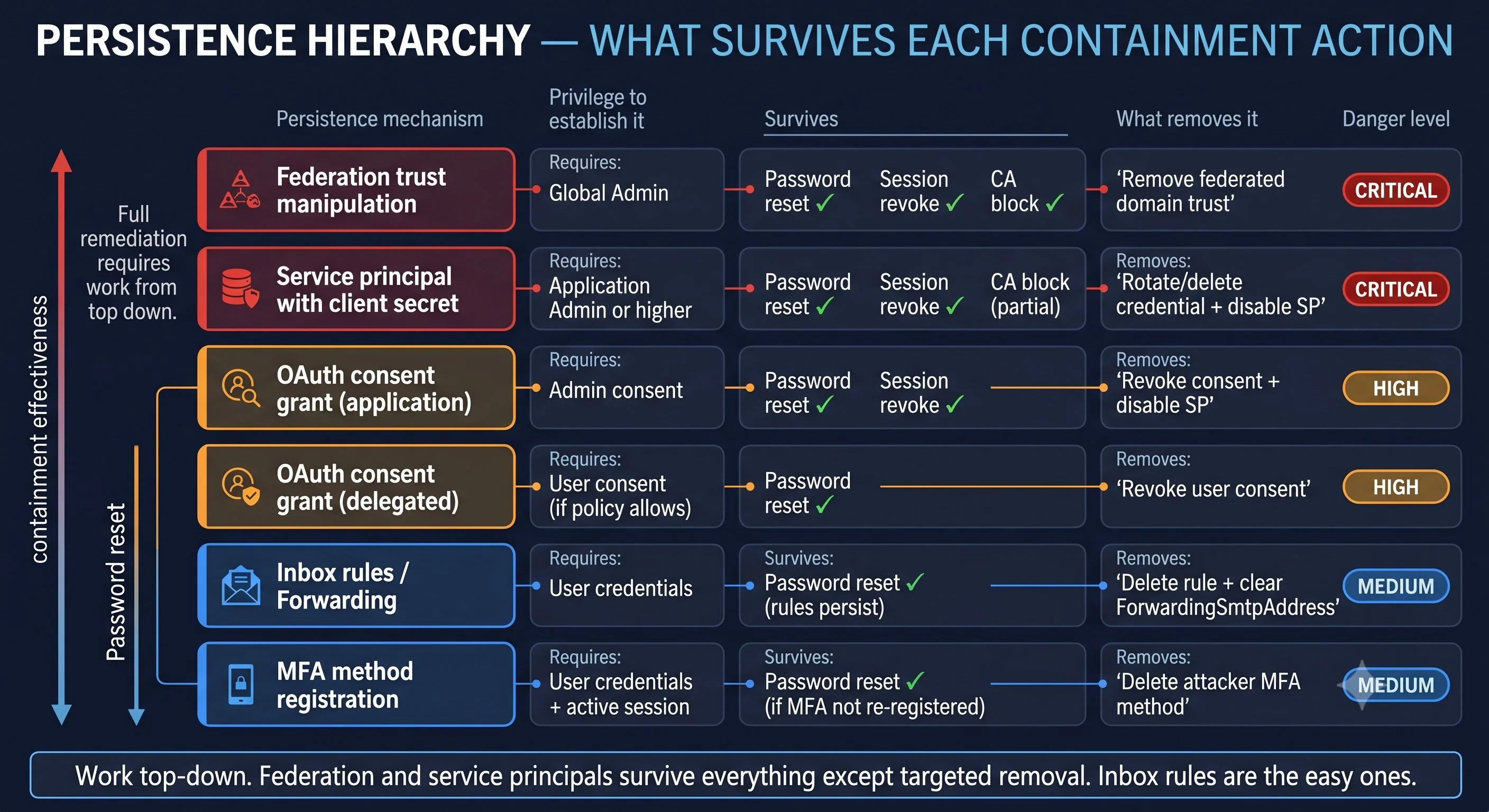
The comprehensive persistence query covers all of these operations for a specific compromised account and time window:
// All persistence-related operations by compromised account
AuditLogs
| where TimeGenerated between (
    datetime("2026-03-14T09:12:00Z") ..
    datetime("2026-03-14T11:30:00Z"))
| where InitiatedBy has "r.okafor@northgateeng.com"
| where OperationName in~ (
    "Consent to application",
    "Add service principal credentials",
    "Add app role assignment to service principal",
    "Add member to role",
    "Add delegated permission grant",
    "User registered security info",
    "Set domain authentication",
    "New-InboxRule",
    "Set-InboxRule",
    "Set-Mailbox",
    "New-TransportRule",
    "Add-MailboxPermission")
| project
    TimeGenerated,
    OperationName,
    Category,
    TargetResources,
    Result
| sort by TimeGenerated asc
Run this query for every compromised account immediately after confirming the compromise. The results determine the containment scope. If the query returns only inbox rule creation, containment is straightforward (IR6.4). If it returns role assignments or service principal credential additions, the investigation scope expands significantly.
Privilege escalation in M365
Privilege escalation is the stage that transforms a limited compromise into a tenant-wide incident. A compromised standard user is a serious problem. A compromised Global Admin is a different category of incident entirely.
Role assignment. The most direct escalation: the attacker adds the compromised account (or another account they control) to a privileged role. Exchange Administrator, Security Administrator, Application Administrator, and Global Administrator are the high-value targets. Role assignments appear in AuditLogs with the operation "Add member to role."
// Detect role assignments during compromised session
AuditLogs
| where TimeGenerated > ago(7d)
| where OperationName == "Add member to role"
| extend Actor = tostring(InitiatedBy.user.userPrincipalName)
| extend TargetUser = tostring(TargetResources[0].userPrincipalName)
| extend RoleName = tostring(
    TargetResources[0].modifiedProperties[1].newValue)
| project
    TimeGenerated,
    Actor,
    TargetUser,
    RoleName,
    CorrelationId
| sort by TimeGenerated desc
Conditional Access modification. A more subtle escalation: instead of assigning a visible admin role, the attacker modifies a Conditional Access policy to weaken MFA requirements for specific accounts. This creates a backdoor that survives password resets and session revocations because the CA policy exemption means the attacker can re-authenticate without MFA using the compromised credentials. CA policy changes appear in AuditLogs under the Policy category.
Entra Admin Center
Protection → Conditional Access → Audit logs
Filter by date range matching the compromised session. Look for policy modifications that add user or group exclusions, change grant controls from "Require MFA" to "Grant access," or disable policies entirely. Any CA change during a compromised session is suspicious until proven otherwise.
PIM role activation. If the compromised account has eligible (not active) Privileged Identity Management assignments, the attacker can activate those roles. PIM activation produces a sign-in event and an audit event. The activation may require justification text and approval (depending on the PIM policy configuration), but many organizations configure PIM with self-approval for lower-tier admin roles. Check the PIM audit log for activations during the compromised session.
Federation trust manipulation. The highest-impact escalation: the attacker adds a federated identity provider to the tenant domain. This allows the attacker to authenticate as any user in the tenant by issuing SAML tokens from their own identity provider. Federation trust changes appear in AuditLogs as "Set domain authentication." This is a Golden SAML or Silver SAML attack variant in the cloud, and it requires Global Admin permissions. If you find this in the audit log, the incident is tenant-wide.
Containment implications by escalation level
The privilege level the attacker reached determines the containment scope and the confidence you can have in the audit trail.
No escalation (standard user). Containment per IR6: emergency CA, session revocation, password reset, application and mailbox remediation, verification. Investigation scoped to the compromised user's data access.
Exchange Admin escalation. Containment expands to include organization-wide email infrastructure: all transport rules, mail flow connectors, journal rules, and any mailbox the attacker accessed using admin delegation. The investigation must scope email access across the entire tenant, not just the compromised account's mailbox.
Global Admin escalation. Containment becomes a full tenant review. The attacker could have created additional admin accounts, modified CA policies, added federated identity providers, created service principals with any permission, or modified audit log retention. The audit log itself may be incomplete if the attacker had time to modify diagnostic settings. Consider engaging Microsoft DART or an external IR firm for Global Admin compromises. The scope exceeds what a single IR team can verify with confidence, because the attacker had the permissions to hide their own activity.
IR7.5 covers what the attacker does with the access they've established: email harvesting, file access, SharePoint enumeration, and the evidence that proves what data was compromised.