
Reading width
Wide uses the full column for everything, text, diagrams, code, and exercises. Narrow keeps the standard reading width.
Text size
Scales the body text. Headings and code blocks keep their size.
In this section
0.1 What a Detection Is, and How It Is Judged
Introduction
A detection is a rule that reads events and raises an alert when they match something the rule's author believes is an attack. That belief is the part that matters.
Every rule is a claim, and most of what a detection engineer does is test the claim: whether the rule catches what it was written for, stays quiet on the work that resembles it, and still does both a month later.
Testing a claim needs data where the right answer is already known. This course has it: a month of telemetry in which every attack, and every piece of ordinary administration that looks like one, carries a label. A rule run against it can be scored, and the score says more than any amount of reading the query.
This lesson takes one simple rule for password spraying and runs it against five real cases from that month. It produces every outcome a rule can produce, and from those outcomes come the two measures this course uses throughout: precision and recall. It ends with the acceptance criteria that would have caught the rule's mistakes before it shipped.
What a Rule Claims
a query, a schedule, a threshold, and an assumptionMITRE ATT&CK describes password spraying as trying one common password, or a small list, against many accounts, so that no single account fails often enough to lock out. It also notes that operators may slow their attempts to stay under alerting thresholds. That is a description of behavior, and the first job is turning it into something a log can show.
In Entra ID every attempt is a row in the sign-in log. A spray from one address leaves many failures, against many different accounts, close together in time. The simplest rule counts exactly that: failed accounts per address per thirty minutes, alerting at ten.
SigninLogs
| where ResultType != "0"
| summarize FailedAccounts = dcount(UserPrincipalName)
    by IPAddress, TimeGenerated = bin(TimeGenerated, 30m)
| where FailedAccounts >= 10
The same rule in SPL, against the same events in Splunk:
index=azuread sourcetype="azure:monitor:aad" category=SignInLogs action=failure
| bin _time span=30m
| stats dc(user) as failed_accounts by src _time
| where failed_accounts >= 10
Read it as a claim with three parts. What it claims: ten or more accounts failing from one address in half an hour is a spray. What it needs: interactive sign-ins with the user, the address and the result populated. What fires it: any address that crosses ten in any thirty-minute bin.
Run against the month, the rule returns four rows. Two come from 198.51.100.23 on 23 February, at 46 and 11 accounts, because the spray crossed the edge of a thirty-minute bin. One comes from 81.2.69.142 on 2 March, at 24 accounts, and one from the same address on 10 March, at 30.
The office address appearing twice is the rule's first assumption failing in plain sight. 81.2.69.142 is where every laptop in the Manchester office reaches the internet, so a rule that groups by address treats the whole office as one source. One address is not always one actor.
Without labels, those four rows are all anyone has, and an analyst would investigate each one. With labels, each row can be matched to the case that produced it, and the question changes from "what fired?" to "was it right to?"
In the portal a spray looks like this: many failed rows from one source, each a different user.
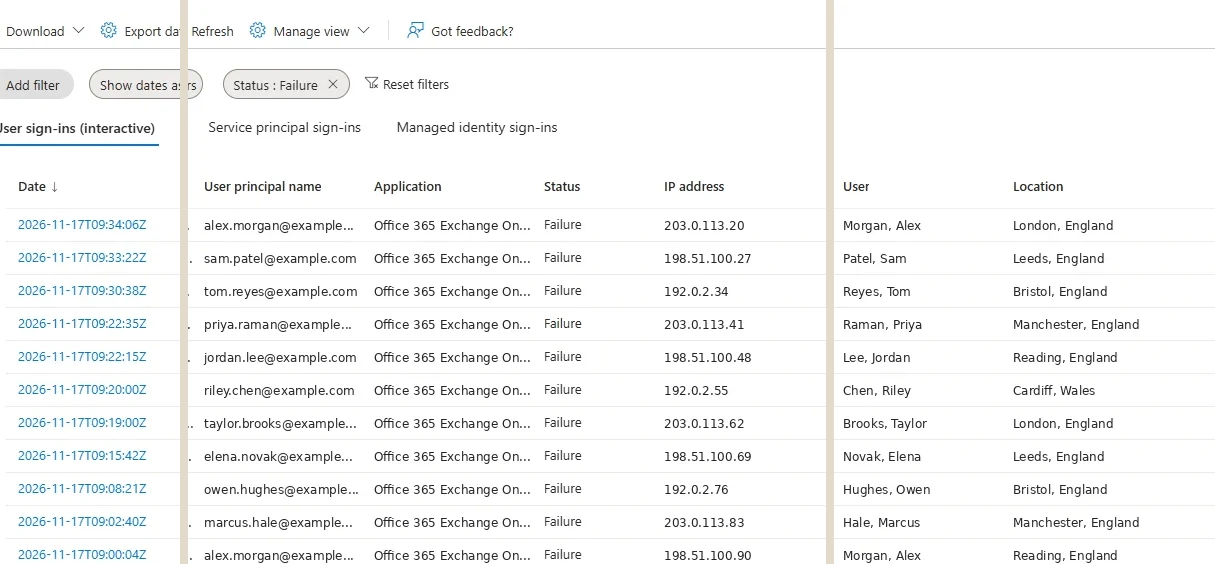
Failed sign-ins in the Entra admin center, in a different tenant. A spray is many rows like these from one address, each a different user. Select the image to open it full size.
Each of those rows is an event the rule reads. The rule's whole job is deciding which crowds of rows like these are an attack.
Four Outcomes
every case lands in exactly oneEvery case a rule meets ends in one of four places. It alerted on an attack: a true positive. It alerted on something benign: a false positive. It stayed quiet on an attack: a false negative, a miss. It stayed quiet on something benign: a true negative. Five labeled cases from the month give this one rule all four:
The two failures cost different things, and that asymmetry runs through the rest of the course. A false positive costs an analyst's time and, repeated often enough, their trust in the rule: a rule that is wrong every morning gets ignored, and then its true positives are ignored with it.
A false negative costs the attack itself, and it costs it silently, because a miss produces no alert, no ticket and no one asking why.
The test run below scores the rule against the spray test set, case by case, with a second version beside it that the next sections arrive at:
Analysts record these outcomes when they close an incident, and the vocabulary is worth knowing because detection engineers read it. Microsoft Sentinel asks for a classification on every closed incident: True Positive for suspicious activity, Benign Positive for activity that is suspicious but expected, False Positive for incorrect alert logic or incorrect data, and Undetermined.
A benign positive is the look-alike case: the rule matched exactly what it was written to match, and the activity was legitimate. Those closing classifications are the feedback a detection engineer tunes from, and a rule that keeps closing as benign positive is telling its author what it cannot yet distinguish.
True negatives are the outcome nobody sees, and the most numerous. Every quiet hour of every address in the month is one. They matter because they are the denominator a false positive is measured against: a rule wrong once in a thousand quiet cases sounds precise until the estate produces a hundred thousand quiet cases a day.
The Look-Alike
a crowd that failed, then got inOn the morning of 2 March the office forced a password change, and staff arrived to devices still holding the old password. From the office address, dozens of accounts failed within the hour. To a rule counting failed accounts per address, that is a spray, and the rule raised it.
What separates it is what happened next. A spray fails and stays out, because the attacker does not have the passwords. Staff retrying an old password fail, then sign in with the new one:
SigninLogs
| where IPAddress == "81.2.69.142"
| where TimeGenerated
    between (datetime(2026-03-02 08:00) .. datetime(2026-03-02 09:00))
| summarize Failed = countif(ResultType != "0"),
    Succeeded = countif(ResultType == "0") by UserPrincipalName
| summarize Accounts = count(), FailedThenIn = countif(Failed > 0 and Succeeded > 0),
    NeverIn = countif(Failed > 0 and Succeeded == 0)
In SPL the two counts become flags summed per account, then summed again across the accounts:
index=azuread sourcetype="azure:monitor:aad" category=SignInLogs src="81.2.69.142"
    earliest="03/02/2026:08:00:00" latest="03/02/2026:09:00:00"
| eval failed=if(action="failure", 1, 0), succeeded=if(action="success", 1, 0)
| stats sum(failed) as failed sum(succeeded) as succeeded by user
| eval failed_then_in=if(failed>0 AND succeeded>0, 1, 0),
    never_in=if(failed>0 AND succeeded=0, 1, 0)
| stats count as accounts sum(failed_then_in) as failed_then_in
    sum(never_in) as never_in
36 accounts signed in from the office that hour. 31 of them failed and then got in, and 0 failed and never did. A spray has the opposite shape. That difference is the one the first rule could not see, because it counted failures and discarded everything else.
The second version on the board in section two counts it directly: per address and hour, the accounts that failed and never got in. A spray scores near its full count on that measure, and the old-password morning scores almost nothing.
The tempting fix is the wrong one. Excluding the office address would silence 2 March, and it would also silence 10 March, when a laptop inside the office sprayed one password across the tenant through the same address, while 5 colleagues signed in normally from it in the same hour.
An exclusion removes a place from the rule's sight, and attackers use the same places as staff. The fix that holds is a better question, not a smaller dataset.
The course's data is built around this pattern. Every test set pairs its attacks with at least one look-alike: legitimate activity that produces the same events as an attack. Forced password changes, administrators running scripts, users traveling, backup jobs deleting old copies: every detection meets one, and a rule that cannot tell them apart has a precision problem whatever its threshold.
The Miss
a spray the rule was never shaped to seeOn 7 March a spray came from a different direction. Instead of one address, the operator rotated through residential proxies, each address trying only a couple of accounts before the next took over:
SigninLogs
| where TimeGenerated
    between (datetime(2026-03-07 01:00) .. datetime(2026-03-07 07:40))
| where IPAddress startswith "203.0.113."
| summarize Accounts = dcount(UserPrincipalName), Attempts = count() by IPAddress
| summarize Addresses = count(), MostAccountsFromOne = max(Accounts),
    TotalAttempts = sum(Attempts)
The SPL form counts accounts and attempts per address, then summarizes the addresses:
index=azuread sourcetype="azure:monitor:aad" category=SignInLogs src="203.0.113.*"
    earliest="03/07/2026:01:00:00" latest="03/07/2026:07:40:00"
| stats dc(user) as accounts count as attempts by src
| stats count as addresses max(accounts) as most_accounts_from_one
    sum(attempts) as total_attempts
23 addresses, 47 attempts, and no single address tried more than 2 accounts. Set beside the sprays the rule caught, the difference is the whole story:
To a rule that groups by address, this spray is 23 unrelated people mistyping a password. It is exactly the evasion ATT&CK warns about: attempts spread so that no counter crosses its line. And nothing announced it. The rule did not fail with an error; it simply never fired, which from the outside looks identical to there being no spray at all.
That is why misses are the harder failure to manage. False positives arrive in the queue and complain about themselves. Misses are found only by testing against data where the attack is known to be present, by hunting for it, or by an incident that reveals it later. Labeled data is the cheapest of the three, and it is why this course has it.
The spray did leave one signal a different rule could use. Of its 47 attempts, one used the right password: q.pemberton's, from 203.0.113.58 at 02:47 on 7 March, where the sign-in stopped at the multifactor prompt with code 50074 and then failed it with 500121.
A correct password from an address the account had never used, stopped only by MFA, is an event worth an alert on its own, whatever the address's count. Module 12 builds rules on exactly that kind of signal, because it survives the rotation that defeats counting.
One more detail is a warning: q.pemberton signs in normally from 203.0.113.42, in the same address block as the proxies. An address range is no more an identity than a single address is.
Precision and Recall
two numbers that pull against each otherTwo measures summarize the four outcomes. Recall is the share of real attacks the rule caught: true positives over all malicious cases. Precision is the share of the rule's alerts that were real: true positives over everything it alerted on.
The first rule's recall is 2 of 3, about 67%, and its precision is 2 of 3, also about 67%. Both are counted per case, not per row: the external spray produced two rows and is still one catch. Counting rows would reward a rule for alerting on the same attack many times, and punish it twice for one false alarm that crossed a bin edge.
The two pull against each other. A wider rule catches more and is wrong more often; a narrower one is right more often and misses more. The natural reaction to the miss is to lower the threshold, and the month shows what that buys:
At a threshold of 2 the rule returns 26 alert rows and flags both look-alikes, and it still catches the same 2 sprays. Precision got worse and recall did not move, because the miss was a matter of the rule's shape, not its sensitivity. Catching the distributed spray means grouping differently, by account or by time across many addresses, which Module 12 does.
Base rates make the trade sharper. The month holds 2,591 interactive sign-ins and 283 failures, nearly all of them people mistyping passwords. Attacks are a small fraction of any log, so even a rule that is rarely wrong on a single event can produce mostly false alarms across a month. Precision is the number that tells you which.
Which of the two to favor depends on what the alert triggers. A rule whose alert blocks an address automatically needs high precision, because every false positive locks out the office.
A rule that feeds a hunt, read by someone who expects to discard most of it, can trade precision for recall. Stating which one a rule is for is part of its design, and Module 5 makes it a field in the specification.
Criteria Before the Rule
what it must catch, what it must ignore, what it may costA rule should be judged against criteria written before it is built, so that "it fired" is never mistaken for "it works". The criteria name the cases: these it must alert on, these it must stay quiet on, and how many other alerts are acceptable across the rest of the data. Written for this rule, they look like this:
Each lane does a different job. The first is recall made concrete: named attacks, each of which must produce an alert. The second is precision made concrete: named look-alikes, each of which must not.
The budget covers everything the author did not think to name, and a budget of zero is a strong claim that the month will check. The preconditions say what must be true of the data for any of it to hold, which is the first thing to check when a rule that used to pass starts failing.
Against these criteria the first rule fails the quiet lane, and the board in section two shows the second version passing: both sprays, nothing on 2 March, nothing else in the month. Notice what the criteria leave out.
The distributed spray is not on the list, and that is a decision rather than an oversight: this rule is for sprays from one address, and the distributed case belongs to a second rule with criteria of its own. Writing the criteria first is what forces that decision into the open.
The order matters for another reason. Criteria written after the rule tend to describe what the rule already does, and a rule always passes a test written around it. Criteria written first describe what the rule should do, and when the two disagree it is the rule that changes.
Later in the course these lanes become automated tests: Module 15 builds them as test sets, and Module 17 runs them on every change to the rule before it can deploy.
Where the Rule Runs
a scheduled query in Microsoft SentinelIn Microsoft Sentinel a rule like this is a scheduled analytics rule: a query, how often it runs, how far back it looks each time, and when the results become an alert. Microsoft is moving Sentinel into the Defender portal and ends support in the Azure portal after 31 March 2027, so the path below is the Defender one:
SigninLogs
| where ResultType != "0"
| summarize FailedAccounts = dcount(UserPrincipalName)
    by IPAddress, TimeGenerated = bin(TimeGenerated, 30m)
| where FailedAccounts >= 10Microsoft requires the query to return TimeGenerated, because the lookback is measured against that column. That is why the rule names its thirty-minute bin TimeGenerated rather than inventing a new column: a rule that summarizes the time away cannot be scheduled. The same settings in the wizard, on a rule in a production workspace:
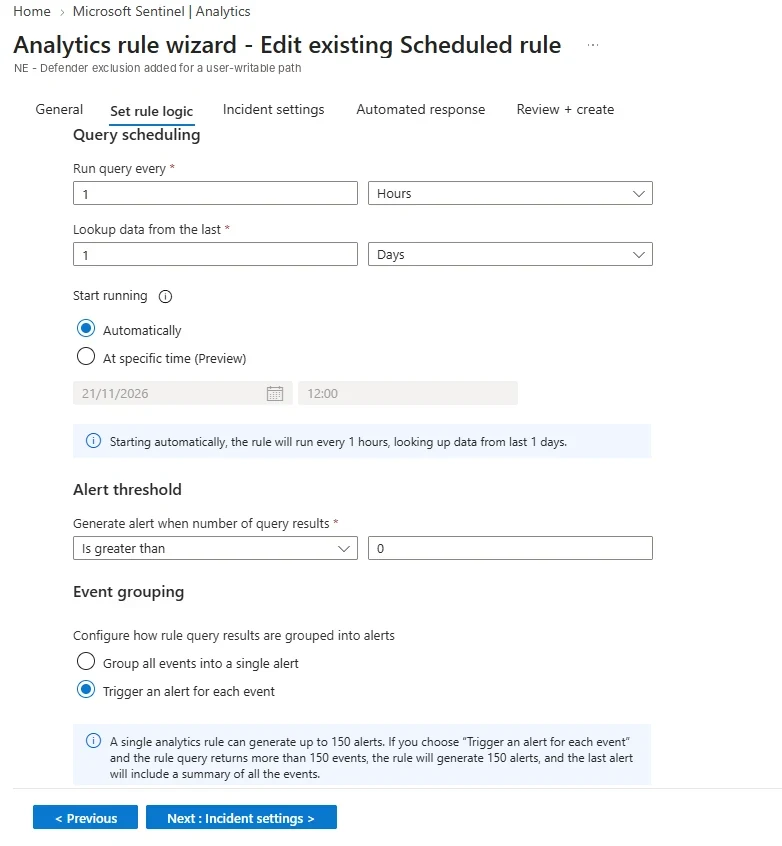
Query scheduling, alert threshold and event grouping for a scheduled rule in a real workspace. Note the cap printed under event grouping: one rule run raises at most 150 alerts. Select the image to open it full size.
Every setting in that procedure is part of the claim. A rule that runs every hour and looks back over the last hour sees each spray once.
A rule that runs every hour but looks back thirty minutes leaves half of every hour unread, and a spray that happens in the other half never reaches the query. A rule that looks back two hours every hour sees each spray twice and raises it twice.
The query also has to find its data already there. Events reach a workspace minutes after they happen, sometimes much longer, and a rule that runs before the late events arrive judges an incomplete hour.
Labeled testing assumes the data is complete; production does not get that luxury, which is why Module 9 treats the schedule, the lookback and ingestion delay as part of the rule rather than settings around it.
How results become alerts is a setting too. By default a scheduled rule raises a single alert each time it runs, summarizing every row the query returned. For a spray rule that would merge the external spray and an office spray into one alert if both fell in the same hour.
Setting the rule to raise an alert for each result keeps one alert per address and window, which is what an analyst needs to triage them separately. The wizard prints the limit that comes with it: a single run raises at most 150 alerts, and past that the last alert summarizes the rest.
Real rules make these trade-offs deliberately. The password spray rule below runs every thirty minutes over the last hour, so each sign-in is read by two consecutive runs. The overlap absorbs late-arriving events, and the cost is that a spray can be raised twice unless something removes the duplicate:
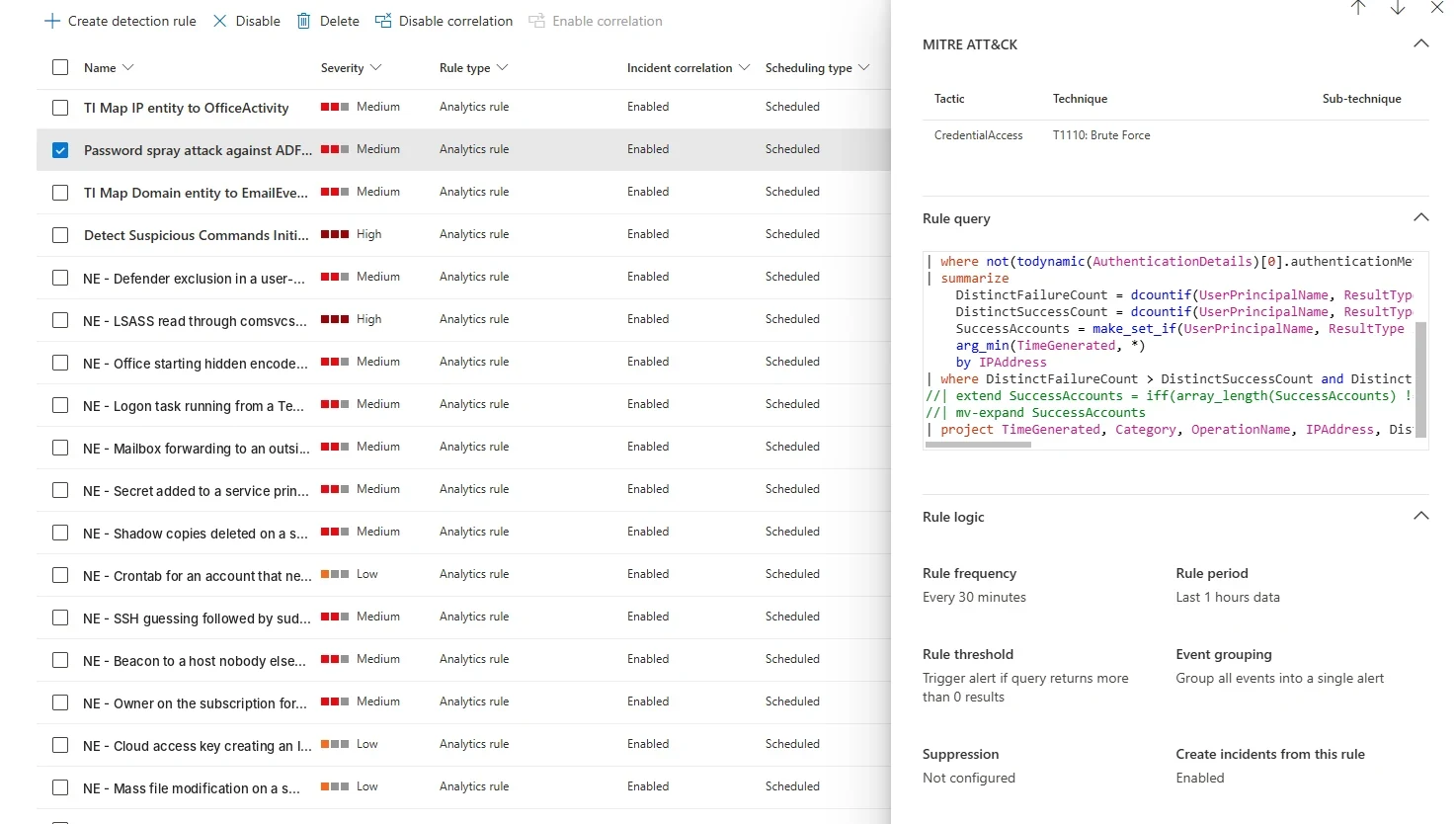
A password spray rule from Microsoft's templates, running in a real workspace beside this course's own rules. It runs every 30 minutes over the last hour, so every event is read twice. Select the image to open it full size.
It also groups all events into a single alert, the default, which suits a rule expected to fire rarely and fails when two sprays share a run.
What Modules 1 and 5 Build On It
reading a detection, then designing oneModule 1 builds the reading side: what a detection claims, how monitoring, hunting and engineering each see the same alert, the life of a rule from request to retirement, and how to judge the quality of rules someone else wrote. Every one of those judgments uses the four outcomes from this lesson, and its last lesson assesses five existing rules the way this lesson assessed one.
Module 5 builds the design side: turning a use case into a hypothesis, naming the events and fields a rule needs, choosing between thresholds, sequences and baselines, stating severity and confidence, and writing acceptance criteria and test cases before the query. The contract in section six is its smallest version, and the look-alike in section three is the kind of case it teaches you to name in advance.
Between them they set the course's working order: decide what to catch and what to ignore, write it down, build the rule, then prove it against data where the answer is known. Every later module, from the query languages to deployment as code, assumes that order.
Practice
The exercise below starts with the first rule. Change what it counts so it keeps both sprays and stays quiet on 2 March.
- Run the starting rule. Read which cases it alerts on and name each outcome: true positive, false positive, false negative or true negative.
- Find what separates the look-alike. Pick one account from 2 March and list its sign-ins in order. What happens after the failure?
- Count that, not just failures. Count, per address and hour, the accounts that failed and never got in.
- Run it on the set. Both sprays detected, the old passwords quiet, nothing else.
- Write down what it still misses. The distributed spray from section five. Say why no threshold on this rule will ever find it.
A detection is a claim about events, and labeled data is how the claim gets tested. Every case lands in one of four outcomes; recall counts the attacks caught and precision counts the alerts that were right. A look-alike is fixed by finding what really separates it, and a miss caused by the rule's shape is not fixed by any threshold.
The next lesson goes one step earlier: from an ATT&CK technique to the events a rule like this one can actually see.