
Reading width
Wide uses the full column for everything, text, diagrams, code, and exercises. Narrow keeps the standard reading width.
Text size
Scales the body text. Headings and code blocks keep their size.
In this section
0.8 Identity, Cloud and Network
Introduction
Endpoints record what ran. Identity, cloud and network records say who was allowed to do what, and who talked to whom.
In a cloud estate that is often the whole story: an attacker with a stolen session, a consented application or a service principal's secret never runs a process on a Northgate machine at all, and the only evidence is in the records of sign-ins, directory changes, control-plane calls and traffic.
This lesson reads those records on the course month. Each section takes one attack and the ordinary activity that looks like it, and finds the field or the context that separates them. In identity and cloud records that is usually a relationship between records rather than a value in one; in network records it is usually a pattern over many connections rather than a single one.
A Session Used From Somewhere Else
the sign-in record and the session it startsA sign-in to Entra ID produces a record of a decision: who asked, from where, with what client, to which application, and whether it was allowed. A successful interactive sign-in starts a session, and every later token request in that session carries the same session ID, recorded in the non-interactive sign-in log. On 25 February one user's session was used from two places:
union SigninLogs, AADNonInteractiveUserSignInLogs
| where UserPrincipalName == "k.foster@ne.com"
    and SessionId == "c3af2856-315b-cb43-e6b8-1b2d324dbbe9"
| summarize Records = count(), FirstSeen = min(TimeGenerated),
    LastSeen = max(TimeGenerated), Apps = make_set(AppDisplayName)
    by IPAddress, Client = substring(UserAgent, 13, 24)
The first record is the user signing in through a phishing page that proxied the real Microsoft sign-in: password and MFA both completed, from a Windows browser. Nineteen minutes later the same session ID appears from a different address and a Mac, and goes on being used for Microsoft Office.
The second address never signed in. It presented the session cookie the proxy captured, and Entra ID accepted it, because a valid session cookie is what a signed-in browser presents.
That is why MFA does not stop this attack and why the evidence is in the relationship between records. No single record is unusual: the first is a successful sign-in with MFA, the rest are ordinary token requests. What is wrong is one session appearing from two clients at once.
The look-alikes in the month are a traveller whose new address appears with a new sign-in, and a person moving between a work laptop and a personal one, each with its own session. Module 12 builds the rule on the session ID, and Module 6 writes the join it needs.
The sign-in logs carry more than the rule above uses. Each record has the authentication requirement that applied, the Conditional Access policies evaluated, a risk level from Entra ID Protection where it is licensed, and the device's compliance state.
Those fields let a rule ask better questions than whether a sign-in succeeded: whether it passed MFA because MFA was required or skipped it because a policy excluded it, and whether the device was one the organization manages. The month's spray rule in lesson 0.1 used one field; Module 12's identity rules use several.
Consent to an Application
a permission granted once, used from then onAn application asks for permissions; a user or an administrator grants them; from then on the application acts with them, without the person signing in again. Two consents were granted in the month:
AuditLogs
| where OperationName == "Consent to application"
| extend App = tostring(TargetResources[0].displayName),
    User = tostring(InitiatedBy.user.userPrincipalName)
| mv-expand MP = TargetResources[0].modifiedProperties
| extend Name = tostring(MP.displayName), Value = tostring(MP.newValue)
| summarize
    Admin = make_set_if(Value, Name == "ConsentContext.IsAdminConsent"),
    Permissions = make_set_if(Value, Name == "ConsentAction.Permissions")
    by TimeGenerated, User, App
| extend Admin = tostring(Admin[0]),
    Scope = extract(@"Scope: ([^,\]]+)", 1, tostring(Permissions[0]))
| project TimeGenerated, User, App, Admin, Scope
The Advanced hunting view of the same records shows the two side by side:
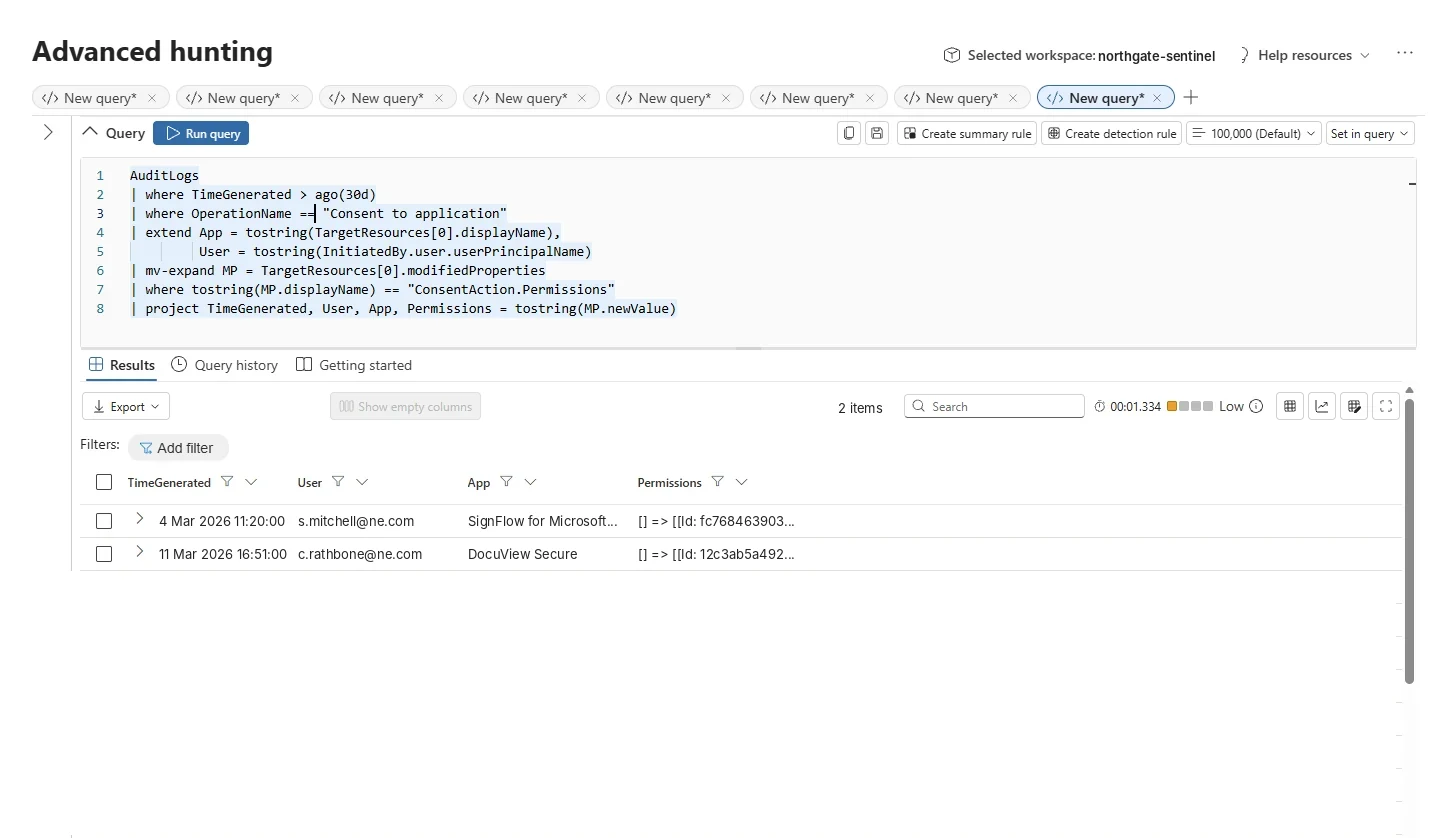
The same question asked in Advanced hunting. Two consents in a month; the permissions column is where they differ. Select the image to open it full size.
One is an administrator granting a document-signing service access to files for the whole organization: a broad permission, granted through the process meant for it. The other is a user granting an application none of the team had heard of permission to read their mail and to keep doing so offline. Then the mail was read:
OfficeActivity
| where UserId == "c.rathbone@ne.com"
    and TimeGenerated between (datetime(2026-03-11 16:51)
    .. datetime(2026-03-12 00:00))
| summarize Events = count(), FirstSeen = min(TimeGenerated),
    LastSeen = max(TimeGenerated) by Operation, ClientIP
4 mailbox reads from 192.0.2.77, starting nineteen minutes after the consent, by an application rather than the user. This is consent phishing, and it survives a password reset: the application holds its own grant, which stays valid until someone revokes it.
The look-alike is the administrator's consent, which grants more and is legitimate because of who granted it and how. An administrator granting a well-known vendor's application, through the approval process, for a stated business need, is the consent model working; a user granting an unknown application mail access from a link in an email is the same model abused.
Module 12 builds the rule on a user consenting to mail permissions for an application with no history in the tenant, and joins it to the mail access that follows.
Many tenants now restrict user consent to low-risk permissions or require an administrator's approval, which removes most of this attack at the source; the rule is still needed, because those settings are often changed for one urgent application and never changed back.
The permissions are inside a nested JSON property of the audit record, which is why the queries above expand it: the shape problem from lesson 0.3 again, in a different table.
A Secret Added to a Service Principal
a credential for an identity that never signs in interactivelyApplications and automation sign in as service principals, using secrets or certificates. Adding a new secret to one is ordinary work for the people and pipelines that maintain it, and also the quietest persistence an attacker with directory rights can create. Every credential change in the month:
AuditLogs
| where OperationName in ("Add service principal credentials",
    "Update application – Certificates and secrets management ")
| extend Actor = coalesce(tostring(InitiatedBy.user.userPrincipalName),
        tostring(InitiatedBy.app.displayName)),
    ActorIp = tostring(InitiatedBy.user.ipAddress),
    App = tostring(TargetResources[0].displayName)
| summarize Changes = count(), FirstSeen = min(TimeGenerated),
    LastSeen = max(TimeGenerated), Addresses = make_set(ActorIp)
    by App, Actor
Most of the changes are routine. One engineer updates the Terraform pipeline's credentials every week from the same address, and the pipeline rotated its own secret once.
One change stands out on three counts: a person rather than a pipeline, adding a credential to the HR synchronization application, at 23:40 at night, from 192.0.2.88, an address none of the routine changes used. What the new credential did next is in the service principal's own sign-ins:
AADServicePrincipalSignInLogs
| where ServicePrincipalName == "ne-hr-sync"
| summarize SignIns = count(), FirstSeen = min(TimeGenerated),
    LastSeen = max(TimeGenerated) by IPAddress
The application normally signs in from one cloud address. After the change it also signed in 5 times from the address the change came from. That is the evidence that settles it: a credential added at night and then used from the same unfamiliar address, by an identity that otherwise only ever signs in from its own platform.
Service principals are attractive to attackers for the same reason they are awkward for defenders. They do not use MFA, they are not covered by most sign-in policies written for people, and their sign-ins go to a separate log that many workspaces never collect.
An attacker who adds a secret to an application that already holds broad API permissions inherits those permissions, and keeps them through any password reset on the account that made the change. Collecting the service principal sign-in log is the precondition for every rule in this section.
The month has a harder variant. On 10 March a credential was added to a backup reader application from the office address, and first used two days later from an address outside. The change looks routine; only its use gives it away, and only to a rule that remembers the change for long enough. Module 12 builds both, and Module 8 handles the delay between them.
The Cloud Control Plane
who changed the subscription, and what came beforeAzure and AWS record every change to their resources as a control-plane call: who called which operation on which resource, from where. Role assignments are among the most important, because whoever holds Owner on a subscription controls everything in it. Two Owner assignments were made in the month, and the directory events around them tell them apart:
union
    (AuditLogs
    | where OperationName in ("Invite external user",
        "Add member to role requested (PIM activation)",
        "Add member to role request approved (PIM activation)")
    | project TimeGenerated, Source = "Entra ID", OperationName,
        Actor = tostring(InitiatedBy.user.userPrincipalName)),
    (AzureActivity
    | where OperationNameValue has "roleAssignments/write"
    | project TimeGenerated, Source = "Azure", OperationName = OperationNameValue,
        Actor = Caller)
| order by TimeGenerated asc
Read in order, the records are two different stories:
Two Owner assignments on the subscription, read with what came before
Entra ID + AzureThe first is privileged access working as intended: an eligible role requested, approved by a second person, activated for a change window.
The second is an account inviting an outside guest and, seven minutes later, giving that guest Owner on the subscription directly, from an address the account had used once before in the month, for the sign-in minutes earlier, at nine at night. Each record on its own is a role assignment; the difference is the invitation before it and the approval that is missing.
AWS has the same shape in CloudTrail, and the month's leaked-key intrusion from lesson 0.6 is its version: an access key used to create an administrator and stop logging. Control-plane rules work best as sequences and as comparisons with what the same caller or peers normally do, which is why Module 12 builds them with the correlation patterns from Module 8.
Control-plane records also have a timing problem that lesson 0.6 met in CloudTrail: they arrive minutes after the call, and the delay varies by service. A sequence rule that expects the invitation and the assignment in the same run has to allow for one arriving later than the other.
The volume is low compared with endpoint data, which makes it practical to look back hours or days on every run, and that is usually how these rules are scheduled. A daily rule with a long lookback costs little on these tables and loses nothing to a late record.
What DNS Shows
names asked for, and what they carryEvery connection to a named destination starts with a DNS query, so DNS records show where machines are trying to go, including places a firewall allows. The month's DNS, grouped by the domain each name belongs to:
ASimDnsActivityLogs
| extend Parts = split(DnsQuery, ".")
| extend Domain = strcat(Parts[array_length(Parts) - 2], ".",
    Parts[array_length(Parts) - 1])
| summarize Queries = count(), Names = dcount(DnsQuery),
    LongestName = max(strlen(DnsQuery)), Clients = dcount(SrcIpAddr)
    by Domain
| top 5 by Names
The top domain is one nobody at Northgate has heard of, asked for by a single client, with every query a different name and names up to 82 characters long.
That is DNS tunneling: data encoded into the labels of names under a domain the attacker controls, carried out through the organization's own resolver, which forwards every question to the domain's name server. Each query is a few dozen bytes of stolen data.
The second line looks similar on two counts, one client and hundreds of different names, and is ordinary: an IT capture tool resolving addresses back to names, under in-addr.arpa, with short names that carry nothing.
A third look-alike, a laptop asking all day for a file server that was retired, repeats one name rather than generating new ones. Module 13 builds the tunneling rule on unique names, name length and the domain's history together, and the exercise at the end of this lesson is its first step.
The month's DNS data is the ASIM table from lesson 0.3, which matters here: a rule written on SrcIpAddr and DnsQuery works for any DNS server with a parser, and DNS is a source where estates change servers and add cloud resolvers more often than most. It also matters what DNS does not show.
A machine configured to use an outside resolver over HTTPS bypasses the organization's DNS servers entirely, and its lookups appear only as HTTPS connections in the firewall log. Module 13 covers that gap alongside the tunneling rule, and the coverage assessment in Module 3 records it as a blind spot until it is closed.
A Beacon and Something That Checks In Like One
regularity, jitter and the hours a laptop is offMalware that has been installed checks in with its controller on a schedule, and a schedule leaves a pattern in traffic records: the same destination, from the same machine, at regular intervals. A sync client does the same. The month has one of each, both checking in every five minutes:
CommonSecurityLog
| where DestinationIP in ("198.51.100.62", "52.36.81.17")
| order by DestinationIP asc, TimeGenerated asc
| extend Gap = datetime_diff("second", TimeGenerated, prev(TimeGenerated)),
    SameDestination = DestinationIP == prev(DestinationIP)
| where SameDestination
| summarize Connections = count(), MedianGap = percentile(Gap, 50),
    Gap10 = percentile(Gap, 10), Gap90 = percentile(Gap, 90),
    LongestGap = max(Gap) by DestinationIP
The medians are identical. The spread is not:
The sync client checks in exactly every 300 seconds, and its longest gap is over 14 hours: when the laptop was asleep or shut down overnight, the client stopped with it. The beacon varies by about 24 seconds either side of five minutes, deliberately, because exact regularity is what beacon detection looks for, and its longest gap is under six minutes: it ran around the clock for four days.
Neither feature is proof on its own. Jitter is configurable, and some legitimate software varies its interval. What a rule can use is the combination: regular check-ins to a destination with no history in the estate, from one machine, continuing when the user is not working. Module 13 builds the beacon rule on interval statistics like these, and Module 6 writes the time-series query that computes them.
The firewall log is the right place to measure this because it sees every connection leaving the estate, from every machine, whether or not an endpoint agent is installed. The second beacon in the month, from another internal machine to a different outside address, is a case only the firewall and DNS record: that machine has no endpoint agent.
Endpoint network records add which process made each connection, which turns a suspicious destination into a suspicious program. Module 13 uses both, and treats a beacon seen only in the firewall log as a gap in endpoint coverage as well as an alert. Every one of these rules also needs a list of known-good regular destinations, kept current, or it will be retuned into silence.
Volume, Direction and Who Else Goes There
a large transfer judged by its contextData theft ends with data leaving, and leaving data is bytes sent outbound. Size alone is a poor signal, because the estate sends large amounts outbound every day. Three destinations from the month show why:
CommonSecurityLog
| where DestinationIP in ("198.51.100.230", "192.0.2.84", "13.107.136.10")
| summarize Connections = count(),
    SentMB = round(sum(SentBytes) / 1048576.0, 0),
    InternalSources = dcount(SourceIP), Days = dcount(bin(TimeGenerated, 1d))
    by DestinationIP
Written out side by side, with the one question each destination answers differently, the comparison is clearer:
Three destinations, read for what makes a transfer unusual
firewall, outboundOneDrive carries a large total too, from 85 machines, because everyone uses it. The payroll upload is a single machine sending a large file to an outside address, which in isolation is exactly what theft looks like; it is ordinary because it happens every Friday, to the same bureau, from the same finance machine.
The theft is a single machine sending more than either to an address that no other machine contacted, over 2 days.
The rule Module 13 builds on this uses population and history: how many internal machines use a destination, how long it has been in use, and how far a transfer sits above that machine's own normal. The same reasoning drives the rest of Module 13, including scanning and remote administration inside the network, where the look-alikes are an IT inventory sweep and an engineer's first legitimate remote desktop session.
Population is a powerful idea because it is cheap. Counting how many internal machines contact each destination over thirty days is one summarize, and it splits the outbound traffic of an estate into destinations everyone uses and destinations one machine uses.
Almost every exfiltration and command-and-control channel lands in the second group. So does a great deal of ordinary traffic, which is why the second step is history: a destination that one machine has used every Friday for a year is a business process, and a destination first seen yesterday is a question.
A rule that asks both questions before alerting is quiet on the payroll upload and loud on the theft.
What Modules 12 and 13 Build On It
identity and cloud, then networkModule 12 builds identity and cloud rules: password spraying from one address and from many, which lesson 0.1 began; a replayed session cookie; consent to an application that reads mail; a secret added to a service principal; Owner on the subscription for a new guest; and a leaked AWS key that creates an administrator.
Module 13 builds network rules: DNS with rare domains, generated names and tunneling; a beacon and the connector that checks in like one; scanning and east-west remote administration; and a large transfer to a destination nobody uses.
Across both modules, the pattern from this lesson repeats. The record that matters is rarely unusual on its own: a sign-in succeeds, a consent is granted, a role is assigned, a name is resolved, a connection is made.
What makes it an attack is its relationship to other records, the session that moved, the use after the consent, the invitation before the assignment, or its relationship to the estate's own history: the domain nobody uses, the interval no person keeps, the destination no other machine contacts.
That puts more weight on context than endpoint rules need. Identity rules need the directory and the tenant's own history; network rules need a baseline of normal traffic. Module 4's enrichment and Module 8's baselines are what make these rules possible, and why the course builds them first.
It also changes how these rules fail. An endpoint rule usually fails by matching too much, because a binary or argument turns out to be common.
An identity or network rule usually fails because its context is wrong: a baseline built over a holiday week, a directory table that lags behind a new hire, a list of known destinations that misses a new vendor. Testing these rules therefore means testing their context as well as their logic, and lesson 0.9 shows how the course does both against the labeled month.
Practice
The exercise below is the DNS rule from section five. Make it catch the tunnel without flagging the capture tool.
- Run the starting query. Note the two clients it returns and look at the names each one asked for.
- Remove the reverse lookups. Names under in-addr.arpa are addresses being turned into names.
- Measure the names. Add the longest name each client asked for.
- Set the condition. Many names and long names, together.
- Check the score. The tunnel caught; the capture and the stale drive mapping left alone.
Identity, cloud and network records describe permissions and conversations rather than programs. A stolen session, a consented application, a new secret and a new Owner each look ordinary record by record, and become visible only in relation to the records around them. Network attacks become visible as patterns over many connections, measured against what the rest of the estate does.
The next lesson tests rules before they ship and tunes them once they run, using the labeled attacks and look-alikes every lesson so far has relied on.