
Reading width
Wide uses the full column for everything, text, diagrams, code, and exercises. Narrow keeps the standard reading width.
Text size
Scales the body text. Headings and code blocks keep their size.
In this section
Incident Response in Microsoft 365: Events, Incidents and the NIST Life Cycle
Introduction
A tenant records thousands of security-relevant events a day, and almost none of them are incidents. A sign-in from a new country, a failed password, a new inbox rule, a file shared outside the organization: each is an event, and most are people doing their jobs.
Incident response starts at the moment one of those events is judged to be something worse, and everything after that moment runs differently. Somebody owns it, a clock may be running, evidence has to be kept before it changes, and decisions are written down because somebody will later ask why they were made.
This lesson sets out how an event becomes an incident, the response life cycle as NIST now describes it, what changes when the systems belong to a cloud provider, where a responder reads first, and the first hour after declaration.
It follows one real account in the course dataset from an ordinary-looking sign-in to the point where it can only be called an incident, and it ends with a first reader's note on the same alert, checked against the records.
From Event to Incident
Three words used as if they were oneNIST's incident response guidance defines an event as any observable occurrence involving computing assets, and it names cloud environments explicitly. A sign-in, a mailbox opened, a file downloaded, a setting changed: all events. They are neutral, overwhelmingly legitimate, and recorded whether or not anybody is looking.
An alert is an event, or a pattern of them, that a detection has flagged for a person. It is a claim made by software, and it can be wrong, or right about something harmless, such as an administrator doing exactly what the rule was written to catch.
An incident, in the same guidance, is an occurrence that actually or imminently jeopardizes the confidentiality, integrity or availability of information or a system, or that violates or imminently threatens to violate law or security policy. The word that matters is imminently. A stolen session that has not yet been used is already an incident, because the harm is a matter of when.
From event to incident. Only the last step is an incident, and it is a person's decision, made on the evidence around the alert rather than the alert alone.
The diagram is the procedure every alert in this course goes through, and the step that matters is triage. An analyst reads the alert and then reads around it: what the identity did before and after, from where, with what. Most alerts close at that step with a recorded reason. A few do not, and the decision to declare is made then, on incomplete evidence, by a person.
Declaring early is the right default. An incident that turns out to be benign is closed with a note explaining why, and that note costs very little. A late declaration costs far more, because legal and contractual deadlines usually start at awareness rather than at certainty, and because evidence ages while the team waits.
The volumes show why triage exists at all. Over the thirty days the course dataset covers, its tenant of about a hundred active users produced this many interactive sign-ins:
SigninLogs
| where TimeGenerated > ago(30d)
| summarize Signins = count(),
            Failed = countif(ResultType != "0"),
            RiskyAtSignIn = countif(RiskLevelDuringSignIn in ("medium", "high")),
            Users = dcount(UserPrincipalName)
The result is 8,062 sign-ins by 101 users. 336 failed, and 23 were scored medium or high risk at the moment of sign-in. Every row is an event, and a few of them belong to the attacks this course investigates. None of them is an incident until somebody has read around it and decided.
The Life Cycle
From four phases to six functionsFor more than a decade the standard reference for incident handling was NIST Special Publication 800-61 Revision 2, published in 2012. Its four-phase life cycle is still the one most responders recite: preparation; detection and analysis; containment, eradication and recovery; and post-incident activity.
In April 2025 NIST replaced it with Revision 3, and the change is more than a refresh. Revision 3 is written as a community profile of the NIST Cybersecurity Framework 2.0, and it places incident response inside an organization's wider cybersecurity risk management rather than treating it as a separate activity run by a separate team.
Revision 3 spreads incident response across all six CSF 2.0 functions. The older four phases still describe the order of work during an incident, and this course's modules follow them.
The point of the change is that most of what decides an incident's outcome happens before it starts. Whether the logs exist, whether anybody on shift can read them at two in the morning, and whether the organization knows which mailboxes hold regulated data are Govern, Identify and Protect work, done months earlier by people who may never touch the incident itself.
Read in a tenant, those three functions become a handful of concrete questions. Govern: who may declare an incident, who may disable an executive's account at night, who speaks to a regulator. Identify: which mailboxes, sites and applications hold regulated or valuable data, and which accounts and applications hold privileged roles. Protect: which logs are on, how long each is kept, where copies go, and which controls make the common attacks hard.
Every one of them shows up in the first hour of a real incident.
Protect is the easiest of the three to check, because the answer is a query. Before any incident, a responder should know which records the workspace holds and how far back each one goes:
union withsource = Source
    SigninLogs, AADNonInteractiveUserSignInLogs, AuditLogs,
    OfficeActivity, EmailEvents
| summarize Records = count(), Earliest = min(TimeGenerated) by Source
| order by Records desc
Each row is a source an investigation in this tenant can use, with the earliest record it still holds. Anything missing from the result is a question no incident here will be able to answer, and an earliest date later than expected means a retention setting is shorter than somebody assumed. Both are cheaper to find on a quiet afternoon than during an incident.
Revision 3 also leaves most step-by-step handling detail to other resources and to an organization's own playbooks, because the details depend on the technology and the technology changes faster than one guide can follow. This course supplies those details for Microsoft 365, in the older phase order, because that is the order the work happens in during an incident: prepare, detect and analyze, collect, contain, recover, report.
When the Provider Holds the Evidence
What a responder can and cannot reachClassic incident response grew up on hardware the organization owned. A responder could image a disk, capture memory, tap a network or seize a laptop, and the evidence was physically in the organization's custody. Most of the discipline's methods assume that.
A Microsoft 365 tenant removes almost all of it. The mail servers, the file servers and the identity system belong to Microsoft. Nobody can image a mailbox database or capture the memory of the server that issued a token.
What a responder can reach is what the service chooses to record and expose: audit records, sign-in logs, message traces, and the current state of objects such as inbox rules and application permissions.
Two routes to evidence. On your own systems you take the evidence; in a tenant the provider records it, your licenses decide how long it lasts, and you collect a copy before it goes.
The second lane is the one this course works in, and each of its three steps can fail. A service may not record the activity at all, in which case nothing done during the incident can recover it.
A record may be produced and then expire before anyone looks, because retention is set by licensing and settings. And a record that still exists is only evidence once somebody has exported a copy, noted where it came from and kept it unchanged. An export of the two sign-ins this lesson reads later, written up as an evidence item, looks like this:
Evidence item E-001
PreservedWhy each field is there
Source and query let someone else produce the same rows. The hash shows the copy has not changed since export. The time shows what the tenant held when it was taken.
The hash is computed over the exported rows, so anyone holding the copy can recompute it and show nothing was changed. Lessons 0.2 and 0.4 take each of the three steps in turn.
Microsoft's shared responsibility model explains why none of this is Microsoft's job to fix during your incident. For software as a service, Microsoft runs the facilities, the network and the service itself. The customer always keeps responsibility for its data, its endpoints, its accounts and its access management, whatever the deployment model.
Microsoft's shared responsibility model, for software as a service. Each lane builds left to right: the service runs on Microsoft's network and facilities, and an attacker reaches your data through an account and the access it holds.
Every incident in this course sits in the lower lane. An attacker who signs in with a stolen session is using an account you are responsible for, reaching data you are responsible for, through access you granted, while Microsoft's infrastructure behaves exactly as designed. Investigation in a tenant is therefore mostly reading: knowing which record answers which question, how to query it, what it proves and what it cannot.
Where a Responder Reads First
The sign-in logsIn a tenant there is no network edge to cross. An attacker gets in by becoming somebody, by guessing or stealing a password, tricking a user into approving a prompt, stealing a session that has already passed multifactor authentication, or persuading a user to grant an application access. Whichever route they take, they arrive as a valid identity, and the first record of their arrival is a sign-in.
That makes the Entra ID sign-in logs the first place most investigations look. Microsoft describes each sign-in by who signed in, the client they used and the resource they reached, and states that the entries are system generated and cannot be changed or deleted, which is exactly the property evidence needs.
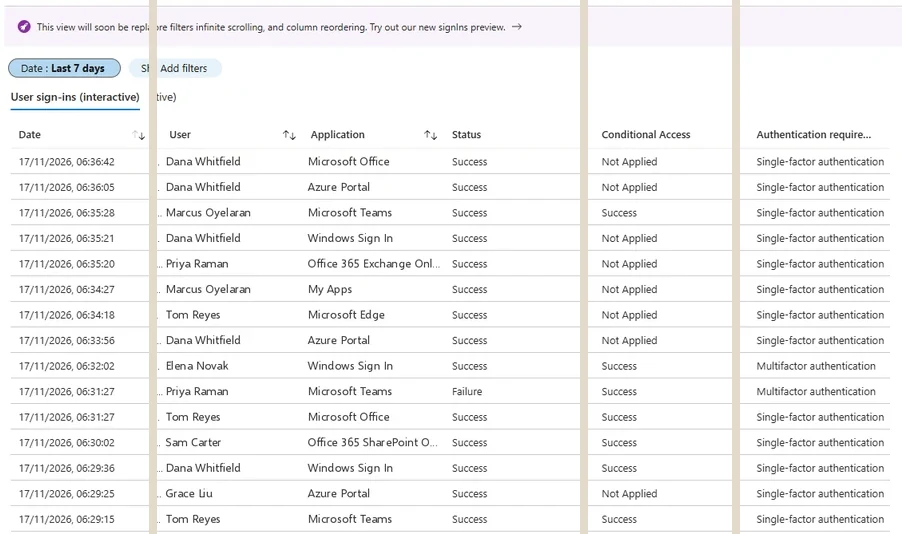
Where a responder reads first: the sign-in logs in the Entra admin center. Interactive sign-ins are the default tab; the other three types sit beside it. Select the image to open it full size.
The logs come in four types: interactive user sign-ins, where a person presented a credential; non-interactive user sign-ins, where a client renewed a session in the background; and sign-ins by service principals and by managed identities, which involve no user at all. The interactive tab opens by default, and it is where a responder starts.
Entra Admin Center
Entra ID › Monitoring & health › Sign-in logs › User sign-ins (interactive)
Add a filter on the user, then compare the Location and Authentication requirement columns down the list. A city the user has never signed in from, with multifactor authentication already satisfied, is the row to open.
Filtered to the finance account at the center of the course dataset's main incident, the evening of 27 February shows two sign-ins worth reading side by side:
| Date | Application | IP address | Location | Status | Authentication requirement |
|---|---|---|---|---|---|
| 2/27/2026, 6:46 PM | Microsoft Office 365 | 203.0.113.36 | Manchester, GB | Success | Multifactor authentication |
| 2/27/2026, 6:47 PM | Exchange Online | 185.234.72.18 | Singapore, SG | Success | Multifactor authentication |
Both rows succeeded and both say multifactor authentication. One came from Manchester, where the user works, at 18:46. The other came from Singapore one minute later. Nobody travels about eleven thousand kilometers in a minute, so at least one of these sign-ins is not the user, and the question is which.
A Sign-In That Passed Every Check
Satisfied by a claim in the tokenOpening the Singapore sign-in and reading its Authentication Details tab answers the question. The tab lists every authentication step and how it was satisfied:
Satisfied by claim in token means the request carried a token that already said multifactor authentication had been done, so Entra ID did not ask again. A user's own laptop produces it constantly when it reuses an earlier sign-in. From a city the account has never used, a minute after a real sign-in somewhere else, it is what a stolen session looks like.
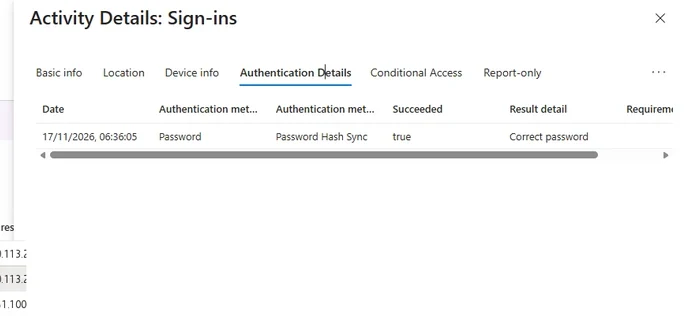
The Authentication Details tab of a sign-in, in a different tenant. Each factor is a row; a sign-in whose only row says the requirement was satisfied by a claim proved nothing new. Select the image to open it full size.
The same comparison is one query in the Advanced hunting console, returning both sign-ins with the method each one used:
SigninLogs
| where UserPrincipalName == "c.richardson@ne.com"
| where TimeGenerated between (datetime(2026-02-27T18:00:00Z)
                           .. datetime(2026-02-27T19:00:00Z))
| project TimeGenerated, AppDisplayName, IPAddress,
          City = tostring(LocationDetails.city),
          Method = tostring(
              parse_json(AuthenticationDetails)[0].authenticationMethod),
          RiskLevelDuringSignIn
The Manchester sign-in, at 18:46, was authenticated with PhoneAppNotification. The Singapore sign-in, at 18:47, was authenticated by SatisfiedByClaimInToken and was scored high risk. Lesson 0.5 explains how a session is captured in the middle of a real sign-in and replayed elsewhere. Here it is enough to see that the attacker passed every control by presenting proof the user had just created.
The Moment It Becomes an Incident
What the identity did nextA risky sign-in on its own is an alert. What turns it into an incident is what the identity did once it was in, so the next question goes to the mailbox the session reached:
OfficeActivity
| where UserId == "c.richardson@ne.com"
| where ClientIP startswith "185.234.72."
| summarize Records = count(), First = min(TimeGenerated), Last = max(TimeGenerated)
    by Operation
Four operations come back. New-InboxRule at 18:49, two minutes after the Singapore sign-in, with the UpdateInboxRules record that saved it. 48 MailItemsAccessed records over the following days, each one an item read. And a Set-Mailbox change on 3 March. Reading the mailbox's rules directly shows what that first one did, beside the user's own rules:
PS C:\> Connect-ExchangeOnline
PS C:\> Get-InboxRule -Mailbox c.richardson@ne.com |
    Format-Table Name, FromAddressContainsWords, MoveToFolder, MarkAsRead

Name          FromAddress  MoveToFolder       MarkAsRead
----          -----------  ------------       ----------
Newsletters   newsletter   Newsletters        False
Marketing     marketing    Marketing          False
Projects      northgate    Projects           False
Archive-2026               RSS Subscriptions  True
Invoices      accounts     Invoices           False
Travel        booking      Travel             False
Client-Harlow harlowmarine Client-Harlow      False
One rule matches on words rather than a sender:
PS C:\> $rule = Get-InboxRule -Mailbox c.richardson@ne.com -Identity "Archive-2026"
PS C:\> $rule.SubjectOrBodyContainsWords

invoice
payment
wire
remittance
bank
The six rules the user made herself were each created from the office and each files mail from one kind of sender into a folder of the same name.
Archive-2026 is different in every way that matters. It matches payment words in any message, moves the matches into a folder nobody opens and marks them read, so the attacker can watch payment conversations without the user ever seeing the replies. It is the standard first move in business email compromise.
Put in order with the email records, the whole sequence takes four minutes:
One account on the evening of 27 February, from the course dataset. Each box is a record a responder can open; the incident is the last three read together.
At this point there is nothing left to resolve before declaring. An identity is under someone else's control, it has set up a way to intercept payment mail, and it has started reading. Each record could have an innocent explanation on its own. Together they meet NIST's definition with room to spare, and the time of that judgment is the time the incident is declared.
The First Hour After Declaration
Ownership first, then evidenceLarge organizations have a dedicated incident response team. Most organizations running Microsoft 365 do not, and their incidents are run by whoever is on shift in security, with IT, legal and management pulled in as needed. The roles still exist when one person holds several of them, and the first hour follows the same procedure either way:
The first hour after declaration. Modules 2 to 9 each take one of these steps into depth.
Two parts of it are skipped most often. The decision log starts at declaration: each decision, its time in UTC, who made it and what evidence it rested on. It feels like overhead during the incident and is the most valuable document afterwards, because when a regulator asks why an account stayed active for three hours, or a lawyer asks when the organization first knew, the log is the answer.
A single entry is short, and every field earns its place:
Decision log, entry 3
Prepared exampleWhy it is written now
The reason for a decision is clear at the time and gone a week later. A regulator, insurer or lawyer asks for it after the incident, and the log is the only place it survives.
Stating the cost is the other. An investigator's job is to give people decisions they can make, not instructions. "Revoking this user's sessions signs her out everywhere and costs her an hour; leaving them means the attacker keeps reading payment mail" is a decision an executive can make in a minute. "We need to revoke sessions" is not, because it hides the cost.
The questions the rest of the course answers follow from the same hour: who is affected, how the attacker got in, what they did, whether they are still in, what must be said to whom and by when, and whether everything is back. Each later module takes one of them, and each answer is written down with the evidence behind it.
A Triage Note, Checked
Read the claim, then the recordMost alerts are first read by somebody in a hurry, and the note they leave is the first summary anyone else sees. A shift handover, an automated enrichment, a ticket comment: each turns records into sentences, and each sentence is a claim that can be checked. The note below is the kind a first reader leaves on the Singapore sign-in:
Triage note: high-risk sign-in, c.richardson@ne.com
UnverifiedClaims in the note
- 1. The sign-in passed multifactor authentication, so it was performed by the user.
- 2. Entra ID rated the sign-in high risk at the time it happened.
- 3. The location is consistent with the user's recent activity.
- 4. No mailbox configuration changes followed the sign-in.
Check each claim against the records already read in this lesson. Claim 1 is wrong in the way that matters most: the Singapore sign-in passed multifactor authentication without anyone being prompted, which is evidence the user did not perform it.
Claim 2 is right. Claim 3 is wrong: the account had never signed in from Singapore, and a minute earlier it had signed in from Manchester. Claim 4 is wrong: an inbox rule hiding payment mail was created two minutes later.
Three of four claims fail, and none of them is careless. Each answered a narrower question than the one asked, or reasoned from a single field. The habit this course builds is to treat any summary of an alert as a list of things to check, never as a finding, and to record in the decision log which claims the records confirmed.
What Module 1 Builds On It
From the definition to the disciplineModule 1 makes the ideas in this lesson operational for Microsoft 365: the shared responsibility model in detail and the half nobody logs for you, why identity is the perimeter and what that costs an investigation, the attacks that collect authentication rather than passwords, where the NIST framework stops describing what a tenant can do, and the clocks that start at awareness.
The skill to carry into it is the one sections five and six used: an event becomes an incident when the records of what an identity did, read together, leave no innocent explanation that fits all of them. A query that puts that habit to work joins every high-risk successful sign-in to the mailbox and file activity from the same user and address:
let suspect = SigninLogs
    | where RiskLevelDuringSignIn == "high" and ResultType == "0"
    | distinct UserPrincipalName, IPAddress;
OfficeActivity
| join kind=inner (suspect) on $left.UserId == $right.UserPrincipalName,
                              $left.ClientIP == $right.IPAddress
| summarize Records = count() by UserId, ClientIP, Operation
The distinct matters: a user with two high-risk sign-ins from one address would otherwise match every operation twice. On the course dataset the query returns three identities: the Singapore sessions with their rule and mail access, a service account downloading 146 files from an address outside the organization, and j.morris@ne.com, whose high-risk sign-in came from an address 16 colleagues also sign in from.
That is the short list an investigator wants: two accounts acting from addresses outside the organization, and one whose risk score and long list of operations need reading before anyone calls it either way.
Practice
Event, alert or incident? prepared evidenceThe prepared evidence below is an alert for a different user on a different day, with every record the tenant kept about the account that afternoon. Read around the alert, decide whether it is an incident, and find the record that makes a password reset the wrong response on its own.
If you have a tenant of your own, open the sign-in logs, filter to one user and compare the Location and Authentication requirement columns down a week of sign-ins. Then run the join in section nine against your own workspace and note how many high-risk sessions produced any activity at all.
An event is anything observable, an alert is software's claim that an event deserves attention, and an incident is a person's judgment that information or a system is being harmed or is about to be.
In a tenant the attacker arrives as a valid identity and the evidence is records rather than disks, so the move to incident is made by reading what that identity did next, and the hour after it is spent on ownership and evidence before action.
The next lesson looks at what a tenant records by default, which decides how much of that reading is possible at all.
Resources
Microsoft revises these pages; where a page and this lesson disagree, the page is newer.