
Reading width
Wide uses the full column for everything, text, diagrams, code, and exercises. Narrow keeps the standard reading width.
Text size
Scales the body text. Headings and code blocks keep their size.
In this section
Entra ID Tokens for Incident Responders: Access, Refresh, Sessions and Theft
Introduction
A password is checked once. After that, nothing in Microsoft 365 asks for it again for a long time. What the services check instead are tokens: signed statements issued by Entra ID that say who the user is, what has been verified about them, and what they may reach. Every request to read mail, open a file or call an API carries one.
That design is what makes the cloud usable, since nobody wants to type a password for every message they open. It is also why modern attacks on Microsoft 365 go after tokens rather than passwords. A stolen token is a stolen sign-in that has already passed multifactor authentication, and it works from anywhere until it expires or is revoked.
This lesson explains the kinds of token, how long each lasts, how a session shows up in the sign-in logs, what token theft looks like in the records, the identifiers that tie later activity back to one sign-in, how application tokens differ, and what actually ends a session.
What a Sign-In Produces
Four kinds of token and a cookieWhen a user signs in, Entra ID checks the credentials, runs the multifactor and Conditional Access checks, and if everything passes it issues tokens to the client that asked. The applications the user then reaches trust those tokens. They never see the password and do not repeat the checks.
What a sign-in hands on. The checks happen once; every request after that presents a token carrying their result.
Three more artifacts complete the set. An ID token tells the client application who signed in, for its own display and logic, and is not used to reach services. A primary refresh token is held by a Windows, macOS or mobile device registered with Entra ID and signs the user in to apps on that device without prompting. A browser session cookie lets later visits to Microsoft sign-in pages pass without a prompt.
The important thing for an investigator is what each token carries. Tokens record the claims established when they were issued: that the password was checked, that multifactor authentication was done, that the device was compliant. When a client presents a refresh token or a session cookie to get new tokens, those claims travel with it. The user is not asked again because, as far as Entra ID can tell, the checks were already passed.
One interactive sign-in, then months of silent refreshes. Whoever holds the refresh token or session cookie inherits the multifactor claim it carries.
Decoded, an access token from the user's real sign-in on the evening of 27 February would carry claims like these:
Access token claims, decoded
Prepared exampleWhat the claims say
amr records the methods used at sign-in: a password and multifactor authentication. ipaddr is where the sign-in happened, not where the token is being used now.
Nothing in it binds the token to the laptop it was issued to. Presented from Singapore, it still says a password and multifactor authentication were used, at a Manchester address. That is what makes theft so effective. Whoever holds a refresh token or a session cookie holds the result of the user's sign-in, including the multifactor step, and can carry it to another machine.
It is worth being clear about why the services trust tokens at all. Each token is digitally signed by Entra ID, and a service checks the signature before accepting it. That makes a token impossible to forge without Entra ID's signing keys, and that is a strong guarantee. It guarantees nothing about who is presenting the token. A signed token stolen from a laptop is exactly as valid as it was on the laptop, and the service receiving it has no way to tell the difference on its own.
The claims inside a token are also what the sign-in logs summarize. The authentication requirement, the methods used and the device details in a sign-in record describe the claims Entra ID put into the tokens it issued. When those claims were inherited from an earlier sign-in rather than established fresh, the record says so, and section four reads that statement.
How Long Each One Lasts
Minutes, and then monthsThe two token types an investigation cares about most have very different lives. Access tokens are short: Microsoft assigns them a lifetime that varies between 60 and 90 minutes, averaging about 75, so a stolen access token on its own is useful for an hour or so.
Refresh tokens are long. By default a refresh token can be used for up to 90 days, and each time it is used the client generally receives a fresh one, so an actively used session can continue indefinitely. A refresh token that sits unused eventually expires, but an attacker with a script that refreshes every hour never lets it.
How a session outlives its sign-in. Each refresh resets the clock, so a session in use can run for months.
Read against the course dataset, the arithmetic is stark:
The stolen session's clock
From the course datasetWhat follows
Left alone, a session last used on 3 March keeps working until June, without the attacker typing anything.
Continuous access evaluation (CAE) narrows the gap for access tokens. Services that support it, including Exchange Online, SharePoint Online and Teams, listen for critical events such as an account being disabled, a password changed, sessions revoked or high user risk detected, and stop honoring existing access tokens close to real time rather than waiting for them to expire. Clients that support CAE receive longer-lived access tokens precisely because they can be cut off this way. Microsoft aims for near real time, but says event propagation can take up to 15 minutes, so a revocation is not instant even where CAE applies.
Not every client or service supports CAE, so an investigator should assume that an access token already issued to an attacker may keep working for up to its normal lifetime after containment. The response modules treat that hour as part of the plan rather than a surprise.
Tenants can shorten the life of sessions with Conditional Access session controls. Sign-in frequency forces a fresh interactive sign-in after a set period, and persistent browser session settings decide whether a browser stays signed in after it is closed. Both reduce how long a stolen cookie or refresh token stays useful, at the cost of more prompts for users. Neither stops a stolen token from working inside the period they allow.
A newer control, token protection, binds certain tokens to the device they were issued to, so that a token copied to another machine is rejected. Where it is enforced, it defeats the replay this lesson describes. Its coverage is limited to particular platforms, applications and token types, so an investigator should check whether it applied to the affected user and application rather than assume it did. Module 6 covers these controls as containment and as prevention.
Interactive and Non-Interactive
Where a session lives in the logsLesson 0.2 introduced the split between interactive and non-interactive sign-ins. Tokens explain it. An interactive sign-in is the one where the user, or something pretending to be the user, presented credentials or a session cookie to a sign-in page. A non-interactive sign-in is a client redeeming a refresh token for a new access token in the background, with nobody involved.
One interactive sign-in can be followed by hundreds of non-interactive ones over the following days, every time a token is renewed for a different service or an old one expires. In the course dataset, background refreshes outnumber interactive sign-ins across the whole tenant.
A stolen session therefore leaves most of its trace in the non-interactive log. The finance account compromised in the course dataset shows it clearly:
AADNonInteractiveUserSignInLogs
| where IPAddress startswith "185.234.72."
| summarize Refreshes = count(), Tokens = dcount(UniqueTokenIdentifier),
            First = min(TimeGenerated), Last = max(TimeGenerated),
            Resources = make_set(ResourceDisplayName)
    by UserPrincipalName, IPAddress
Two rows, both for c.richardson. From 185.234.72.18, nine refreshes between 18:57 and 19:07 on 27 February, for Exchange Online and Microsoft Graph. From 185.234.72.41, three refreshes for Microsoft Graph between 18:56 and 19:04. Each refresh produced a distinct token, recorded by its UniqueTokenIdentifier.
The interactive log for the same evening holds one sign-in from Singapore. The non-interactive log holds twelve. An investigation that searched only interactive sign-ins would have found the attacker's arrival and missed most of what the session did next, including that it was being used from two addresses at once.
The sign-in pages in the Entra admin center show interactive sign-ins by default, with the non-interactive ones on a separate tab, and the separate log category has to be selected explicitly when routing to a workspace. Both facts push investigators toward the interactive view. Making the non-interactive log the first place to look for an attacker's session, rather than an afterthought, is one of the habits this course builds.
Opened on the second tab, the same account and evening look like this:
| Date | Resource | IP address | Location | Status | Correlation ID |
|---|---|---|---|---|---|
| 2/27/2026, 6:56 PM | Microsoft Graph | 185.234.72.41 | Singapore, SG | Success | aitm-corr-001 |
| 2/27/2026, 6:57 PM | Office 365 Exchange Online | 185.234.72.18 | Singapore, SG | Success | aitm-corr-002 |
| 2/27/2026, 6:58 PM | Microsoft Graph | 185.234.72.18 | Singapore, SG | Success | aitm-corr-003 |
| 2/27/2026, 6:59 PM | Office 365 Exchange Online | 185.234.72.18 | Singapore, SG | Success | aitm-corr-001 |
| 2/27/2026, 7:00 PM | Microsoft Graph | 185.234.72.41 | Singapore, SG | Success | aitm-corr-002 |
| 2/27/2026, 7:01 PM | Office 365 Exchange Online | 185.234.72.18 | Singapore, SG | Success | aitm-corr-003 |
| 2/27/2026, 7:02 PM | Microsoft Graph | 185.234.72.18 | Singapore, SG | Success | aitm-corr-001 |
| 2/27/2026, 7:03 PM | Office 365 Exchange Online | 185.234.72.18 | Singapore, SG | Success | aitm-corr-002 |
| 2/27/2026, 7:04 PM | Microsoft Graph | 185.234.72.41 | Singapore, SG | Success | aitm-corr-003 |
| 2/27/2026, 7:05 PM | Office 365 Exchange Online | 185.234.72.18 | Singapore, SG | Success | aitm-corr-001 |
| 2/27/2026, 7:06 PM | Microsoft Graph | 185.234.72.18 | Singapore, SG | Success | aitm-corr-002 |
| 2/27/2026, 7:07 PM | Office 365 Exchange Online | 185.234.72.18 | Singapore, SG | Success | aitm-corr-003 |
Twelve rows, three correlation identifiers and two addresses, and not one of them on the tab an investigator opens first.
What Token Theft Looks Like
A session that passed checks it never facedThere are two common ways to steal a session. Adversary-in-the-middle phishing puts a proxy between the user and the real Microsoft sign-in page: the user signs in, completes multifactor authentication for real, and the proxy captures the session cookie Entra ID issues at the end. Token theft from a device uses malware or a stolen browser profile to copy cookies or refresh tokens that are already there.
Either way, the attacker's first appearance is a sign-in that succeeds without any multifactor prompt, because the stolen token already carries the claim that multifactor authentication was done. The account's sign-in history, broken down by how each sign-in satisfied authentication, shows the difference:
SigninLogs
| where UserPrincipalName == "c.richardson@ne.com"
| extend Method = tostring(parse_json(AuthenticationDetails)[0].authenticationMethod),
         Country = tostring(LocationDetails.countryOrRegion)
| summarize Signins = count() by Method, Country
The account signed in 157 times from the United Kingdom by approving an Authenticator notification and 8 times with a FIDO2 security key. Three sign-ins came from Singapore, and every one of those was satisfied by a claim in the token: no notification, no key, no person.
Seen alone, satisfied by claim in token is ordinary, because a user's own devices produce it constantly when they reuse an earlier sign-in. What makes these three stand out is the combination: a country the account has never authenticated from, no matching interactive sign-in with a real method from that location, and a high risk score at the time. That combination is the signature of a replayed session.
The three signals, read together
Method
SatisfiedByClaimInToken
Location
A country with no earlier sign-in using a real method
Sequence
Minutes after a phishing click, before any sign-in from that place
The sequence matters as much as the method. A user who flew to Singapore would first sign in there with a real method, an Authenticator approval or a security key, and only later produce claim-in-token sign-ins from the same place. A session that appears in a new country already authenticated has skipped the step a real traveler cannot skip.
The surrounding records fill in how the session was stolen. In the course dataset, the phishing message reached the account at 18:45 on 27 February, and the user clicked its link at 18:46, which took her to a page on a domain made to resemble the organization's own. The first Singapore sign-in followed at 18:47. One minute from click to replay is typical of an adversary-in-the-middle kit: the proxy captures the session cookie the moment the real sign-in completes and hands it straight to the attacker's infrastructure.
Theft from a device looks different in the records. There is no phishing message and no click, the stolen token often comes from a device the user really owns, and the first sign of it can be the same claim-in-token sign-in from an unfamiliar address, sometimes days after the theft. When the sequence does not begin with a lure, the investigation turns to the user's devices, which is where an endpoint investigation joins the tenant one.
The Identifiers That Tie Activity Together
From a sign-in to what it didInvestigations often need to answer a precise question: was this action done by the attacker's session, or by the user? Address and time get most of the way there, but addresses are shared and times overlap. The sign-in logs carry identifiers designed to link records more precisely.
How the identifiers link. CorrelationId ties a session's records together; SignInActivityId in a Graph request matches the UniqueTokenIdentifier of the sign-in that issued its token.
The course dataset shows why these are worth using. Grouping the attacker's refreshes by CorrelationId rather than by address reveals that the two Singapore addresses were not two separate intrusions:
AADNonInteractiveUserSignInLogs
| where UserPrincipalName == "c.richardson@ne.com"
| where IPAddress startswith "185.234.72."
| summarize Addresses = make_set(IPAddress), Refreshes = count() by CorrelationId
Three correlation identifiers come back, and every one of them appears on both 185.234.72.18 and 185.234.72.41. The same client sessions were refreshing tokens from both addresses within minutes, which means one actor's infrastructure, not two attackers who happened to choose the same provider.
In the admin center the identifiers sit on a sign-in's Basic info and Token details tabs:
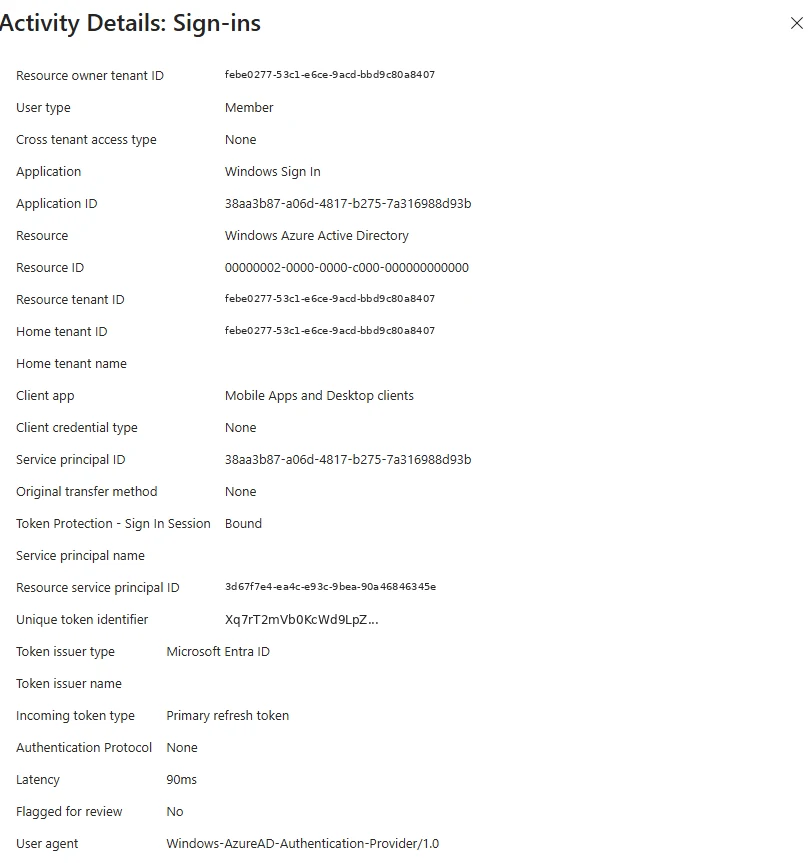
Token details for one sign-in, in a different tenant. The unique token identifier here is the value a Graph request's SignInActivityId points back to. Select the image to open it full size.
The Graph link is the most valuable in practice. When the Graph activity logs are routed, every API request carries the SignInActivityId of the token that made it, so an investigator can take the attacker's sign-in records and list exactly which mail folders, files and directory objects that token touched. Module 5 builds that join in full.
The identifiers have limits worth knowing before relying on them. Their presence and naming have changed over time as Microsoft revised the log schemas, so a query written against one tenant's records should be checked against another's before it is trusted. They link records produced by Entra ID and the services that adopted them; activity recorded by older audit sources, such as some mailbox operations in the unified audit log, carries no token identifier, and those records are tied to a session by account, address and time alone. A link through an identifier is strong evidence. A link through address and time is reasonable inference, and the report should say which kind it is.
Application Tokens
Access that belongs to an app, not a sessionEverything so far concerns tokens issued to a user's session. Applications get tokens too, and those behave differently enough to need separate treatment.
An application acting on behalf of a user, with delegated permissions the user consented to, receives tokens tied to that user. If the consent included offline_access, the application holds its own refresh token and keeps working without the user signing in again. An application acting as itself, with application permissions an administrator granted, authenticates with its own secret or certificate and appears in the service principal sign-in log rather than the user logs.
The course dataset shows what this means for an incident. Within minutes of the attacker's first sign-in, the compromised account consented to an application, and the Graph activity logs show what that application did afterwards:
MicrosoftGraphActivityLogs
| where IPAddress startswith "185.234.72."
| summarize Requests = count(), First = min(TimeGenerated), Last = max(TimeGenerated),
            Requested = make_set(RequestUri)
    by ServicePrincipalId, IPAddress
It returns 44 requests by one service principal from 185.234.72.18, between 27 February and 5 March, all reading the compromised user's inbox and messages. The stolen session's background refreshes all fall within twenty minutes on 27 February, and its later appearances were single interactive sign-ins on 2 and 3 March. The application's access ran steadily for a week in between and after.
That difference is the reason application consent is a favored persistence step. Ending the user's session does nothing to an application's grant, because the application holds its own token. Lesson 0.6 covers what does.
Finding these grants is part of every account investigation, not only consent-phishing cases. The delegated grants a user has given are recorded as OAuth2 permission grants on the user, and they can be listed with Microsoft Graph PowerShell using Get-MgUserOauth2PermissionGrant, each one naming the application's service principal and the scopes it holds. The audit log records each consent as it happens, as lesson 0.3 showed, but the current list of grants is what containment acts on, because grants given long before the incident window are just as able to read mail today.
The scope worth looking for first is offline_access. It is what lets an application keep a refresh token and work while the user is away, so an application holding it alongside mail or file permissions has standing access to that data. Many legitimate applications need it. An application nobody recognizes that holds it, granted during the incident window, is the persistence this section describes.
What Ends a Session
And what each action leaves runningBecause tokens outlive the password check, ending an attacker's access is not the same as changing a password. Each response action ends some kinds of access and leaves others.
Four response actions, each read left to right: what it ends, and what it leaves running. Only the last ends an application's access, and none of the first three touches it.
The pattern to remember is that access in Microsoft 365 is layered: the session, the credentials, the authentication methods, and the applications the user has granted. An attacker who is any good establishes more than one layer, and containment that addresses one leaves the others running. The compromised account in the course dataset had a stolen session, a new authentication method and an application grant within sixteen minutes.
Order matters as well as coverage. Revoking sessions before resetting the password lets an attacker who still holds the password sign straight back in. Resetting the password before removing an attacker's authentication method lets them use that method to satisfy multifactor authentication with the new password, if they can obtain it. And removing the application last leaves it reading mail throughout. Module 6 sets out a sequence that closes each layer in an order that stops the next one reopening it, and lesson 0.6 introduces the actions themselves.
Entra Admin Center
Entra ID › Users › All users › (user) › Revoke sessions
Confirm the prompt. Entra ID invalidates the user's refresh tokens and browser session cookies, and the user, or whoever holds their session, has to sign in again.
The action itself is one button on the user's overview page:
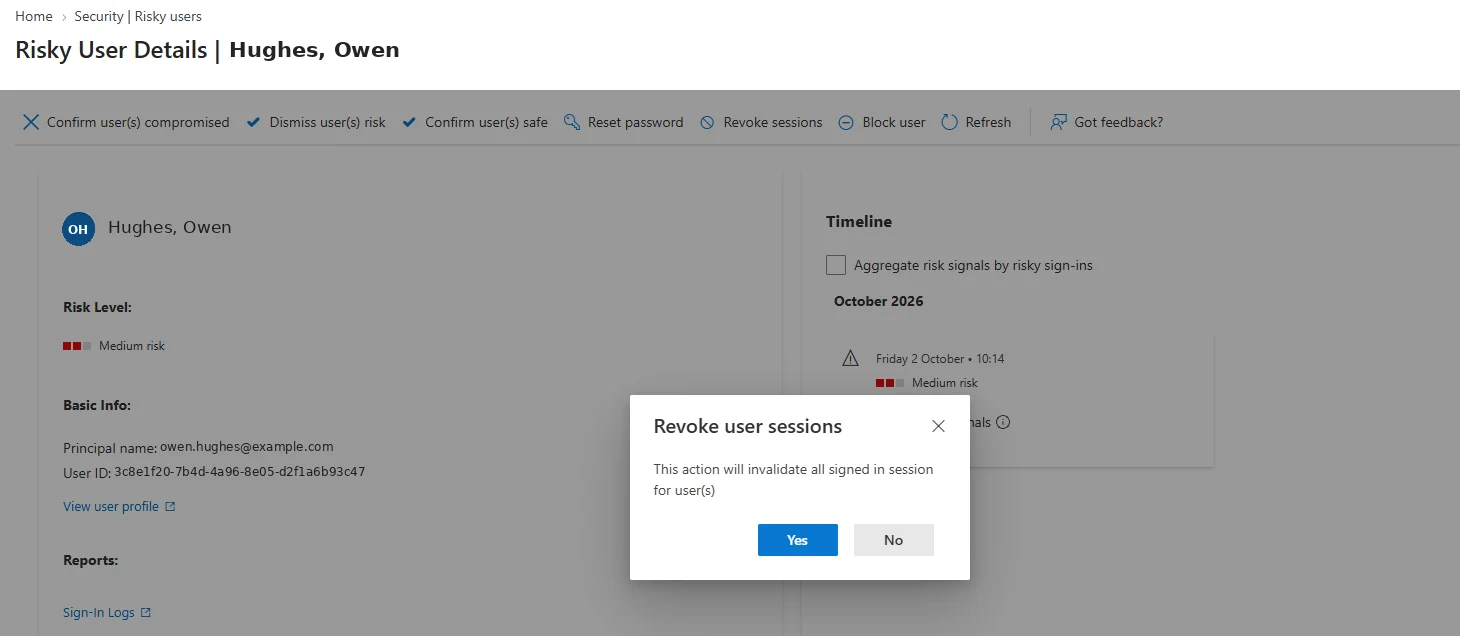
Revoke sessions, in a different tenant. It ends refresh tokens and cookies; it does not remove a method or an app grant. Select the image to open it full size.
One click covers the first row of the diagram above. The other three rows each need their own action, and Lesson 0.6 sets them out in order.
What Module 5 Builds On It
Forensics on tokens and what they didModule 5, Forensics, works across every layer this lesson introduced. It covers the evidence inventory and what can be claimed from it, Entra ID's forensic artifacts, mailbox and Exchange forensics, collaboration forensics, OAuth, tokens and application forensics, the Graph activity logs as the record of what a token did, collection tooling, timeline reconstruction across sources, anti-forensic techniques and hybrid identity.
The habit to take into it is to treat every account investigation as two questions: how did the attacker authenticate, and what tokens are still out there? The first is answered from the interactive log; the second needs the non-interactive log, the Graph logs and the application grants. A short query lists the second for any account:
AADNonInteractiveUserSignInLogs
| where UserPrincipalName == "c.richardson@ne.com"
| summarize Refreshes = count(), LastRefresh = max(TimeGenerated) by IPAddress
| order by LastRefresh desc
Any address in that list that is not the user's, with a recent last refresh, is a session that containment has to end. On the course dataset the list has three addresses: the office address the user refreshes from every day, and the two Singapore addresses, whose last refreshes were on the evening of 27 February.
Practice
Whose session is this? prepared evidenceThe prepared evidence below is a set of sign-ins for one account over two days, interactive and non-interactive. Decide which belong to the user's own devices and which to a replayed session, and say which identifiers prove it.
The second path works the same reasoning on the course dataset, or your own tenant, starting from the non-interactive log rather than the interactive one.
- Run the authentication-method query in section four for an account and list every country and method combination.
- For any claim-in-token sign-in from a new place, find the earliest real-method sign-in from the same place, if one exists.
- Run the correlation query in section five and note any identifier that appears on more than one address.
- Run the last-refresh query in section eight and list the addresses whose sessions would still need ending.
Tokens carry the result of a sign-in, including multifactor authentication, to wherever they are presented. Access tokens last about an hour, refresh tokens months, and stolen sessions appear mostly as non-interactive refreshes. Correlation and token identifiers tie activity back to one sign-in, application grants hold their own tokens, and each response action ends some layers of access while leaving others.
The next lesson sets out those response actions in full: what each one does, what it costs, and what it leaves running.
Resources
Microsoft revises these pages; where a page and this lesson disagree, the page is newer.