
Reading width
Wide uses the full column for everything, text, diagrams, code, and exercises. Narrow keeps the standard reading width.
Text size
Scales the body text. Headings and code blocks keep their size.
In this section
How Microsoft 365 Attacks Unfold: Spray, AiTM, Consent, Device Code and BEC
Introduction
Attacks on Microsoft 365 are not as varied as they first appear. Most of them follow one of a handful of patterns, and those patterns differ mainly in one thing: how the attacker gets something Entra ID will accept as proof of identity. Once they have it, what they do next is remarkably consistent.
Knowing the patterns is what lets an investigator move quickly. A risky sign-in with no multifactor prompt, an application consent nobody recognizes and a burst of denied multifactor requests each point to a different pattern, and each pattern tells the investigator which records to read next and which footholds to expect.
This lesson covers six patterns: password spraying, push bombing, adversary-in-the-middle phishing, consent phishing, device code phishing, and business email compromise, which is less a way in than the thing most of the others are used for. For each it sets out the stages and the evidence they leave, using the course dataset wherever it holds an example.
Attacks Collect Authentication
The shift away from passwordsFor years the central problem in Microsoft 365 security was the password. Multifactor authentication largely solved it, and attackers moved on. The modern patterns are built to obtain a completed authentication, whether a session that has already passed multifactor authentication, a user's approval of a prompt, or an application grant that needs no authentication at all after it is given.
Five patterns, read left to right: what each one collects, where it works, and the control that stops it. The bottom three go around multifactor authentication rather than through it.
The first two attack the credentials themselves and are increasingly stopped by the controls most tenants now have. The last three go around those controls by getting the user to complete them on the attacker's behalf. That is why the course spends so long on sessions, tokens and grants: they are what the attacks now collect.
Whether the first two can still work in a tenant is a question one query answers:
SigninLogs
| where ResultType == "0"
| summarize Signins = count(), Users = dcount(UserPrincipalName)
    by AuthenticationRequirement, ClientAppUsed
| order by Signins desc
7,170 successful sign-ins required multifactor authentication. The single-factor rows are where a sprayed password would be enough on its own, and 5 of them are legacy protocols such as IMAP, POP and SMTP, which cannot prompt for a second factor at all. Each of those rows names a client a spray could use.
All five share an important property for investigators. The moment of compromise is recorded, but it rarely looks like a compromise. A successful sign-in, an approved prompt, a consent: each is a normal event in a normal tenant, and recognizing it depends on reading the records around it.
They also share a weakness that defenders can use. Each pattern has a moment that is unusual when read in context: an application nobody has heard of, a sign-in already authenticated from a country the user has never visited, a code redeemed from an address the user does not use. The investigator's job is to know which moment to look for, and the sections below name it for each.
Password Spray and Push Bombing
Attacks on the credentialsA password spray tries one common password against many accounts from one source, staying under each account's lockout threshold. Lesson 0.3 read one in detail: 20 accounts, one address, a legacy sign-in flow, nineteen failures and one success. Its evidence is entirely in the sign-in log, and its signature is the shape across many accounts rather than anything in a single record.
Sprays are not always that easy to see. More careful operators spread attempts across many addresses, often residential proxy networks whose addresses look like ordinary home connections, and across days rather than minutes, so no single address or hour stands out. The signature then becomes a slow rise in failures with code 50126 across many accounts and many addresses, which is a question for aggregation over weeks rather than a glance at one afternoon. Module 8 covers hunting for that slower shape.
Push bombing, also called MFA fatigue, begins where a spray ends. The attacker has the password and the account requires multifactor authentication, so they sign in repeatedly and let the user's phone receive a stream of approval requests, often late in the day or at a weekend, until the user approves one to make them stop. The course dataset holds one:
SigninLogs
| where UserPrincipalName startswith "d.foster"
| summarize Attempts = count(), First = min(TimeGenerated), Last = max(TimeGenerated)
    by ResultType
Fourteen attempts with code 500121, strong authentication failed, between 14:05 and 14:11 on Sunday 1 March, and then one success at 14:12. Every attempt passed the password step, because the failures are at the multifactor step. The user's approval at 14:12 is the compromise.
In the admin center, the same afternoon fills one screen of the sign-in log, newest first:
| Date | Application | IP address | Location | Status | Sign-in error code |
|---|---|---|---|---|---|
| 3/1/2026, 2:12:34 PM | OfficeHome | 91.215.85.201 | London, GB | Success | |
| 3/1/2026, 2:11:45 PM | OfficeHome | 91.215.85.201 | London, GB | Failure | 500121 |
| 3/1/2026, 2:11:19 PM | OfficeHome | 91.215.85.201 | London, GB | Failure | 500121 |
| 3/1/2026, 2:10:47 PM | OfficeHome | 91.215.85.201 | London, GB | Failure | 500121 |
| 3/1/2026, 2:10:16 PM | OfficeHome | 91.215.85.201 | London, GB | Failure | 500121 |
| 3/1/2026, 2:09:44 PM | OfficeHome | 91.215.85.201 | London, GB | Failure | 500121 |
| 3/1/2026, 2:09:11 PM | OfficeHome | 91.215.85.201 | London, GB | Failure | 500121 |
| 3/1/2026, 2:08:39 PM | OfficeHome | 91.215.85.201 | London, GB | Failure | 500121 |
| 3/1/2026, 2:08:10 PM | OfficeHome | 91.215.85.201 | London, GB | Failure | 500121 |
| 3/1/2026, 2:07:38 PM | OfficeHome | 91.215.85.201 | London, GB | Failure | 500121 |
| 3/1/2026, 2:07:04 PM | OfficeHome | 91.215.85.201 | London, GB | Failure | 500121 |
| 3/1/2026, 2:06:35 PM | OfficeHome | 91.215.85.201 | London, GB | Failure | 500121 |
| 3/1/2026, 2:06:01 PM | OfficeHome | 91.215.85.201 | London, GB | Failure | 500121 |
| 3/1/2026, 2:05:28 PM | OfficeHome | 91.215.85.201 | London, GB | Failure | 500121 |
| 3/1/2026, 2:05:00 PM | OfficeHome | 91.215.85.201 | London, GB | Failure | 500121 |
What followed is typical. The new session read 23 mail items over the next quarter of an hour and, at 14:27, registered a new authentication method so the attacker would not need the user's approval again. Lesson 0.1's practice worked through the same records.
Both attacks are largely prevented by controls that are widely available. Blocking legacy authentication removes the flows sprays rely on, and number matching in Authenticator, now standard, makes a blind approval far less likely. When either attack succeeds, the investigation usually also finds a gap in those controls, and that belongs in the findings.
Adversary-in-the-Middle Phishing
The user signs in, the attacker keeps the sessionAdversary-in-the-middle (AiTM) phishing is the pattern behind most serious Microsoft 365 compromises of recent years. The phishing link leads to a page that is not a copy of the Microsoft sign-in page but a live proxy of it. The user enters their password and completes multifactor authentication against the real Entra ID, through the proxy, and the proxy captures the session cookie issued at the end. Lesson 0.5 showed how that cookie, replayed, produces a sign-in satisfied by claim in token.
The proxy relays a real sign-in in both directions. Every check passes for the user, and the session it produces is copied on the way back.
Because the user really does complete multifactor authentication, AiTM defeats push approvals, codes and number matching alike. Only phishing-resistant methods, such as FIDO2 security keys, passkeys and Windows Hello for Business, defeat it, because they are bound to the real sign-in site and will not complete through a proxy at a different address. Device-based Conditional Access also helps, since the attacker's machine is not the user's compliant device.
The course dataset's main incident is an AiTM compromise, and its timeline shows how quickly the stages run once the session is captured:
union
    (AuditLogs
     | where tostring(InitiatedBy.user.userPrincipalName) == "c.richardson@ne.com"
     | project TimeGenerated, Source = "Directory", Action = OperationName),
    (OfficeActivity
     | where UserId == "c.richardson@ne.com" and ClientIP startswith "185.234.72."
     | where Operation != "MailItemsAccessed"
     | project TimeGenerated, Source = "Mailbox", Action = Operation)
| where TimeGenerated between (datetime(2026-02-27T18:00:00Z)
                            .. datetime(2026-03-04T00:00:00Z))
| order by TimeGenerated asc
Seven rows, and with the email records from lesson 0.4 the whole sequence reads as one story. The phishing message arrived at 18:45 and was clicked at 18:46. The replayed session signed in at 18:47. An inbox rule hiding payment mail was created at 18:49. An application was granted mail access at 18:55, a new authentication method registered at 18:58, a recovery address set at 19:00 and the account added to an administrative group at 19:03. Mail forwarding to an outside address followed on 3 March.
AiTM, stage by stage
Lure
A message from a lookalike domain about an outstanding invoice
Capture
The user's real sign-in, completed through the proxy
Replay
Sign-in from new infrastructure, MFA satisfied by claim in token
Persistence
Rule, application grant, new method, recovery address, group membership
Objective
Payment mail, then all mail forwarded outside
The speed is the point. Persistence is usually automated or scripted, so by the time anyone reads an alert, the attacker no longer depends on the stolen session. That is why lesson 0.6 starts containment from an inventory rather than a password reset.
AiTM kits are sold and rented as services, complete with hosting, lure templates and a panel showing captured sessions as they arrive. That has two consequences for investigators. The infrastructure is shared across many unrelated victims, so an address or domain in one incident may appear in threat intelligence from others. And the lure domains are usually registered shortly before use and abandoned soon after, so a sender domain only a few days old, like the lookalike in this incident, is itself a signal worth checking.
Consent Phishing
No password, no prompt, no session to stealConsent phishing, also called an illicit consent grant, skips authentication attacks entirely. The attacker registers an application, gives it a plausible name and logo, and sends the user a link that asks them to grant it access. The consent screen is Microsoft's own, on Microsoft's own domain, and everything about it is genuine except the intent of the application asking. When the user clicks accept, the application receives delegated permissions and, with offline_access, its own refresh token.
Nothing about the user's sign-in is unusual, because the user signs in from their own device, often with their own multifactor method. The compromise is the consent record. The course dataset's example is the DocuSync Pro grant lesson 0.3 read: consented by a user from her usual office address on the evening of 2 March, widened to send mail and write files on 5 March. What happened between the two is in the service principal sign-in log:
AADServicePrincipalSignInLogs
| where ServicePrincipalName == "DocuSync Pro"
| summarize SignIns = count(), First = min(TimeGenerated), Last = max(TimeGenerated)
    by IPAddress, ResultType
Four successful sign-ins by the application from 167.99.84.221, an address unrelated to the organization, between 21:34 on 2 March, thirteen minutes after the consent, and 02:05 on 5 March, three minutes after the grant was widened. The Graph activity logs show what those tokens read: the user's OneDrive root and recent files.
Two things make consent phishing hard to contain and easy to miss. It survives every action on the user, as lesson 0.6 set out, and it needs no further interaction with the user at all, so there is often nothing in the user's own records after the moment of consent. The evidence is in the directory audit log, the service principal sign-ins and the Graph activity logs, which is where an investigation has to look.
The difference between user consent and admin consent matters here. A user can consent only for themselves, and only to permissions the tenant's settings allow users to grant; the resulting grant covers that user's own data. An administrator can consent on behalf of the whole organization, and an application granted admin consent to read mail can read everyone's. Consent phishing aimed at an administrator is therefore far more damaging, and an IsAdminConsent value of True in the consent record changes the scope of an investigation from one mailbox to all of them. The DocuSync Pro grant was a user consent, which limited it to one person's data.
Entra Admin Center
Entra ID › Enterprise apps › Consent and permissions › User consent settings
Read which option is selected. Allowing consent only to apps from verified publishers, for selected permissions, is the setting that would have blocked both grants in the course dataset, since each asked for mail access that low-impact permissions do not include.
The setting is a single choice on one page:
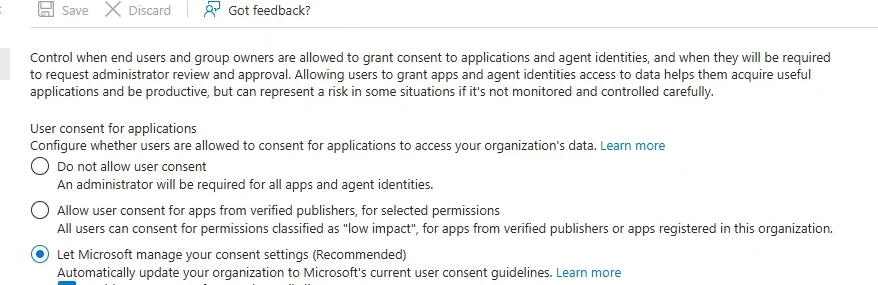
User consent settings, in a different tenant. The third option, consent for all apps, is what consent phishing needs. Select the image to open it full size.
One setting, changed in advance, would have left both grants in this lesson to an administrator instead of the user being phished.
Device Code Phishing
A real sign-in, on the attacker's behalfThe device code flow exists for devices without a usable browser or keyboard, such as conference room systems and command-line tools. The device shows a short code and asks the user to enter it at a Microsoft sign-in page on another device. The user signs in there, completes multifactor authentication, and the tokens are issued to the device that requested the code.
In device code phishing, the attacker requests the code from their own machine and sends it to the user with a pretext: a meeting invitation, a document share, a support request. The user goes to Microsoft's genuine page, enters the code, and signs in for real. The tokens go to the attacker. As with AiTM, the user's own multifactor authentication is what the attacker collects, and nothing on the page the user sees is fake.
The course dataset does not contain a device code attack, so the pattern below is shown as a query to run in a tenant rather than a result. The sign-in records carry the authentication protocol, and device code sign-ins are recorded as such:
// Device code sign-ins, with where the code was redeemed and what was reached.
union SigninLogs, AADNonInteractiveUserSignInLogs
| where TimeGenerated > ago(30d)
| where AuthenticationProtocol == "deviceCode"
| summarize SignIns = count(), Addresses = make_set(IPAddress),
            Apps = make_set(AppDisplayName) by UserPrincipalName
In most organizations the legitimate users of device code flow are few and known: some meeting room devices, a handful of administrators using command-line tools. Any other user appearing in this result, particularly from an address the user does not normally use, is worth an immediate look. Many tenants now block the flow outright with a Conditional Access policy for everyone except the accounts that need it, which turns this from an investigation problem into a configuration one.
Entra Admin Center
Entra ID › Conditional Access › Policies › New policy
Target all users and all resources, then under Conditions set Authentication flows to Device code flow and grant Block access. Start it in Report-only to find the legitimate users first, and exclude them by group.
The condition is its own pane in the policy:
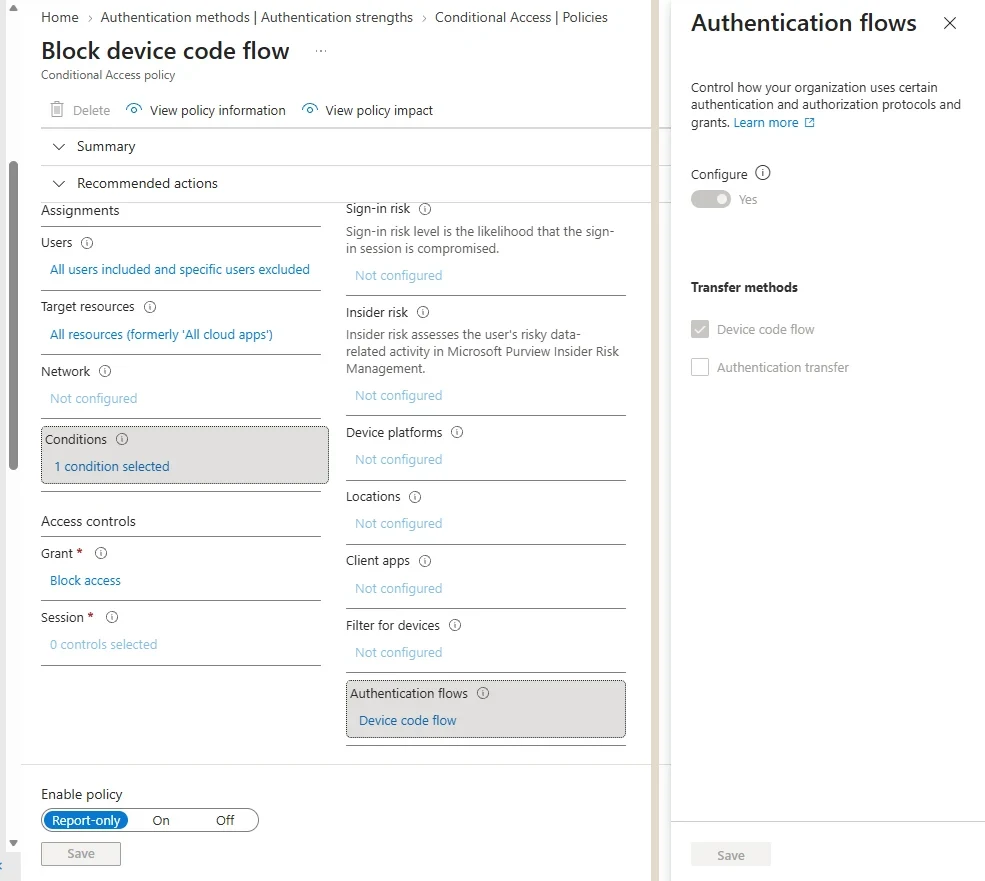
The Authentication flows condition, in a different tenant. Microsoft recommends blocking device code flow wherever it is not needed. Select the image to open it full size.
The pattern has a practical constraint that shapes how attackers use it: device codes expire within minutes of being requested. The lure has to reach the user and be acted on quickly, which is why device code phishing is often run live, through a chat message or a call in which the attacker asks the user to enter the code there and then. A message thread or call log near the time of the sign-in is part of the evidence, and the user's account of the conversation often matters more than it does with other patterns.
Business Email Compromise
What most of the others are forBusiness email compromise (BEC) is the objective behind a large share of Microsoft 365 intrusions. The aim is money: diverting a payment by changing bank details on an invoice, persuading a finance team to pay a fake supplier, or redirecting a salary. It works because the requests come from, or appear to come from, someone the recipient has every reason to trust.
BEC uses two kinds of access. Account compromise gives the attacker a real mailbox, through any of the patterns above, from which to read ongoing conversations and reply in them. Impersonation needs no compromise at all: a lookalike domain, a display name that matches an executive, or a supplier's real but compromised mailbox. The most effective campaigns combine them, reading real conversations from a compromised mailbox and continuing them from a lookalike domain the victim does not notice.
The course dataset shows the impersonation side clearly. Senders on domains built to resemble the organization's own are rare, and listing them is a quick check in any BEC investigation:
EmailEvents
| where SenderFromDomain startswith "northgate" and SenderFromDomain != "ne.com"
| summarize Messages = count(), Recipients = dcount(RecipientEmailAddress)
    by SenderFromDomain
Two domains come back: northgateeng-accounts.com, which sent the invoice lure that began the AiTM compromise, and northgate-finance-share.com, which sent two messages to two other recipients. The second domain is a new lead. It belongs to the same campaign's style, and its recipients need checking for clicks and sign-ins of their own.
The footholds lesson 0.6 removed, the hidden rule and the outside forwarding, are BEC's working tools. The rule hides the real supplier's replies so the user does not see that the attacker's bank details were challenged. The forwarding gives the attacker every new message without needing a session. Module 7 treats BEC as its own playbook because the response involves the finance team, the bank and often the partner organization, as much as the tenant.
BEC also runs on a different clock from the rest of the incident. A fraudulent payment can sometimes be recalled if the bank is told within hours, and far less often after days. That makes the first question in any BEC investigation not "how did they get in" but "has money moved, and to where", answered by the finance team rather than by the logs. The technical investigation runs alongside, and the incident lead makes sure the two are talking from the start.
Where Each Pattern Leaves Its Evidence
The first table to readEach pattern leaves its most telling evidence in a different place, and starting in the right table saves the first hour of an investigation. The mapping below is where to start, not where to stop: every pattern eventually involves sign-ins, audit records and mailbox activity.
The first table to open for each pattern, what to look for there, and where to go next.
Investigations often find more than one pattern at once. The AiTM compromise in the course dataset also involved an application consent and set up BEC tooling, and the same infrastructure appears in an administrator sign-in later in the month. Module 7 ends with a lesson on exactly that: two or more patterns running together, and how to set priorities between them.
The other value of knowing the patterns is in what to expect next. A confirmed AiTM sign-in means looking straight away for rules, consents, new methods and forwarding, because that is what follows in nearly every case, rather than waiting to stumble on them.
Written down, that expectation is a checklist an investigator can work through in minutes:
After a confirmed AiTM sign-in, look next for
ChecklistIn this order
- Inbox rules and forwarding: OfficeActivity, New-InboxRule and Set-Mailbox
- Application consents: AuditLogs, Consent to application
- New authentication methods: AuditLogs, User registered security info
- Recovery details and group changes: AuditLogs, Update user and Add member to group
- Mail read and sent: OfficeActivity, MailItemsAccessed and Send
Every item on it was present in the course dataset's AiTM incident, and the rule, consent, method, recovery and group changes all came within sixteen minutes of the first sign-in.
What Module 7 Builds On It
A playbook for each patternModule 7, Responding by Attack Type, turns each pattern into a playbook. It covers the window between access and containment, stolen sessions, consent phishing and the app that stays, business email compromise, ransomware without an endpoint, insider investigations, a compromise that is the vendor's, incidents where the identity is an AI, identities that leave the tenant, and several patterns running at once.
The habit to take into it is to name the pattern as early as the evidence allows, because the name brings a checklist with it. A first-pass query that sorts a tenant's recent sign-ins by how they authenticated is often enough to suggest which pattern an incident follows:
SigninLogs
| where TimeGenerated > ago(14d)
| summarize SignIns = count(), Users = dcount(UserPrincipalName),
            Addresses = dcount(IPAddress) by ResultType
| order by SignIns desc
Many failures across many users point to spraying. A concentration of 500121 for one user points to push bombing. Ordinary results everywhere, with an alert nonetheless, point to the patterns that collect a completed sign-in, and the investigation turns to sessions, consents and email.
On the course dataset over fourteen days the result is dominated by successes, as any healthy tenant's is, with 125 failures of code 50126 spread across 41 users and 11 addresses. One row stands out: 14 instances of code 500121, all for a single user from a single address. That one line is the push bombing incident from section two, visible in a tenant-wide summary without anyone having to know where to look.
Practice
Name the pattern prepared evidenceThe prepared evidence below is a short set of records from one user's account on one morning. Name the attack pattern, say which record establishes it, and say what you would look for next.
The second path is to find each pattern's signature in the course dataset, or the absence of it in your own tenant, using the starting tables from section seven.
- Run the push bombing query in section two and the spray query from lesson 0.3, and note what separates them.
- Run the AiTM timeline in section three and add the email and click times from lesson 0.4.
- Run the consent query in section four and find the time between consent and first application sign-in.
- In your own tenant, run the device code query in section five and list every user who appears.
Most Microsoft 365 attacks follow a small number of patterns, and the modern ones collect a completed authentication rather than a password: an approved prompt, a captured session, an application grant or tokens issued to the attacker's device. Each leaves its first evidence in a predictable table, and each is followed by the same footholds, most often in service of business email compromise.
The next lesson builds the query skills every one of these investigations depends on.
Resources
Microsoft and MITRE revise these pages; where a page and this lesson disagree, the page is newer.