
Reading width
Wide uses the full column for everything, text, diagrams, code, and exercises. Narrow keeps the standard reading width.
Text size
Scales the body text. Headings and code blocks keep their size.
In this section
0.7 How Attacks on Entra ID Have Changed
Introduction
Attacks on Entra ID have moved in one direction for a decade. They began with guessing passwords, and MFA made guessing nearly worthless.
So attackers stopped trying to defeat the sign-in and started borrowing it: getting the user to approve a prompt, relaying a real sign-in through a proxy, having the user sign in on the attacker's behalf, having the user grant an application access, or taking the tokens off a device that has already signed in. Each step arrives with MFA already done.
This lesson walks that path one technique at a time, with the evidence each leaves and the control that closes it, using Microsoft's own reports of the campaigns. It ends with Copilot answering which of these routes a tenant still leaves open, and you checking it against the tenant's policies.
Guessing the Password
Spray, stuffing, and what MFA did to themThe oldest attacks need nothing but a list of usernames. Password spraying tries a few common passwords against many accounts, slowly enough to stay under lockout thresholds. Credential stuffing tries passwords leaked from other sites against the same people's work accounts.
Both show in the sign-in log as failures, error 50126 for an invalid username or password, spread across many accounts from a set of addresses, with the occasional success among them.
The lab tenant had a spray in March, and it reads exactly as described:
SigninLogs
| where TimeGenerated > ago(30d) and ResultType == "50126"
| summarize Failures = count(), Accounts = dcount(UserPrincipalName)
    by IPAddress
| where Accounts >= 5
| order by Accounts desc
One address, many accounts, a failure each: the spray's signature is the spread across accounts, not the count for any one of them, which is why a per-account lockout never sees it.
The direction of travel. Each technique on the right exists because the one on its left was stopped, and the ones on the right arrive with MFA already satisfied.
MFA broke this economy. Microsoft's own guidance puts it plainly: based on its studies, an account is 99.9% less likely to be compromised with MFA. A sprayed password without the second factor fails at the MFA step, and the failure is in the log too.
That is why password attacks still run at enormous volume and now succeed mainly against the accounts MFA does not cover: those excluded from a policy, service accounts that cannot use it, and legacy protocols that never ask for it, which lesson 0.8 covers and Module 2 hunts.
The old attacks still matter for a second reason: they are how attackers find the accounts the new ones need.
A spray that succeeds against one account with no MFA gives a foothold from which to read the directory, invite a guest or register an application, all the day-one defaults from lesson 0.2. And a spray that fails at the MFA step still confirms the password, which the attacker can then use in the prompt abuse of the next section.
Reading spray in the logs therefore means reading the successes and the MFA failures as well as the wrong passwords: a correct password stopped only by MFA is a compromised password, and it should be reset even though nothing got in.
Asking the User
MFA prompt abuseThe first answer to MFA was to ask the user for it. An attacker with a valid password triggers the push notification again and again, often at night, until a tired or confused user approves one; or calls the user pretending to be the helpdesk and asks them to approve the prompt that is about to arrive. The second factor works perfectly and is simply handed over.
MFA prompts that end in failure are recorded with their own result code:
SigninLogs
| where TimeGenerated > ago(30d) and ResultType == "500121"
| summarize Failures = count(), Addresses = make_set(IPAddress, 4)
    by UserPrincipalName
| order by Failures desc
A user with a run of these, outside working hours and from an address they do not use, is being asked to approve someone else's sign-in. Module 2 reads the pattern in full.
The evidence is a run of MFA prompts the user did not complete, followed by one they did, often from an address and device the user has never used.
The control is to remove the blind approval: number matching, which makes the user type a number shown on the sign-in screen, defeats repeated prompting because the user is not looking at the attacker's screen. It does not defeat a user who is reading the number to someone on the phone, which is why the lasting answer is a method that cannot be relayed at all.
The user is part of the detection here. Microsoft Authenticator lets a user report a prompt they did not start as suspicious, and that report becomes a signal Entra ID Protection can act on, raising the user's risk so that risk-based Conditional Access steps in.
A tenant that teaches its people to report the unexpected prompt, rather than simply decline it, turns the attacker's first attempt into an alert. A tenant that does not will usually find out about prompt abuse from the one approval that worked.
Relaying the Sign-In
Adversary-in-the-middle phishingThe next step removed the user's decision entirely. In an adversary-in-the-middle (AiTM) attack the phishing link leads to a proxy that relays the real Microsoft sign-in page. The user enters their password and completes MFA on what looks like, and largely is, the genuine page; the proxy passes everything through and keeps the session cookie Entra ID issues at the end.
Microsoft described one such campaign in 2022: because the attack steals the session cookie, it bypassed sign-in even where the user had MFA enabled, and it had targeted more than 10,000 organizations since September 2021.
The relay shows in the log as one user signing in from two places minutes apart:
SigninLogs
| where TimeGenerated between (datetime(2026-02-27T18:40)
    .. datetime(2026-02-27T18:50))
| where UserPrincipalName == "c.richardson@ne.com"
| project TimeGenerated, IPAddress, AppDisplayName,
    Method = tostring(AuthenticationMethodsUsed)
The first row is the user completing MFA on the proxy; the second is the attacker using what the proxy kept, from another address, with the MFA requirement met by the claim alone.
What followed is the pattern Module 4 teaches you to recognize. The attackers used the stolen cookies to reach mailboxes, and moved to business email compromise fast, with payment fraud beginning within about five minutes of the theft. They created an inbox rule to hide replies from their fraud target and deleted the messages they had sent.
In the sign-in log the theft looks like a successful MFA sign-in from the proxy's address, followed by sign-ins from a different address in the same session.
That pattern is worth spelling out, because it is the one lesson 0.6 prepared you to read. The first sign-in is genuine in every field except its address: the user's own password, the user's own second factor, a successful Conditional Access result.
The second is where the attacker shows up: the same session ID, MFA satisfied by claim in the token, an address and often a browser the user has never used, and usually within minutes.
The mailbox then shows the business email compromise steps in its own audit trail, an inbox rule created and sent items deleted, which is why Module 4 joins the Entra sign-in log to the mailbox audit log rather than reading either alone.
The controls Microsoft recommended are the ones in the second picture of this lesson: make MFA phishing-resistant with FIDO2 security keys or certificate-based authentication, and use Conditional Access to require a compliant device or a trusted address. A passkey is bound to the real site's address and will not sign in to a proxy; a compliant device requirement fails the attacker's own machine even with a valid cookie.
Signing In for the Attacker
Device code phishingDevice code flow exists for devices with no keyboard, such as conference room systems: the device shows a short code, and the user enters it at a Microsoft sign-in page on another device. Microsoft's Conditional Access documentation calls it a high-risk authentication method that can be part of a phishing attack.
The attacker starts a device code sign-in, sends the code to the victim with a plausible reason, and the victim signs in, with MFA, on the genuine Microsoft page. The tokens go to the attacker's session.
Microsoft documented Storm-2372 running exactly this from 2024, with lures built to look like WhatsApp, Signal and Microsoft Teams meeting invitations. After signing in, the actor used Microsoft Graph to search the victim's mail for words such as password and admin, and exfiltrated what it found.
From February 2025 it switched to the Microsoft Authentication Broker's client ID, which let it register a device of its own in Entra ID and obtain a Primary Refresh Token, the long-lived, device-level trust lesson 0.4 described. Microsoft has since assessed the group as an initial access sub-cluster of Midnight Blizzard.
The control is a single Conditional Access policy. Microsoft's guidance is to allow device code flow only where necessary and to block it wherever possible, scoping any exception narrowly, for example to conference room devices on one network. The policy is easy to leave half-done:
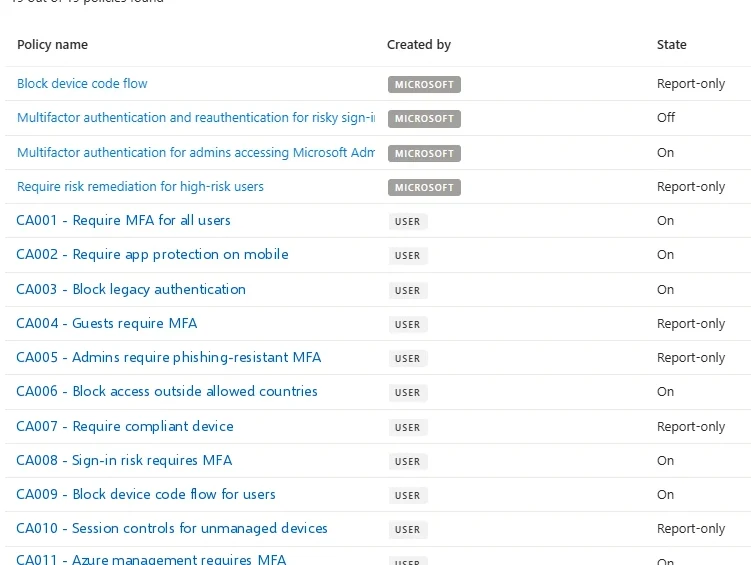
A tenant's Conditional Access policies. Microsoft-managed Block device code flow is in Report-only: it records device code sign-ins and blocks none of them. Select the image to open it full size.
The policy list shows the state at a glance, and the callout below says what to open to confirm it:
Entra Admin Center
Entra ID › Conditional Access › Policies
Look for a policy whose Conditions include Authentication flows with Device code flow selected, and check its State is On, not Report-only. Microsoft's managed policy Block device code flow starts in Report-only.
In Graph the authentication flows condition is part of each policy, so one query finds every policy that touches device code flow and its state:
PS C:\> Connect-MgGraph -Scopes 'Policy.Read.All'
PS C:\> $dcf = {
    $_.Conditions.AuthenticationFlows.TransferMethods -match 'deviceCodeFlow'
}
PS C:\> Get-MgIdentityConditionalAccessPolicy -All | Where-Object $dcf |
    Select-Object DisplayName, State

DisplayName             State
-----------             -----
Block device code flow  enabledForReportingButNotEnforced
enabledForReportingButNotEnforced is report-only. The policy exists, records every device code sign-in, and blocks none of them. Lesson 0.4's defaults, any user may register a device without MFA, complete the route Storm-2372 took.
The evidence is unusually clear when you know where to look. Device code sign-ins are recorded with their authentication protocol, and Microsoft suggests filtering the sign-in logs on that protocol, or running a blocking policy in report-only mode first, to see who really uses the flow before blocking it.
In most tenants the honest answer is a handful of conference room devices and nobody else, so a device code sign-in by an ordinary user's account is worth an investigation on its own.
In the Storm-2372 pattern, it is followed by a new device registration for the same user, and then sign-ins from that device that carry the trust of a PRT. Three records in three places, minutes apart, and each of them ordinary unless read with the others.
Granting an Application
Consent and the applications that outlive passwordsLesson 0.3 covered the application route in full, and it belongs in this sequence because it is the step that survives a response. Consent phishing sends the user to a genuine Microsoft consent prompt for an application the attacker controls; if the tenant allows user consent, one click grants the application delegated access to the user's mail or files, with offline_access to keep it.
Midnight Blizzard's 2024 intrusion went further, using an existing application to grant its own applications full_access_as_app over every mailbox. Neither is touched by resetting the user's password, and the application keeps working after every session is revoked.
Consents are recorded with the account that gave them, and the lab tenant's month of them is short:
AuditLogs
| where TimeGenerated > ago(30d) and OperationName == "Consent to application"
| summarize Consents = count()
    by App = tostring(TargetResources[0].displayName)
| order by Consents desc
Most rows are ordinary applications consented by many people; an application consented once, by one user, in the hour after a suspicious sign-in, is the pattern Module 4 follows to Mail Reader Pro.
The control is the consent setting from lesson 0.3, verified publishers only or off, and a review of which applications hold which grants.
Consent phishing is attractive to attackers for the same reason it is hard to spot: everything the user sees is genuine. The sign-in page is Microsoft's, the consent prompt is Microsoft's, and the only false thing is the application's name and the reason the lure gave for clicking.
The evidence is therefore in the record of the grant rather than the sign-in: a Consent to application entry by an ordinary user, for an application nobody has heard of, asking for mail or file access with offline_access, followed by that application's own activity against the user's mailbox from addresses that have nothing to do with the user. Module 4 builds the detection from those two halves.
Taking It From the Device
Token theft, and the newest surfaceThe last step skips the sign-in altogether. Malware on a user's machine, information stealers above all, copies browser cookies and application tokens from a device that has already signed in, and the attacker replays them elsewhere.
Nothing about the sign-in was unusual, because the attacker never performed one; what appears in the log is the token's use from somewhere new, the same session ID from a different address, as lesson 0.6 described.
A token taken from a device shows as one session used from more than one address:
AADNonInteractiveUserSignInLogs
| where TimeGenerated > ago(30d) and isnotempty(SessionId)
| summarize Addresses = make_set(IPAddress, 4)
    by SessionId, UserPrincipalName
| where array_length(Addresses) > 1
A session belongs to one sign-in on one device, so a second address is either the user moving networks or someone else holding the token. The lab tenant's only row is the attacker from Module 4.
The controls are the ones that tie a session to something the attacker cannot copy: a compliant device requirement, token protection that binds a token to the device it was issued to where the client supports it, and continuous access evaluation that ends the session when the user is disabled or their risk rises. Module 5 takes token theft apart.
Token theft has grown with the market for stolen session data. Information stealers are cheap, spread through ordinary routes such as malicious downloads and cracked software, and collect whatever the browser holds, so a single infected personal laptop used for work can hand over a working session to a corporate tenant.
The defender's position is that the tenant cannot see the infection, which happens on a device it may not manage, but it can decide which devices may hold a session at all. That is why the compliant device requirement appears on both this route and the AiTM route: it is the one control that fails the attacker's machine regardless of how the token was obtained.
The newest surface is agents. AI agents now sign in as identities of their own, with permissions to read and act on data, and some of them take instructions from content an attacker can write. An agent with broad permissions combines the application route of section 5 with a new way in, and Module 8 treats it in full.
The Methods a Tenant Allows
Phishing-resistant beside phishableSet side by side, every route has a control that closes it, and every one of those controls lives in Entra ID:
Every route has a control that closes it, and every control on the right is a setting or a policy in Entra ID. Module 0.8 lists them with the license each needs.
Every route above is easier when the tenant allows weak methods. The authentication methods policy lists which methods users may register:
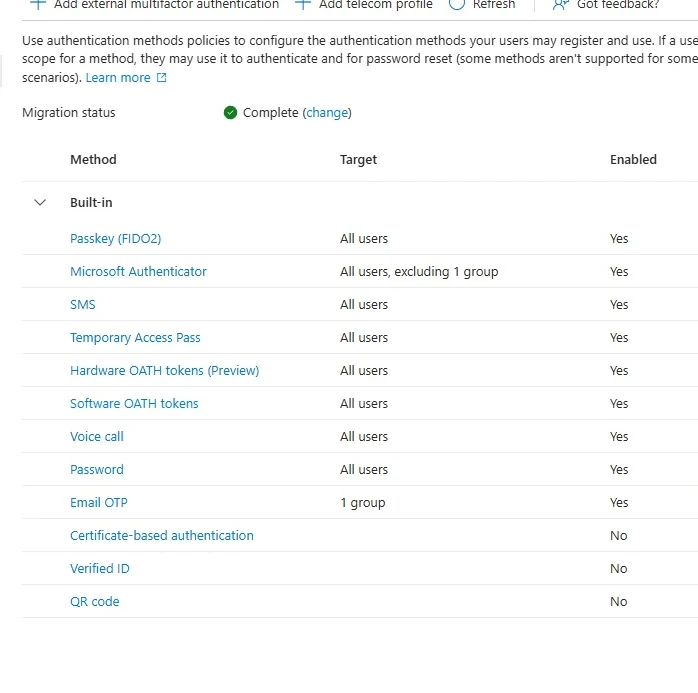
The authentication methods a tenant allows. Passkeys sit beside SMS and voice call, so a user can be phished through the weakest method they have registered. Select the image to open it full size.
The page is the first place to look, and the same list is one object in Graph:
Entra Admin Center
Entra ID › Authentication methods › Policies
Every method that is Enabled is one a user may register and an attacker may target. SMS and Voice call can be phished; Passkey (FIDO2) and certificate-based authentication cannot be relayed by a proxy.
Each method is a configuration on the tenant's authentication methods policy, with a state:
PS C:\> $pol = Get-MgPolicyAuthenticationMethodPolicy
PS C:\> $pol.AuthenticationMethodConfigurations |
    Select-Object Id, State | Sort-Object State

Id                     State
--                     -----
Fido2                  enabled
MicrosoftAuthenticator enabled
Sms                    enabled
TemporaryAccessPass    enabled
Voice                  enabled
X509Certificate        disabled
A tenant with passkeys enabled for all users and SMS and voice call enabled beside them has made the strong method available without taking the weak ones away, and an attacker relaying a sign-in will be offered whichever method the user picks.
The path out is to move users and administrators to phishing-resistant methods and then require them, with an authentication strength in Conditional Access, for the access that matters. Lesson 0.8 lists the controls and the license each needs.
An authentication strength is a named set of methods a Conditional Access policy can require instead of plain MFA. Microsoft provides built-in ones, including one for phishing-resistant MFA that accepts only methods such as passkeys, Windows Hello for Business and certificate-based authentication, so a policy using it rejects an SMS code or an Authenticator approval even when the user has registered them.
That is what turns the methods page from a list of options into a control: administrators first, because their sessions are worth the most, then the users who handle money or sensitive data, then everyone.
Getting there is a rollout rather than a switch, and the order matters for security as much as convenience. Users need a way to register a passkey without first signing in with a weaker method an attacker could also use, which is what a Temporary Access Pass is for: a time-limited code an administrator issues so a user can register strong methods once.
The weak methods come off last, after usage in the sign-in logs shows nobody depends on them. A tenant halfway through, with both kinds enabled, is protected exactly as far as the weakest method its users still have.
Asking Copilot Which Routes Are Open
Delegate, then verifyThe question a manager asks after reading about these campaigns is which of them the tenant is still exposed to. Here is the question asked of Copilot, and a prepared example of the answer:
- Device code phishing is blocked by the Microsoft-managed policy. (Conditional Access, policies)
- Users can still sign in with SMS and voice call, which can be phished. (Authentication methods)
- Users cannot consent to applications without an administrator. (Consent and permissions)
- Passkeys are enabled for all users. (Authentication methods)
The prompt names the attacks and asks for the control, its state and its gaps for each, so exposed becomes a list of settings to open. Claim 3 cites the consent page, which in this tenant still shows the legacy setting the claim misreads.
Check claim 1 against the policies list, the place it is most easily mistaken:
| Policy name | Created by | State |
|---|---|---|
| Block device code flow | Microsoft | Report-only |
| Multifactor authentication for admins accessing Microsoft Admin Portals | Microsoft | On |
| CA001 - Require MFA for all users | User | On |
| CA007 - Require compliant device | User | Report-only |
| CA003 - Block legacy authentication | User | On |
The Microsoft-managed Block device code flow policy exists, so a summary that looks for it finds it, but it is in Report-only and blocks nothing; claim 1 fails. Claim 3 fails on the consent setting, which in this tenant is the legacy one that lets any user consent to any application.
Claims 2 and 4 hold, and they belong together in the record: passkeys are available and the phishable methods have not been taken away. The record you keep lists two open routes with the setting that closes each, and one improvement that needs a rollout plan rather than a switch.
Notice which mistake Copilot made. It found the right policy by name and stopped there, without reading its state, which is the same shortcut a hurried reviewer takes. Report-only is the state most likely to be misread in any summary, human or AI, because the policy exists and appears in every list of the tenant's controls.
Practice
Which attack routes are still open? prepared evidenceThe scenario below holds Copilot's answer, the tenant's Conditional Access policies, its authentication methods and its consent and device settings. Work it as delegate, verify, record: check each claim, and for each route still open, find the policy or setting that would close it.
If you have a tenant of your own, run the device code query in section 4 and the methods query in section 7, then open Enterprise apps, Consent and permissions. Ask Copilot the same question first and compare.
Attacks on Entra ID have moved from guessing what the attacker does not know to borrowing what the user or the device hands over: an approved prompt, a relayed sign-in, a device code entered for someone else, a consent click, a token copied from a laptop.
Each arrives with MFA done, and each has a control that closes it: phishing-resistant methods, a compliant device requirement, a blocked device code flow, restricted consent, and session controls that tie tokens to devices. A policy in report-only mode closes nothing.
Resources
Microsoft revises these pages; where a page and this lesson disagree, the page is newer.
- Microsoft Security Blog: From cookie theft to BEC, attackers use AiTM phishing sites as entry point to further financial fraud
- Microsoft Security Blog: Storm-2372 conducts device code phishing campaign
- Microsoft Learn: Authentication flows in Conditional Access
- Microsoft Graph: conditionalAccessConditionSet resource type