
Reading width
Wide uses the full column for everything, text, diagrams, code, and exercises. Narrow keeps the standard reading width.
Text size
Scales the body text. Headings and code blocks keep their size.
In this section
0.9 Working With Copilot and Entra's Agents
Introduction
Every lesson in this module has done the same thing at its end: asked Copilot a question about the tenant, taken its answer apart claim by claim, and checked each claim against the record it was about. That is the method this course runs on, delegate, verify, record, and it is how identity work is now done in the admin center.
This lesson makes the method explicit, shows the four ways Copilot's answers went wrong in Module 0, and extends the method to the agents Entra ID now runs on its own: the Conditional Access Optimization Agent that suggests policies, and the agent identities AI agents sign in as.
It ends with an agent's suggestion and Copilot's summary of it, and you checking both before anything is switched on.
Delegate, Verify, Record
The method, step by stepThe method has five steps. Delegate: ask Copilot the question, or let an agent run and propose. Split the answer into separate claims, one per line, because an answer is wrong one claim at a time. Check each claim against its source record, the portal page or the Graph query that holds the fact. Look next door: for each claim, ask what sits beside the object it was read from, because that is where the misses have been. Record each claim as held, wrong or missing something, with the evidence, and act only on what held.
A verification is usually one query. For a claim about who holds Global Administrator, the check reads both kinds of assignment:
PS C:\> $f = "displayName eq 'Global Administrator'"
PS C:\> $r = Get-MgRoleManagementDirectoryRoleDefinition -Filter $f
PS C:\> $f = "roleDefinitionId eq '$($r.Id)'"
PS C:\> $a = Get-MgRoleManagementDirectoryRoleAssignment -Filter $f
PS C:\> $e = Get-MgRoleManagementDirectoryRoleEligibilitySchedule -Filter $f
PS C:\> 'Active:   ' + @($a).Count
PS C:\> 'Eligible: ' + @($e).Count
Two numbers, from the source, compared with the claim. When they disagree, the record holds the numbers and the query that produced them, which is the third step of the method.
The method every lesson in this course runs on: Copilot and Entra's agents do the first pass; nothing is acted on until each claim has been checked against its own record.
The point of delegating is speed, and the method keeps it: Copilot reads more records faster than a person does, and a first draft that is three-quarters right saves most of the work. The point of verifying is that three-quarters right is not a finding.
A defender who acts on an unchecked claim, enables a policy that blocks the emergency account or reports six Global Administrators as two, has turned the speed into a mistake. The record is what makes the work reviewable: the next person, or the next question, starts from what was checked rather than from what was said.
Not everything should be delegated in the first place. A question whose answer is one row on one page, such as whether a named user is enabled, is faster to read than to ask about.
A question whose answer will change something, a policy, a role or a user's sessions, should never be acted on from the draft, however confident it sounds; the draft tells you where to look, and the change is made from what you found.
And the questions where delegation pays most are the broad ones a person would answer slowly: everyone who can reach a resource by any route, every application with a given permission, every sign-in in a week that met a pattern. Those are also the questions where the neighbor and quantity errors are most likely, which is why the method matters most exactly where the speed does.
Copilot in the Admin Center
What it reads, and whereMicrosoft describes Security Copilot in Entra as getting insights from Entra users, groups, sign-in logs, audit logs and more, to help investigate identity risks, find gaps in access policies and troubleshoot faster.
In the admin center, Copilot chat is available from the left side navigation, and as you move around the admin center the chat stays open in the new page. You need at least the Security Reader role to use it there. And every answer carries Microsoft's own note: AI-generated content might be incorrect.
It opens from the admin center's own navigation:
Entra Admin Center
Entra ID › Overview
Requires
Security Reader or higherSelect Copilot from the left navigation. The chat stays open as you move between pages, and it needs at least the Security Reader role.
Because the chat follows you between pages, a claim can be checked against the page it describes without losing the conversation.
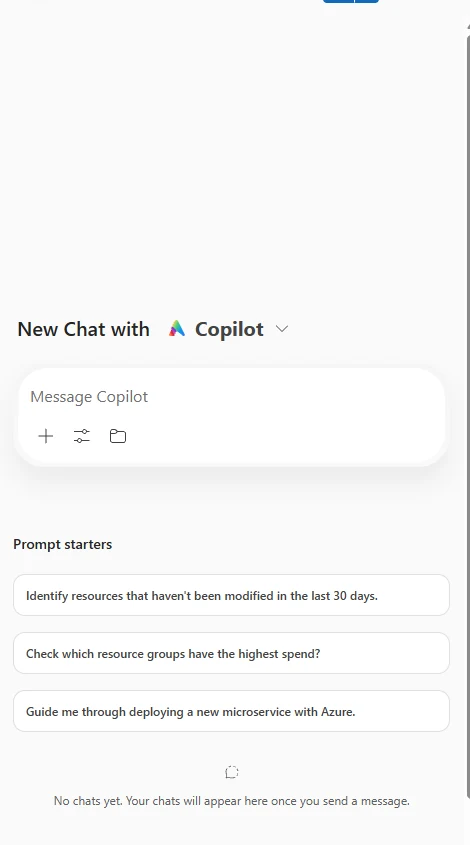
A Copilot chat pane opened from a Microsoft admin portal. In the Entra admin center the pane stays open as you move between pages, so a claim can be checked on the page it is about. Select the image to open it full size.
The sidecar behavior is what makes the method practical. With the chat open beside the page, each claim can be checked on the page it is about: ask who holds a role, then open the role's Eligible assignments tab without closing the answer.
The same is true of Graph PowerShell beside it, which is why every lesson in this module paired the portal page with the query that reads the same thing: a claim about a count is checked by running the count.
In an investigation, Copilot is most useful at the start and at the end. At the start, asked to summarize a user's sign-ins and the audit entries about them over a period, it produces a timeline in seconds that would take a person half an hour to assemble from two logs; that timeline is a draft, and each entry on it is checked before it becomes evidence.
At the end, asked to draft the summary of what was found, it turns the checked record into prose for a ticket or a report, and the record keeps the prose honest. In between, the work is reading records, which is what the portal callouts and Graph queries in every lesson teach.
Four Ways an Answer Goes Wrong
And the question that catches eachLook back over Module 0 and every wrong claim falls into one of four kinds. None was a badly written sentence, and each would have been easy to act on.
The state kind of error has a direct check, the history of a policy's state in the audit log:
AuditLogs
| where TimeGenerated > ago(30d) and Category == "Policy"
| mv-expand M = TargetResources[0].modifiedProperties
| where tostring(M.displayName) == "ConditionalAccessPolicy.State"
| project TimeGenerated, OperationName,
    Policy = tostring(TargetResources[0].displayName),
    Old = tostring(M.oldValue), New = tostring(M.newValue)
A policy that moved to report-only, or was switched on last week, is the kind of fact an assistant states in the present tense from an older reading. The record says when it changed.
Every Copilot error in this module was one of four kinds, and each has a question that catches it. None of them was a badly written sentence.
The neighbor. Copilot read the object it was pointed at and not the one beside it: the active assignments and not the eligible tab in lesson 0.1, the direct members and not the nested group in 0.2, Microsoft Graph's permissions and not Exchange Online's in 0.3. The state. It found the right object and did not read whether it was in force: lesson 0.7's device code policy existed and was in report-only. The kind. It read a value as the wrong kind of thing: a delegated Mail.Read as an application one in 0.3, a registered device as a compliant one in 0.4. The quantity. It answered from what a product includes rather than what the tenant holds: P2 exists, for 25 of 300 users, in 0.8.
Each kind has a question that catches it, and asking those four questions of every answer is most of verification: what sits next to this, is it on, which kind is it, and how many here.
It is worth being clear about why these errors happen, because it tells you which answers to trust more. An assistant summarizing records answers the question as the records it retrieved allow, and a question about a tenant usually touches more records than one retrieval fetches.
The answers that need the least checking are the narrow ones, a single record read back; the ones that need the most are the broad ones that sound complete, a count, a "no one", an "all of them".
A negative claim deserves the most suspicion of all: "no external users have access" and "turning it on would affect no one" are each a statement about every record of a kind, and each was wrong in this module. Treat any answer that says none, all or every as a claim about the whole population, and check the population.
Asking Questions That Can Be Checked
Prompts for verifiable answersHow a question is asked changes how easily the answer is checked. Ask for records, not judgments: "list every principal with an active or eligible Global Administrator assignment, with its type" produces lines you can compare with the page, where "is Global Administrator protected?" produces an opinion.
Ask for the neighbors explicitly: include eligible assignments, nested members, every API, the policy state. Scope the time and the population, the last seven days, this user, these applications, so the answer and the check cover the same data. And ask for the source of each claim, the blade or the log, so you know where to look.
The question the section recommends asking, written as a query that produces lines rather than an opinion:
PS C:\> $f = "displayName eq 'Global Administrator'"
PS C:\> $r = Get-MgRoleManagementDirectoryRoleDefinition -Filter $f
PS C:\> $f = "roleDefinitionId eq '$($r.Id)'"
PS C:\> $a = Get-MgRoleManagementDirectoryRoleAssignment -Filter $f
PS C:\> $e = Get-MgRoleManagementDirectoryRoleEligibilitySchedule -Filter $f
PS C:\> @($a | Select-Object @{ n = 'Kind'; e = { 'Active' } }, PrincipalId) +
PS C:\> @($e | Select-Object @{ n = 'Kind'; e = { 'Eligible' } }, PrincipalId)
Every line it returns can be compared with a line of the assistant's answer, and a line missing from either side is a finding.
Lesson 0.2's question shows the difference. "Who has access through the Finance Files group?" invited Copilot to read the member list and stop.
Asked as "list every user who reaches the Finance Files group's resources, through direct membership or any nested group, and every principal that can change its membership, including owners of any type and the roles that can manage groups", the same question names both neighbors that the first answer missed, asks for lines rather than a verdict, and tells you which pages to open to check it.
It is longer, and the answer is shorter to verify.
None of this removes the check. A well-asked question produces a better first draft and a faster verification, and the record still says what was checked against what.
Entra's Own Agents
The Conditional Access Optimization AgentAgents go a step further than chat: they run on their own and propose changes.
The one most tenants meet first is the Conditional Access Optimization Agent, and Microsoft documents its behavior precisely. It scans the tenant for new users, applications and agent identities from the last 24 hours, decides whether Conditional Access policies apply to them, and where it finds something no policy covers, it suggests next steps: new policies, or updates to existing ones.
It runs every 24 hours, with activity-based runs in preview, reviews up to 300 users and 150 applications in a run, and cannot be stopped or paused once a run has started.
Two rules govern what it may change. It does not change any existing policy unless an administrator explicitly approves the suggestion, and every new policy it suggests is created in report-only mode. It needs at least Entra ID P1, with some suggestions needing P2, and Security Copilot compute units.
Since November 2025 an agent activated in a tenant runs under its own agent identity rather than the identity of the person who activated it, which means its actions are its own in the logs. Security Reader and Global Reader can view the agent and its suggestions; Conditional Access Administrators and Security Administrators can act on them.
Entra Admin Center
Entra ID › Conditional Access › Optimization agent › Overview
Suggestions are under Recent suggestions. Open one to see the policy it proposes and its expected impact; Security Reader and Global Reader can view, Conditional Access and Security Administrators can act.
New policies are visible in Graph like any other, so a weekly check of what appeared and in what state takes one query:
PS C:\> Connect-MgGraph -Scopes 'Policy.Read.All', 'AuditLog.Read.All'
PS C:\> $since = (Get-Date).AddDays(-7)
PS C:\> Get-MgIdentityConditionalAccessPolicy -All |
    Where-Object { $_.CreatedDateTime -ge $since } |
    Format-List DisplayName, State, CreatedDateTime

DisplayName     : Require MFA for new applications
State           : enabledForReportingButNotEnforced
CreatedDateTime : 11/15/2026 2:11:38 AM
A report-only policy is exactly what lesson 0.6 said makes a policy testable before it acts: every sign-in it would have blocked is recorded with a report-only failure. The agent's suggestion is therefore checked the same way as any Copilot claim, against evidence, and the evidence is the sign-in log. One query lists every user who would have been blocked:
PS C:\> $name = 'Require MFA for new applications'
PS C:\> $f = 'createdDateTime ge 2026-11-15T00:00:00Z'
PS C:\> $isFail = { $_.DisplayName -eq $name -and $_.Result -eq 'reportOnlyFailure' }
PS C:\> $p = { $_.AppliedConditionalAccessPolicies | Where-Object $isFail }
PS C:\> $hits = Get-MgAuditLogSignIn -Filter $f -All | Where-Object $p
PS C:\> $hits | Group-Object UserPrincipalName | Select-Object Count, Name

Count Name
----- ----
    4 svc-scanner@example.com
    1 breakglass1@example.com
Four sign-ins by a scanner service account and one by an emergency access account would have failed. The agent proposed a sound policy for the wrong population: it excluded nothing, and Microsoft's own guidance in lesson 0.5 is that emergency access accounts stay outside the policies that could lock every administrator out.
Two more details of the agent's behavior belong in a defender's notes. Some of its recommendations are driven by Microsoft Defender signals, and Microsoft states an administrator always reviews and approves those before any policy change takes effect. And if the agent is removed, its activity, suggestions and metrics are deleted, but any policy created or updated from its suggestions stays in place.
The policies it leaves behind are ordinary policies from then on, owned by whoever approved them, and they need the same review as any other.
Agents as Identities
A new kind of principalThe agent itself is an example of the newest object in a tenant. Microsoft describes agent identities as identity accounts in Entra ID for AI agents: they represent software rather than people, and do not use human authentication.
Microsoft contrasts them with application identities, which were designed for services with long-term stability and known ownership; agent identities are built for agents that are created in bulk and retired often, without leaving orphaned credentials or permissions behind.
An agent can act autonomously, with access rights given directly to its identity, which can include Graph permissions, Azure roles, directory roles and app roles, or act on behalf of a user, with rights the user delegates. And its activity is subject to the security policies enforced for agent identities.
The tenant's non-human identities can be counted by type in Graph PowerShell:
PS C:\> Get-MgServicePrincipal -All -Property ServicePrincipalType |
    Group-Object ServicePrincipalType |
    Select-Object Name, Count
Applications, managed identities and the rest each have their own count, and agent identities join that inventory as they are created, which is why the inventory is worth running on a schedule rather than once.
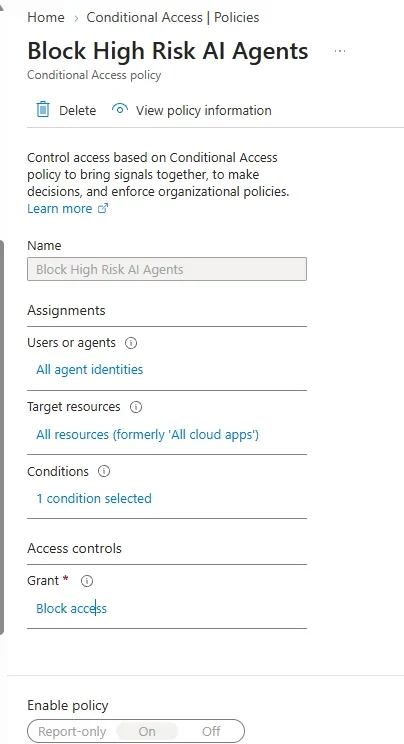
A Conditional Access policy whose assignment is agent identities rather than users. Agents are a principal type in Entra ID in their own right, and policies can target them. Select the image to open it full size.
That last point is what the screenshot shows: Conditional Access now lists agents beside users as something a policy can assign to. Everything in lessons 0.3 and 0.5 applies to them.
An agent holding Mail.Read as an autonomous permission reads every mailbox, an agent in a directory role holds that role without MFA, and an agent's actions are recorded with its own identity as the actor. Module 8 treats agents as an attack surface in full, including the routes that are new to them, such as instructions planted in content an agent reads.
For now, the review questions are the ones lesson 0.3 asked of applications, with one added. Who owns this agent, and are they still here?
What can it reach, autonomously and on whose behalf? Which policies apply to it? And what does it read: an agent that summarizes email reads text written by anyone who can send the organization a message, which makes the content it reads part of its attack surface in a way no ordinary application's is.
An agent nobody can answer those questions about is the same finding as an application nobody owns, and it is growing faster.
What Goes in the Record
Making the check reviewableThe record is short and specific. For each claim: what Copilot or the agent said, whether it held, the evidence that decided it, and where that evidence is. For an agent's suggestion: the policy as proposed, its report-only results over a stated period, the users it would have blocked, the change needed before enforcement, and who approved it.
The audit log records the approval, with the administrator as the actor, and the agent's creation of the policy, with the agent's identity as the actor, so the record and the log agree on who did what.
The approval the record describes is an audit entry with the administrator as the actor:
AuditLogs
| where TimeGenerated > ago(30d) and Category == "Policy"
| project TimeGenerated, OperationName,
    Actor = tostring(InitiatedBy.user.userPrincipalName),
    Policy = tostring(TargetResources[0].displayName)
Each row names who made the change and when, which is what the record links to: the claim, the decision and the entry that proves the decision was carried out.
In practice the record can be a few lines in a ticket. Claim 2, "affects no one": wrong, two report-only failures in three days, svc-scanner and breakglass1, from the sign-in log query in section 5.
Claim 3, "excludes emergency accounts": wrong, Exclusions is None on the policy page. Each line names the claim, the verdict, the fact and its source, which is all a reviewer needs to agree or to look again.
The record is also what keeps the method honest over time. A Copilot answer that was wrong in the same way twice is a prompt to change, and an agent whose suggestions keep excluding nothing is a pattern worth knowing before the next one is approved.
Checking the Agent's Suggestion
Delegate, then verifyThe agent ran, suggested a policy, and you asked Copilot to summarize what it did before turning the policy on:
- The agent created one new policy, in report-only mode. (Audit logs)
- Turning it on would affect no one, because no sign-ins failed it. (Sign-in logs, report-only)
- The policy excludes the emergency access accounts. (Conditional Access, policy)
- The agent also updated the existing MFA policy, CA001. (Audit logs)
The prompt asks for the agent's changes from the audit log and the policy's impact from its report-only results, two sources for two questions. Claim 2 cites the report-only results and still reports no failures, and claim 4 cites the audit log, whose only entry for the agent contradicts it: the sources were right and the reading was not.
Check the claims about impact against the report-only results in the sign-in logs:
| Date | User | Application | Require MFA for new applications |
|---|---|---|---|
| 11/15/2026, 9:40 AM | priya.raman@example.com | Report Builder | Report-only: Success |
| 11/15/2026, 3:12 PM | svc-scanner@example.com | Invoice Scanner Portal | Report-only: Failure |
| 11/16/2026, 4:05 AM | breakglass1@example.com | Report Builder | Report-only: Failure |
| 11/16/2026, 10:22 AM | tom.reyes@example.com | Report Builder | Report-only: Success |
Claim 1 holds: the agent created one policy, in report-only mode, as Microsoft documents it always does. Claim 2 fails: two sign-ins failed the policy, so turning it on would have blocked a service account and an emergency access account. Claim 3 fails: the policy has no exclusions at all.
Claim 4 fails on the audit log, where the agent's only entry is the creation of the new policy, under its own identity; the change to CA001 was made by an administrator. And Copilot's closing offer, to turn the policy on, is the one thing not to accept until the record is complete.
The record says: the agent found a real gap, its policy is sound, the emergency access accounts must be excluded and the service account decided on, and then it can be enforced, by an administrator, with that approval in the log.
This is also the clearest example in the module of why the method applies to agents as much as to chat. The agent did its job well: it noticed six new applications no policy covered and wrote a reasonable policy for them.
What it could not know was which accounts this tenant keeps outside its policies on purpose, and Copilot, summarizing the agent's work, could not see the report-only failures it never fetched. The tenant's knowledge lives in its records and its people, and the check is where the two meet before anything changes.
Practice
Check the agent's suggestion prepared evidenceThe scenario below holds Copilot's summary, the policy the agent created, its report-only results and the policy audit entries. Work it as delegate, verify, record: check each claim, find who the policy would block, and decide what must change before it is enforced.
If you have a tenant with the agent, open its Recent suggestions and run the impact query in section 5 against one of its report-only policies before approving anything. If you do not, run the same query against any policy you have in report-only mode.
The first pass belongs to Copilot and Entra's agents, and the method keeps them useful: split the answer into claims, check each against its record, look at what sits next to it, and record what held. Module 0's errors were all of four kinds, the neighbor, the state, the kind and the quantity, and each has a question that catches it.
The Conditional Access Optimization Agent suggests in report-only and never changes a policy without approval, so its suggestions are checked with the same report-only evidence as any policy; and agent identities are principals in their own right, held to the same review as applications and roles.
Resources
Microsoft revises these pages; where a page and this lesson disagree, the page is newer.